Talos's 'AI-assisted' label rests on three emails; the Google relay behind them forwards the codes people type
Cisco Talos describes lures to Taiwan research staff that led to a live Google sign-in relay. Its AI-assisted verdict rests on three emails, and Talos says language alone cannot prove it; the kit's code and prompt screens matter more, and on passkeys the post is silent.
By Parminder Kumar Sharma · · 20 min read
Talos's AI-assisted verdict rests on three emails, nine quoted phrases and a hedge
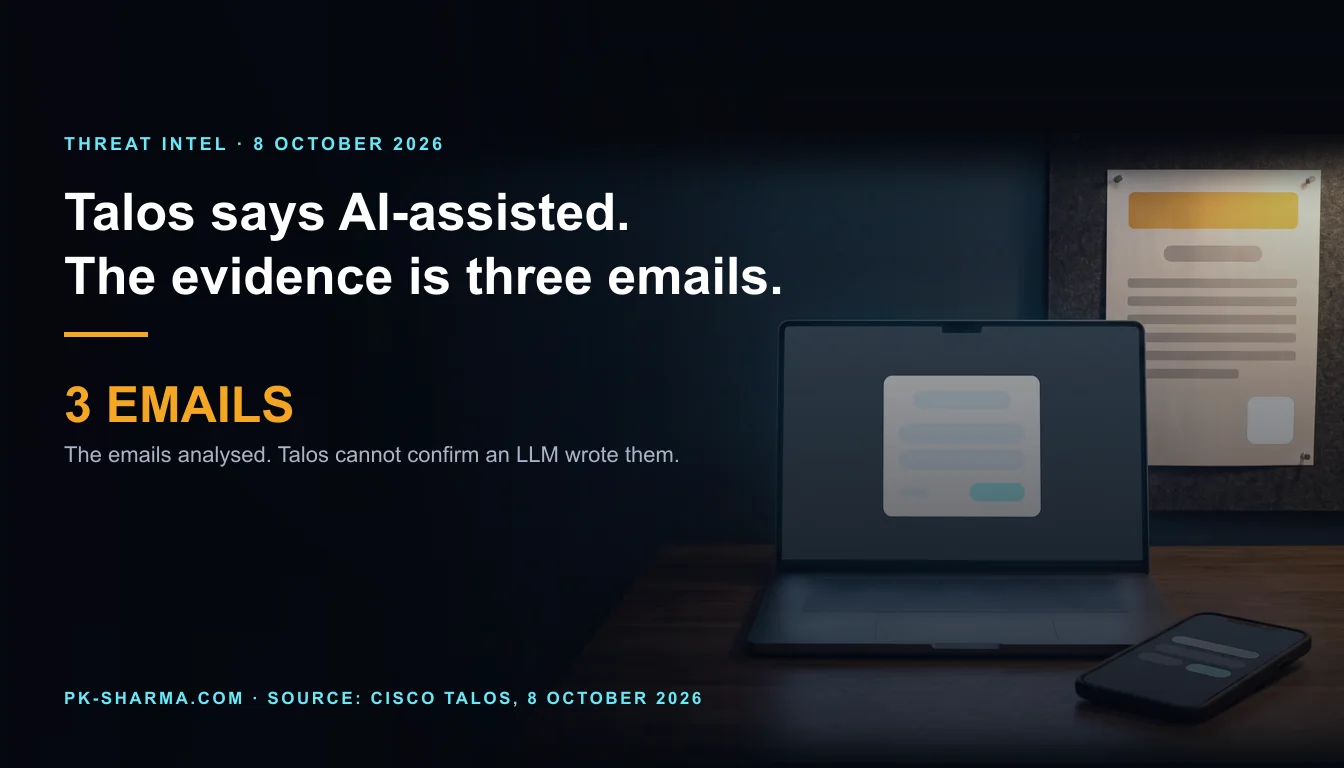
Cisco Talos published its report on UAT-11985 on 8 October 2026 under the headline "AI-assisted event lures delivering real-time Google AitM phishing". The AI claim in that headline rests on three emails. The post shows them in its Figures 1 to 3 and quotes nine phrases from them: five from the scene-setting opening and four from the flattery (a count we made). A recipient contacted the three institutions named in the emails, and Talos says none could confirm that the three senders were staff or representatives. On the language, the post is careful: Talos "cannot conclusively determine" whether the emails were fully generated by a large language model, and says the "linguistic indicators alone cannot conclusively prove" the use of generative AI.
The headline carries no such hedge. Here is what the evidence does not establish:
- That a model wrote anything. The evidence is similarity between three messages. The post describes no model fingerprint, no prompt, no email headers and no detector result.
- That the template is new. A letter with a fixed shape and swappable topic, flattery and logistics is how mass-mailed lures have been built for years. The post cannot tell a template filled in by a person from one filled in by a model. That is our reading, not a Talos finding.
- That the label changes the defence. The sign-in relay that follows works the same whoever, or whatever, wrote the invitation.
- A victim count. The post states no victim, no compromised account and no number of recipients.
- A state. Talos's moderate-confidence call concerns the language the kit's interface was first written in, not who sponsors the operation.
What a defender can act on is the second half of the post: a kit that relays a Google sign-in to the real Google in real time, and what it does to the codes people type.
The campaign: mid-2026, researchers, three invitations
When. Talos says only "mid-2026". The three lures advertise events on dates printed in Figures 1 to 3, which we read from the Chinese text: Thursday 25 June, Friday 26 June and Wednesday 22 July 2026. The first and last are 27 days apart, and Talos published 78 days after the last (both derived). These are the dates of the events the emails advertise, not send dates, and the post gives no send date. One lure says the event is "this Thursday" (our translation), which puts that email in the days before 25 June.
Who. Talos says "individuals affiliated with Taiwan research organizations". In role terms they are researchers and academics. Each lure addresses the reader as a teacher or professor and praises their depth in defence, security or cross-Strait military questions (our reading of the Chinese text; Talos states only the research affiliation). The three events are on trade wars and European integration, the tenth anniversary of the 2016 South China Sea arbitration, and AI, industrial shocks and governance (our reading).
The cover. The emails impersonate three Taiwan institutions, named in the post and not named here, through fabricated senders. The event details were real and public, copied from legitimate announcements. Talos calls this "legitimacy laundering" and says accurate details do not validate the email or the sender. All three share a three-part shape: a polished but vague opening on the geopolitical context, personalised flattery that includes reserved seating and unique expertise, and the logistics with a registration link.
The link. In the HTML Talos shows (Figure 4), the visible text looks like a Google Forms address while the underlying link goes to a deceptive page on a third-party platform. The page imitates a Google Form, then forcibly redirects the reader to a spoofed Google sign-in.
The poster. Talos also saw event posters, scraped from legitimate sites, attached to several emails with the QR codes altered. Its reading is that the actor "may have anticipated" that recipients might print and display them on office bulletin boards, so that other people scan the code. That is inference. The post does not say that any poster was printed, displayed or scanned, or by whom.
How Talos gets to "AI-assisted", and what the label does not change
Talos's method is a close reading of the text. It offers four pieces of evidence: the shared three-part structure; the nine quoted phrases, which it calls grandiose and vague ("three-dimensional analysis" is one); compliments that are broadly applicable and name few verifiable details of the recipient's work; and five traits it lists together: fluent but formulaic prose, grand abstract policy vocabulary, interchangeable praise, repetitive sentence patterns, and quick customisation across recipients, institutions and topics. From these it concludes that the actor "likely used an AI-assisted template to produce and personalize the phishing lures at scale".
The confidence moves within the post. The key-points list says the actor "likely" used AI-assisted generation. The opening paragraph says the campaign "demonstrates strong evidence" of it. The analysis then says the indicators alone cannot prove it. The headline drops all of that. The conclusion also says "at scale", and the sample shown is three emails; elsewhere the post says "several" without a number.
What the post does not give: a model or tool name, a prompt, email headers or other metadata, a detector score, a comparison set of human-written lures, or a count of emails beyond three.
"AI-assisted" is also a loose label. It is true of any lure in which a model touched a sentence, so it is hard to be wrong and hard to test (our reading). The NCSC's phishing guidance makes the practical point that matters more: no training package "can teach users to spot every phishing attempt", so a well-written lure, from whatever source, has to be met by controls that do not depend on the reader's judgement of the prose.
Cisco sells email, web and network security, and the post ends with the Cisco products that cover this activity. That is normal in a vendor report and is no reason to doubt the technical findings, which can be checked against its figures. The AI finding cannot be checked the same way, so treat it as an inference. Talos also published a separate post today on text addressed to AI analysers inside malware. That is a different question, AI as reader rather than writer, and we covered it separately.
What the kit does, step by step, at defender level
After the click, the victim sees a Google-style sign-in that Talos calls a pixel-perfect replica. It is offered in three locales (Simplified Chinese, Traditional Chinese and English), chosen from the browser's language settings, and its script is obfuscated. Two channels do the work. Ordinary web requests carry what the page captures to the attacker's server: a browser fingerprint, typed credentials and challenge answers, and periodic heartbeats. A persistent WebSocket carries instructions back, chiefly which screen to show next. Because the attacker's server forwards each input to the real Google, the fake page can mirror Google's real state.
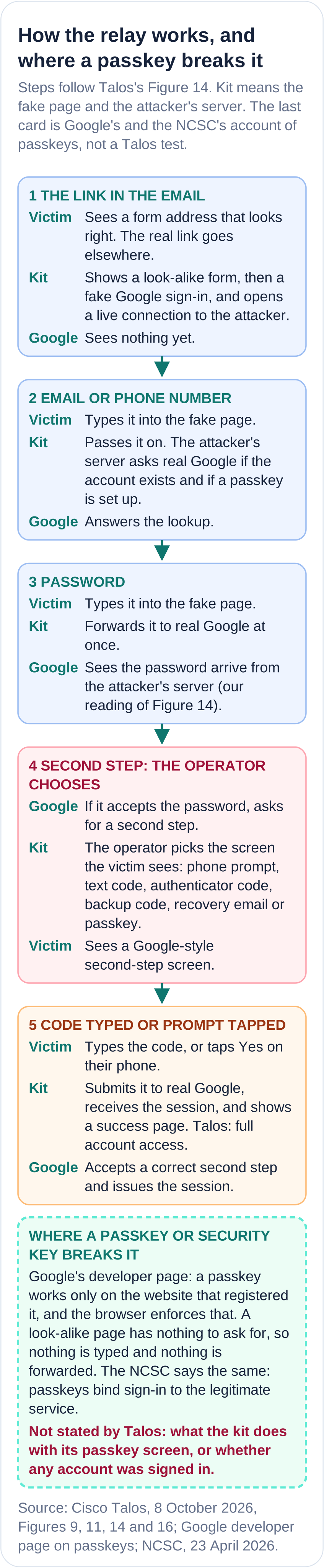
Talos says this kit, unlike fully automated ones, "appears optimized for operator-driven authentication orchestration". In Figure 14 the second-step screen is "chosen by operator", so someone, or something, is steering in real time while the victim is on the page. The sequence ends with the operator receiving a live Google session cookie, the victim seeing a success page, and the note "Attacker has full account access". That is Talos's description of what the kit is built to do. The post does not state that any account was signed in to, or how many victims reached each step.
The friendly-name fallacy: "MFA enabled" is not a control against a relay
Talos's summary sentence is that the mechanism "effectively bypasses" multi-factor authentication. It does not say which methods. The figures say more. Figure 14 shows the operator choosing among six kinds of second step. Figure 16 lists at least eleven challenge options the page can show. Figure 11 holds the matching interface strings. Taken together:
Table 1. The second steps in the kit's screens, as Talos's Figures 11, 14 and 16 show them, set against what the NCSC and Google say about each. Talos publishes no tested list of what worked.
- Second step
- Tap Yes on a phone prompt
- What Talos shows
- A screen the operator can pick. The victim taps Yes (Figure 14, step 21)
- Bound to the real site?
- No. The user approves what they are shown. The NCSC rates prompts as only partly phishing resistant and names prompt fatigue
- Second step
- Text, authenticator, backup, recovery-email or security code
- What Talos shows
- Screens in Figures 11, 14 and 16. The typed code goes to the attacker, then to Google (steps 21 to 23)
- Bound to the real site?
- No. A typed secret can be passed on. The NCSC says codes are "vulnerable to the OTP interception phishing attack"
- Second step
- Passkey
- What Talos shows
- A screen and interface strings exist, and the server checks whether a passkey flow is on. What happens next is not stated
- Bound to the real site?
- Yes, by design (Google, NCSC). How the kit handles it is not stated
- Second step
- Security key
- What Talos shows
- Not named in the text or in the figures we could read
- Bound to the real site?
- Yes, by design (Google, NCSC)
- Second step
- Number matching
- What Talos shows
- Not mentioned. Google says it may ask users to match a number when a sign-in looks unusual
- Bound to the real site?
- No. The user still approves. Whether the kit can show the number is not stated
| Second step | What Talos shows | Bound to the real site? |
|---|---|---|
| Tap Yes on a phone prompt | A screen the operator can pick. The victim taps Yes (Figure 14, step 21) | No. The user approves what they are shown. The NCSC rates prompts as only partly phishing resistant and names prompt fatigue |
| Text, authenticator, backup, recovery-email or security code | Screens in Figures 11, 14 and 16. The typed code goes to the attacker, then to Google (steps 21 to 23) | No. A typed secret can be passed on. The NCSC says codes are "vulnerable to the OTP interception phishing attack" |
| Passkey | A screen and interface strings exist, and the server checks whether a passkey flow is on. What happens next is not stated | Yes, by design (Google, NCSC). How the kit handles it is not stated |
| Security key | Not named in the text or in the figures we could read | Yes, by design (Google, NCSC) |
| Number matching | Not mentioned. Google says it may ask users to match a number when a sign-in looks unusual | No. The user still approves. Whether the kit can show the number is not stated |
The NCSC names the attack in its corporate MFA guidance. In its words, a user is "convinced to enter their OTP code into a disguised phishing website", handing the attacker what they need to sign in as that user. A code typed into a relayed page is relayed. That is why "MFA enabled" on an audit sheet is a friendly name rather than a control: it says an account has a second step, not which second steps it accepts, and five of the six kinds in the operator's menu are the weak ones. Cyber Essentials v3.3, discussed below, lists one-time codes and push notifications among its examples of passwordless authentication. Those are the two things this kit most plainly relays.
What leaves nothing to relay is a credential bound to the real site's address. Google's developer page says that "passkeys are bound to a website or app's identity" and that "the browser and operating system ensure that a passkey can only be used with the website or app that created them". The NCSC's April 2026 passkey post assesses all traditional MFA methods as "inherently phishable", says secrets or approvals "can be observed and relayed during a live session", and says passkeys remove that class of attack by binding authentication to the legitimate service.
Two cautions. First, Talos does not say what the kit does with its passkey screen, and no one should read that screen as proof of a bypass or as proof of safety. Second, the kit's menu includes "Try another way". Google's own security-key page says that if a key does not work on a device or browser, "you might see an option to sign in with a code or prompt instead". An account that holds a key and still accepts a code or tap keeps a phishable route open, the shape we described in our GOV.UK One Login briefing. The fix is to enforce the strong method and remove the weak ones, not to add the strong one beside them.
We have met the operator-picks-the-prompt design before, in a fake ad portal that drew a browser window, and the limit of codes in an EvilTokens takedown, a phish MFA cannot stop. Passkeys have limits too: our Pass-ta-key explainer covers an attack that needs malware first.
UAT-11985, "APT" and a language call: what is attributed, and to whom
Talos calls this an advanced persistent threat campaign and tracks the actor as UAT-11985. The post does not define the UAT prefix, and we could not find a Talos page that does (we searched this post, at least eleven other Talos posts and the blog feed). Talos's own usage shows the prefix covers very different actors: UAT-7290 is described as tasked with espionage against critical infrastructure in South Asia, while UAT-10147 is assessed, with moderate-to-high confidence, as a financially motivated operator. So the label tells a reader that Talos tracks a cluster. It does not say who sponsors it.
For UAT-11985 the post states no nexus, no sponsor and no motive beyond calling credential theft "the threat actor's primary objective". The one attribution-style claim is moderate confidence that the interface was first written in Simplified Chinese and then adapted for Traditional Chinese and English. Talos's evidence: the base text is entirely in Simplified Chinese and assigned as that locale, while the other two are derived from it at run time; word choices follow mainland usage rather than Taiwanese or Hong Kong usage; and the code falls back to Simplified Chinese throughout. That concerns who wrote the interface text. It does not say who sent the emails or who commands the operation, and a kit can be written by one person and run by another (our reading).
Talos mentions a separate August 2026 report on a different phishing framework with similar WebSocket techniques, used by a Chinese-speaking actor, and adds that the strategies "differ from those in this case". The post states no link to other campaigns.
The only technique reference is a link to MITRE ATT&CK T1557, Adversary-in-the-Middle, on the words "adversary in the middle". The post has no ATT&CK table. MITRE's page (version 2.5, last modified 12 May 2026) describes positioning between devices by abusing network protocols such as ARP, DNS and LLMNR, and its four sub-techniques are all network-level. A hosted web relay behind a look-alike page is not one of its examples. The tag is Talos's mapping and is fine for coverage records; it is not a description of how this kit works (our reading).
What the post states and what it does not
Table 2. The post's main claims against what its text, figures and indicator file establish. Counts marked derived are ours.
- Claim in the post
- AI-assisted lures
- Stated
- Three emails share a three-part structure; nine quoted phrases (derived); "likely" and "strong evidence"
- Not stated
- Any model or tool, a prompt, headers or a detector result. That language alone proves it: Talos says it cannot
- Claim in the post
- Fabricated senders
- Stated
- A recipient asked the institutions; none could confirm the three senders
- Not stated
- How many people received the emails. Whether more than three were sent
- Claim in the post
- Timing
- Stated
- "Mid-2026". Lure event dates 25 and 26 June, 22 July 2026 (our reading)
- Not stated
- Send dates, first or last activity, the age of any infrastructure
- Claim in the post
- Real-time Google relay
- Stated
- The flow in Figure 14. The operator chooses the second-step screen
- Not stated
- A successful sign-in. Any compromised account. Any victim count
- Claim in the post
- MFA bypass
- Stated
- "Effectively bypasses" MFA. Codes and Yes taps shown in the figures
- Not stated
- Which methods worked in the wild. Any test against passkeys, security keys or number matching
- Claim in the post
- Quishing
- Stated
- Altered QR codes on posters attached to emails
- Not stated
- That any poster was printed, pinned up or scanned
- Claim in the post
- Attribution
- Stated
- APT; UAT-11985; moderate confidence the interface was first written in Simplified Chinese
- Not stated
- A state or sponsor. A motive beyond credential theft. Any link to other campaigns
- Claim in the post
- Indicators and coverage
- Stated
- Talos lists 8 indicators (5 URLs and 3 sender addresses, derived), one ClamAV signature and two Snort rules
- Not stated
- File hashes or IP addresses: the file holds none. None of the indicators is printed here
| Claim in the post | Stated | Not stated |
|---|---|---|
| AI-assisted lures | Three emails share a three-part structure; nine quoted phrases (derived); "likely" and "strong evidence" | Any model or tool, a prompt, headers or a detector result. That language alone proves it: Talos says it cannot |
| Fabricated senders | A recipient asked the institutions; none could confirm the three senders | How many people received the emails. Whether more than three were sent |
| Timing | "Mid-2026". Lure event dates 25 and 26 June, 22 July 2026 (our reading) | Send dates, first or last activity, the age of any infrastructure |
| Real-time Google relay | The flow in Figure 14. The operator chooses the second-step screen | A successful sign-in. Any compromised account. Any victim count |
| MFA bypass | "Effectively bypasses" MFA. Codes and Yes taps shown in the figures | Which methods worked in the wild. Any test against passkeys, security keys or number matching |
| Quishing | Altered QR codes on posters attached to emails | That any poster was printed, pinned up or scanned |
| Attribution | APT; UAT-11985; moderate confidence the interface was first written in Simplified Chinese | A state or sponsor. A motive beyond credential theft. Any link to other campaigns |
| Indicators and coverage | Talos lists 8 indicators (5 URLs and 3 sender addresses, derived), one ClamAV signature and two Snort rules | File hashes or IP addresses: the file holds none. None of the indicators is printed here |
UK relevance: the same kind of target, and standards that do not ask for the control that matters
The target. The post names no UK organisation, no UK victim and nothing about the UK. The targets are defined by role: researchers who speak at and attend public events, whose expertise others want. UK universities, think tanks and policy bodies share that profile (our inference). The kit already speaks English. The NCSC's phishing guidance notes that attackers "use information freely available" on websites and social media to make spear-phishing more convincing, and an event listing is exactly that.
Phishing. The NCSC's guidance for organisations says some phishing "will always get through", so plan for incidents. It warns against leaning on users to spot emails, and advises verifying important requests "using a second type of communication". It also advises running a proxy "to block any attempt to reach websites" identified as hosting phishing. Its reporting guidance says the NCSC can investigate and take down scam addresses and websites.
QR codes. The NCSC's February 2024 blog describes "quishing": criminals use QR codes in phishing emails to disguise links, not all email security tools scan images, and people tend to scan on personal phones, which may lack work protections. It concerns codes in email and in public spaces. It says nothing about an altered poster pinned up in an office, so treating a printed code as a link is our advice, not the NCSC's.
Table 3. What the baseline asks for, and what it leaves open against this relay. Cyber Essentials v3.3 is the April 2026 edition, in force from 27 April 2026.
- Source
- Cyber Essentials v3.3, IT infrastructure requirements
- What it says
- "authentication to cloud services must always use MFA". Names Google Workspace as an organisational service. Lists one-time codes and push notifications among passwordless examples. The word "phishing" does not appear in its 26 pages
- Against this relay
- A certified Google tenant can use any MFA the service offers, and the kit relays codes and taps. It points to NCSC guidance on choosing the type
- Source
- NCSC MFA guidance, version 2.0
- What it says
- Orders MFA types from FIDO2 down to message-based. Says app-based code generators are "known to be vulnerable to the OTP interception phishing attack"
- Against this relay
- This is the advice that matches the threat. It is guidance, not a requirement of the scheme
- Source
- NCSC passkey post, 23 April 2026
- What it says
- Announced at CYBERUK 2026: passkeys wherever a service supports them, two-step verification where it does not. Says traditional MFA is "inherently phishable"
- Against this relay
- The direction of travel. Passkeys need a service that supports them and accounts that no longer accept the weak route
| Source | What it says | Against this relay |
|---|---|---|
| Cyber Essentials v3.3, IT infrastructure requirements | "authentication to cloud services must always use MFA". Names Google Workspace as an organisational service. Lists one-time codes and push notifications among passwordless examples. The word "phishing" does not appear in its 26 pages | A certified Google tenant can use any MFA the service offers, and the kit relays codes and taps. It points to NCSC guidance on choosing the type |
| NCSC MFA guidance, version 2.0 | Orders MFA types from FIDO2 down to message-based. Says app-based code generators are "known to be vulnerable to the OTP interception phishing attack" | This is the advice that matches the threat. It is guidance, not a requirement of the scheme |
| NCSC passkey post, 23 April 2026 | Announced at CYBERUK 2026: passkeys wherever a service supports them, two-step verification where it does not. Says traditional MFA is "inherently phishable" | The direction of travel. Passkeys need a service that supports them and accounts that no longer accept the weak route |
Cyber Essentials is a baseline against common attacks, and v3.3 does ask for more than earlier editions: its own list of what is new includes a definition of cloud services and a statement that they cannot be left out of scope. It does not ask for phishing-resistant methods, so certification is not evidence of protection against this relay. Ask the question separately.
Google's own controls give a UK organisation on Workspace several levers. Google sells security keys and its pages promote them, so read its key advice with that in mind; the NCSC's independent ranking points the same way. None of the controls is tested against this kit in either Google's pages or Talos's post.
Table 4. Google controls an organisation on Workspace can apply, from Google's own help pages. Several depend on the edition.
- Control
- Passkeys and security keys
- What Google says
- Passkeys work only on their registered websites. Security keys are "the most secure form of 2SV and protect against phishing threats"
- Against this relay
- Origin binding leaves nothing to relay. Talos does not test it
- Control
- 2-step verification enforcement, "Only security key"
- What Google says
- Users must set up a security key. Since passkeys arrived, the option supports both
- Against this relay
- Should remove the code and tap routes for enforced accounts (our reading; test it). Needs a recovery plan
- Control
- Advanced Protection Program
- What Google says
- Requires a passkey or security key. Admins can enable enrolment but cannot make it mandatory. Its list of at-risk groups does not name researchers
- Against this relay
- Strongest for the few most exposed. Opt in per person
- Control
- Context-Aware Access
- What Google says
- Policies by user, location, device security status and IP address. Limited to listed editions
- Against this relay
- Can limit where a session works. Check your edition
- Control
- Session binding (DBSC)
- What Google says
- On by default for Workspace. Needs Chrome 146 or later on Windows with a TPM. Applies to new sessions
- Against this relay
- Built for cookie theft from a user device. Not described for a relay, so do not rely on it
- Control
- Sign-in logs and alerts
- What Google says
- User log events cover web sign-ins for up to 6 months, with suspicious ones flagged. An alert centre exists
- Against this relay
- Detects after the fact. The relay sign-in comes from the attacker side (our reading of Figure 14)
| Control | What Google says | Against this relay |
|---|---|---|
| Passkeys and security keys | Passkeys work only on their registered websites. Security keys are "the most secure form of 2SV and protect against phishing threats" | Origin binding leaves nothing to relay. Talos does not test it |
| 2-step verification enforcement, "Only security key" | Users must set up a security key. Since passkeys arrived, the option supports both | Should remove the code and tap routes for enforced accounts (our reading; test it). Needs a recovery plan |
| Advanced Protection Program | Requires a passkey or security key. Admins can enable enrolment but cannot make it mandatory. Its list of at-risk groups does not name researchers | Strongest for the few most exposed. Opt in per person |
| Context-Aware Access | Policies by user, location, device security status and IP address. Limited to listed editions | Can limit where a session works. Check your edition |
| Session binding (DBSC) | On by default for Workspace. Needs Chrome 146 or later on Windows with a TPM. Applies to new sessions | Built for cookie theft from a user device. Not described for a relay, so do not rely on it |
| Sign-in logs and alerts | User log events cover web sign-ins for up to 6 months, with suspicious ones flagged. An alert centre exists | Detects after the fact. The relay sign-in comes from the attacker side (our reading of Figure 14) |
What to do, in the order worth doing
Take this with you
Before the next invitation arrives
- List the accounts that matter most: researchers and policy staff who speak at or attend public events, administrators, finance, communications and leadership. Start with them rather than waiting for a tenant-wide rollout.
- Move those accounts to passkeys or security keys, then remove the phishable second steps. In Google Workspace the enforcement option "Only security key" accepts both keys and passkeys and requires one of them as the second step. Test that the code and tap routes are gone for those accounts. Enrol a second key per person and settle how lost keys are recovered before it happens.
- Put the most exposed people into Advanced Protection or an equivalent. Google admins can enable enrolment but cannot make it mandatory, so ask each person and book the time.
- Block or warn at the proxy and in DNS on look-alike hosts: any page that shows a Google sign-in on a host that is not Google. Load Talos's published indicators into blocklists and mail searches. The NCSC advises a proxy that blocks known phishing sites.
- Teach one habit and make it a rule: verify an invitation by a route the email did not supply. The recipient in Talos's report asked the institutions directly. Type the institution's address yourself or call a number you already hold, and never sign in from an invitation link. Do not punish anyone who reports a click, as the NCSC advises.
- Treat a printed or attached QR code as a link someone else chose. Scan with the phone's built-in scanner, read the address it shows before opening, and take posters from the organiser's own site rather than an email attachment.
- Log and alert. In Workspace, review sign-in events for new locations and for a session created after a sign-in from an unfamiliar network. In the relay the real sign-in comes from the attacker's server (our reading of Figure 14), so the location of that sign-in is the signal.
- Shorten the exposure window for the same groups. Google's default web session for Google services is 14 days, which an admin can shorten on supported editions.
Take this with you
If someone typed a code or tapped Yes after following a link
- Treat it as a compromise now, not after an investigation. Tell your security lead and keep the email, the link and the page address. Do not open the link again.
- Revoke sessions and tokens first, then reset the password. Google's checklist suspends the user, which resets sign-in cookies and OAuth tokens, before it resets the password.
- Re-enrol the person on passkeys or security keys and remove any code-based second steps.
- Review recovery email and phone, forwarding and filter rules, delegated access, app passwords and OAuth grants. Google's checklist names forwarding settings, OAuth log events and recovery options.
- Read the sign-in log for the window. Google keeps user log events for web sign-ins for up to 6 months and flags suspicious ones. Look for sign-ins from unfamiliar networks, then what that session did.
- Tell your data protection lead early: a mailbox holds other people's data, and what the session could see decides what you must do next.
- Report the email and the page to the NCSC, which says it can investigate and take down scam addresses and websites.
The question that exposes the gap
Count the accounts in your Google tenant that can still finish a sign-in with a code, a text or a tap. Cyber Essentials counts every one of them as MFA, and Talos's Figure 14 shows a kit built to relay each. Which of them belong to the people most likely to be invited to a forum?
Key facts
Sources
- PrimaryThe primary post, "UAT-11985: AI-assisted event lures delivering real-time Google AitM phishing", 8 October 2026 (page time 06:01). Read in full from the page HTML with a browser User-Agent around midday BST, with all 17 figures downloaded and read: the three lure emails, the link HTML, the QR poster, the sign-in pages, the operating diagram (Figure 14), the interface strings and the challenge optionsCisco Talosaccessed 2026-10-08
- PrimaryThe indicators file the post links, read as the raw file only to count the kinds of indicator it holds (8 entries: 5 URLs and 3 sender addresses; no hashes, no IP addresses). No indicator is reproduced in the articleCisco Talos (GitHub)accessed 2026-10-08
- PrimaryThe separate post of 13 August 2026 that the UAT-11985 post links for similar WebSocket techniques used by a Chinese-speaking actor. Read to confirm what it is and that the UAT-11985 post says the strategies differCisco Talosaccessed 2026-10-08
- PrimaryUAT-7290 post, 8 January 2026, read for how Talos uses the UAT label for an actor it describes as tasked with espionageCisco Talosaccessed 2026-10-08
- PrimaryUAT-10147 post, 20 August 2026, read for how Talos uses the UAT label for an actor it assesses as financially motivatedCisco Talosaccessed 2026-10-08
- PrimaryT1557 Adversary-in-the-Middle, version 2.5, last modified 12 May 2026, the technique the post links. Read for the description (network protocols such as ARP, DNS and LLMNR) and the four network-level sub-techniquesMITRE ATT&CKaccessed 2026-10-08
- PrimaryBlog post by Dave Chismon, 23 April 2026: the CYBERUK 2026 announcement to recommend passkeys where supported, and the assessment that all traditional MFA methods are inherently phishableNCSCaccessed 2026-10-08
- PrimaryMulti-factor authentication for your corporate online services, version 2.0, 26 September 2024, page 2: the OTP interception attack described as a user entering a code into a disguised phishing websiteNCSCaccessed 2026-10-08
- PrimarySame guidance, page 3: the order of MFA types (FIDO2 first), phishing resistance of each, and the statement that app and hardware code generators are vulnerable to OTP interceptionNCSCaccessed 2026-10-08
- PrimaryPhishing attacks: defending your organisation, version 2.0, reviewed 13 February 2024: layered defence, verifying requests by a second channel, a proxy that blocks phishing sites, reporting culture, and the limits of trainingNCSCaccessed 2026-10-08
- PrimaryPhishing scams: how to spot and report them: the statement that the NCSC can investigate and take down scam email addresses and websitesNCSCaccessed 2026-10-08
- PrimaryBlog post "QR Codes - what's the real risk?", 8 February 2024: quishing in phishing emails, image-blind email filters, scanning on personal phones. Read for what the NCSC does and does not say about QR codesNCSCaccessed 2026-10-08
- PrimaryCyber Essentials resources page: version 3.3 of the technical requirements is effective from 27 April 2026NCSCaccessed 2026-10-08
- PrimaryCyber Essentials: Requirements for IT Infrastructure v3.3, April 2026, 26 pages, read as text with pypdf: the cloud service definition, the MFA requirement, the passwordless authentication examples, and a search showing the word phishing does not appearNCSCaccessed 2026-10-08
- PrimarySign in with a passkey instead of a password: passkeys cannot be shared, copied or given away and are more secure against phishing; Workspace users may not be able to sign in with a passkey aloneGoogle Account Helpaccessed 2026-10-08
- PrimaryPasskeys: the statements that passkeys are bound to a website or app identity and that the browser and operating system ensure a passkey can only be used with the site or app that created itGoogle for Developersaccessed 2026-10-08
- PrimaryUse a security key for 2-Step Verification: security keys as a more secure second step, and the possible fallback to a code or prompt if a key does not workGoogle Account Helpaccessed 2026-10-08
- PrimarySign in with Google prompts: prompts show device, location and time, and Google may ask for a number match when a sign-in looks unusualGoogle Account Helpaccessed 2026-10-08
- PrimaryCommon questions with Advanced Protection Program: a passkey or security key is required, and an admin cannot make enrolment mandatoryGoogle Account Helpaccessed 2026-10-08
- PrimaryProtect your business with 2-Step Verification: security keys as the most secure form of 2SV, and text messages discouragedGoogle Workspace Helpaccessed 2026-10-08
- PrimaryDeploy 2-Step Verification: the enforcement methods Any, Any except text or phone call, and Only security key, which now supports both security keys and passkeysGoogle Workspace Helpaccessed 2026-10-08
- PrimaryProtect users with the Advanced Protection Program: enforced security keys or passkeys, the list of at-risk groups, and the note that security codes weaken the protectionGoogle Workspace Helpaccessed 2026-10-08
- PrimaryProtect your business with Context-Aware Access: policies by user, location, device security status and IP address, and the supported editionsGoogle Workspace Helpaccessed 2026-10-08
- PrimaryPrevent cookie theft with session binding (DBSC): on by default, Chrome 146 or later on Windows with a TPM, new sessions only, enforceable through Context-Aware AccessGoogle Workspace Helpaccessed 2026-10-08
- PrimarySet session length for Google services: the default web session length of 14 days and the option to shorten itGoogle Workspace Helpaccessed 2026-10-08
- PrimaryIdentify and secure compromised accounts: suspend (which resets sign-in cookies and OAuth tokens), reset the password, review forwarding, recovery options and OAuth log events, enrol security keys; user log events kept for up to 6 monthsGoogle Workspace Helpaccessed 2026-10-08