GOV.UK One Login opens passkeys to 23 million users and keeps the phishable route open beside them
GOV.UK One Login has opened passkeys to more than 23 million users, and the government's own guidance keeps the password and security code route live beside them. The phishing moves to recovery, which is where the volume is.
By Parminder Kumar Sharma · · 21 min read
Three hundred thousand is 1.3 per cent of 23 million
The Government Digital Service published two numbers in the same paragraph on 16 September 2026. The first: "23 million people are already using GOV.UK One Login to sign in to over 250 UK government services." The second: "In the first month since we rolled out passkeys for GOV.UK One Login, we have already seen 300,000 (almost 10%) of our users are using them."
Those two figures cannot be measured against the same population. 300,000 divided by 23,000,000 is 1.30 per cent. For 300,000 to be almost a tenth of anything, the denominator has to be about 3 million, roughly one in eight of the headline figure.
The Department for Digital, Culture, Media and Sport announcement of 14 September resolves where the tenth comes from: "Nearly one in 10 daily GOV.UK One Login sign-ins are now made using passkeys." That is a share of authentications on a given day. It is not a share of the people who hold an account. The blog has put a per day figure and a per person figure next to each other and joined them with a bracket.
What that does not establish. It does not establish that anything in the announcement is wrong. Both underlying measurements are plausible and they measure different things. What it does establish is that the 23 million is not the denominator of the adoption claim, and neither document says what the 23 million is. Registered accounts since 2021? People who signed in during some window? Accounts eligible to be offered a passkey? The word used on gov.uk is "users" and the word used on the GDS blog is "people", and no page I read defines either.
That matters because every other number in the story hangs off it. If 23 million is a cumulative registration count going back to 2021, then 300,000 passkey users is 1.3 per cent of the estate and about 13 per cent of whoever is actually active. If 23 million is an active population, then adoption is 1.3 per cent and the "almost 10%" in the blog is simply the sign in share misattributed. The two readings differ by a factor of about eight, and the difference is the whole of the rollout story.
The good part, said plainly
Passkeys are a real improvement and the site does not sneer at good news. The NCSC's own technical comparison, published 23 April 2026 and updated 31 July 2026, is unusually blunt about it. Against adversary in the middle phishing, the paper's summary table scores password only as "Always vulnerable", traditional multi-factor authentication as "Always vulnerable", and a FIDO2 credential as "Never vulnerable". Not "reduced". Never.
The mechanism is why. A passkey is a key pair created by the credential manager on the user's device. The private half never leaves it. The public half sits with the relying party. The browser will only offer the credential to the origin it was created for, so a look alike domain gets nothing, and there is no shared secret for the user to type into the wrong box. The NCSC paper also settles the recurring argument about whether this counts as multi factor: it asserts that a FIDO2 credential which verifies the user before authenticating is equivalent to two factor authentication, because factors are not devices.
The service level numbers are good too. Sign in is described as up to 8 times faster than username, password and a 2 step verification code, and GDS expects to cut sign in time by more than half. Biometric data stays on the device and is not seen or stored by One Login. And there is a cash line: the announcement puts the SMS saving at nearly 600 pounds a day.
Worth doing the arithmetic on that one, because the blog reaches further. 600 pounds a day is about 219,000 pounds a year. The blog says GDS expects passkeys to "save millions a year for the UK taxpayer". If passkeys are near one in ten daily sign ins and that is worth 600 pounds a day, then a straight linear extrapolation to every sign in gives about 6,000 pounds a day, or roughly 2.19 million pounds a year. That is arithmetic on the published rate, not a GDS forecast, and the real curve will not be linear. But it does locate "millions a year" at the far end of near total adoption rather than anywhere near the current 10 per cent of sign ins.
The door marked Sign in another way
Here is the sentence that decides how much of the phishing resistance a One Login account actually gets. It is in the official guidance, published 28 July 2026:
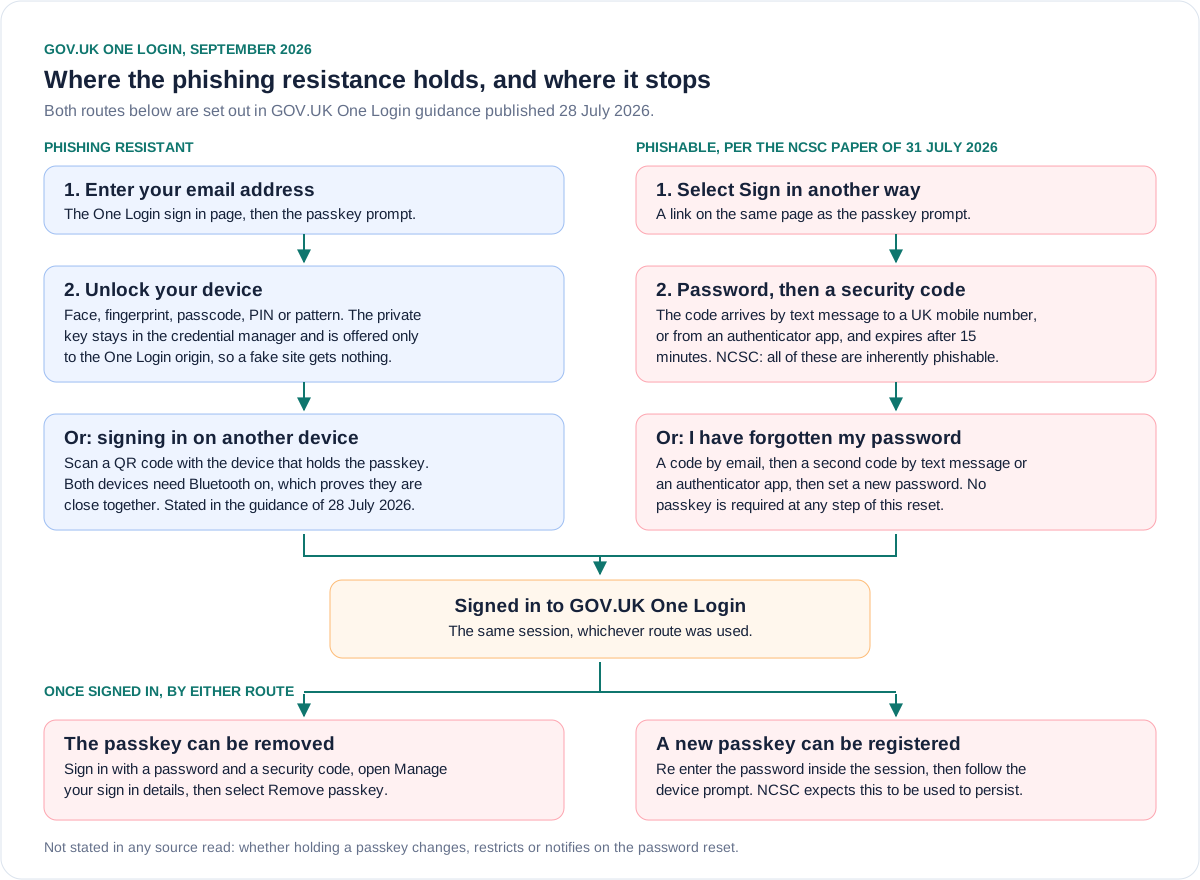
If you cannot sign in with your passkey, you can use your password and a security code instead. To do this, when you see the page 'Sign in with your face, fingerprint or passcode', select Sign in another way.
The fallback is not buried in a support article. It is a link on the passkey prompt itself. The announcement is equally clear about the policy: "Passkeys are optional, so people can continue to use a password to sign in if they prefer." The guidance says a passkey "becomes the main way you sign in". Main, not only.
A second factor that can be skipped is not a control, it is an option. An adversary in the middle proxy does not have to defeat the passkey. It has to render the page that the user reaches by clicking the link the service itself offers, collect a password, and relay one code. The NCSC paper names this exactly: "Downgrade attacks are sometimes reported on FIDO2 protected accounts where the attacker has instead downgraded the authentication to use non-FIDO mechanisms / tMFA." The paper expects it to grow: attackers are "expected to increasingly conduct downgrade attacks" as passkeys become the default.
Two further steps in the same guidance complete the picture, and both are worth reading slowly.
To remove a passkey, the guidance says: sign in using your password and a security code, open Manage your sign in details, find the passkey, select Remove passkey, enter your password. So the weaker credential pair can delete the stronger credential.
To add one, the guidance says: sign in, select Manage your sign in details, find the row for Set up a passkey, enter your password, and follow the device prompt. So a session obtained with a password and one relayed code can register an attacker controlled passkey. The NCSC paper flags precisely this as an emerging technique, "the registering of passkeys or other FIDO2 credentials by attackers in order to persist access to a victim's account following compromise of tMFA", and says better surfacing of registered passkeys may be needed.
Recovery is a code to your inbox and a code to your phone
Recovery is where phishing goes when the front door is closed, so this section sets out exactly what One Login's published recovery path is. It is documented, which is more than many services manage, and every step of it runs on credentials the NCSC classifies as phishable.
The forgotten password reset, from the guidance on changing sign in details, is: enter your email address, select "I've forgotten my password", receive a security code by email, enter it, then enter a second security code which arrives by text message or from your authenticator app, then set a new password.
A security code can reach you by text message to a UK mobile number or from an authenticator app, and the code expires after 15 minutes. A non UK number cannot receive one at all, so those users must use an authenticator app.
Read that against the NCSC's summary of its own analysis: "All traditional / classical multifactor authentication including passwords, SMS codes, email codes, TOTP codes, TOTP tokens and notification approval systems are inherently phishable and attackers are increasingly abusing this property to access accounts."
Every element of the One Login reset path appears in that sentence. The paper is equally direct about why recovery is the target: "Attackers are seen to target account recovery for both tMFA and FIDO2 protected accounts, as the recovery process can often be weaker than the authentication to the account," and it singles out the forgotten password pattern for "effectively reducing the security of the service to that of the email account".
Device loss is handled better than most consumer services manage, and the guidance is specific. If you lose the device, nobody else can use the passkey on it as long as they cannot unlock it, and you can still sign in with the passkey on another device in the same credential manager, or with your password and a security code. If the device was stolen, you are told to remove the passkey and set up a new one. That is sound advice and it is written in plain language.
The harder case is losing the phone that receives your security codes with no backup method set. Then you select "Problems with the code", then "Check if you can change how you get security codes". You can only take that route if you have already proved your identity with One Login, in which case you prove it again through the GOV.UK ID Check app. If you cannot, the guidance says to contact GOV.UK One Login. What that contact route checks before it restores access is not stated on any page I read, and for a service with tens of millions of accounts that is the single most load bearing gap in the published documentation.
Stated and not stated
Compiled from the 14 September 2026 gov.uk announcement, the 16 September 2026 GDS blog, and One Login guidance pages published or updated on 28 July 2026. Accessed 23 September 2026.
| Question | Stated in the sources | Not stated |
|---|---|---|
| The user number | More than 23 million users, or 23 million people using One Login across over 250 services | Whether that counts registered accounts, active users or eligible users, and over what period |
| Passkey adoption | 300,000 users, and nearly one in 10 daily sign ins | How many accounts hold a registered passkey today, and whether the 300,000 from the trial and the 300,000 from the first month are the same people |
| Mandatory or optional | Optional. People can continue to use a password if they prefer | Whether the password route will ever be retired, for any group of users or any service, and on what trigger |
| Fallback method | Password plus a security code, reached from a Sign in another way link on the passkey page | Whether high risk services behind One Login can require the passkey and refuse the downgrade |
| Recovery path | Code by email, then a code by SMS or authenticator app, then set a new password | Whether holding a registered passkey changes, restricts or notifies on that reset at all |
| Device loss | Use a passkey on another device in the same credential manager, or password plus code. If stolen, remove the passkey | What the contact GOV.UK One Login route verifies when a user has no working method and no proved identity |
| Shared or borrowed devices | Do not set up a passkey on a shared device. A person borrowing a device must not set one up on it | Any technical enforcement of either instruction, or what the helper is meant to do instead long term |
| Users without a modern smartphone | Minimum is iPhone 8 on iOS 16, Android 10, Windows 10 or macOS Ventura 13, with a screen lock set | How many One Login users fall below that floor, and what the plan is for them |
The negative column is not a list of failures. Several of those entries are reasonable things for a product team not to have published yet. But taken together they describe a service where the phishing resistant credential is a preference expressed by the user, and the phishable one is the floor that everything else stands on.
One front door, 57 rooms
One Login is described as the front door to government. The GDS blog says 23 million people use it "to sign in to over 250 UK government services", and in the comments on 22 September 2026 a GDS account repeats it: "GOV.UK One Login is already being used by more than 250 government services and counting." The same reply says One Login "will replace up to 300 individual accounts, accessed via 44 different sign-in methods".
The official public list of services you can use with One Login, at home.account.gov.uk, returned 57 results when I counted it on 23 September 2026. The page is still labelled Beta and it says plainly: "At the moment, you can only use GOV.UK One Login to access some government services." Nothing on the list page or the blog explains the gap between 57 and over 250. The most likely benign reading is that the 250 counts internal or departmental integrations and the 57 counts public facing journeys a citizen can start today, and that reading is inference on my part, not a statement either page makes.
What is on the list is instructive. Manage your benefits and State Pension. Driver and vehicles account. Companies House services. Request a basic DBS check. Use a lasting power of attorney. Apply for Personal Independence Payment. Childcare Offer for Wales.
What is not on it is more instructive. No HMRC service appears on the list at all, although the announcement says One Login provides access to "managing tax services" and the Digital Government Minister's quote is about checking "their tax return". Universal Credit is named on the One Login overview page as an explicit exception: "It does not work with all government accounts and services yet (for example Universal Credit)." Passport applications and renewals are absent, and the only passport entry is Cancel a lost or stolen passport.
So the passkey covers what is behind One Login. The highest volume, highest value citizen journeys in UK government, self assessment, PAYE, Universal Credit and passports, are either explicitly outside it or absent from its published list. A phishing resistant front door is worth having. It is not the same as a phishing resistant government.
The users who are told not to set up a passkey
A service that must serve everybody has to answer for the edges, and at this scale the edges are where the volume is. Three groups are visible in the guidance.
People using a borrowed device. The assisted digital guidance, updated on 28 July 2026 to cover passkeys, tells the helper: "You can let the person you're helping borrow your phone or computer if they do not have their own," and then, "They should not save a password or set up a passkey on your phone or computer." It is correct advice. It also means that a citizen with no device of their own is structurally on the password and SMS route, permanently. That is the group least able to spot a convincing fake sign in page.
People on a shared device. The passkey guidance says: "You should not set up a passkey on a device that you share with other people. This is because anyone who can unlock that device may be able to use your passkey." Again correct, and again advice rather than a control. Nothing in the guidance describes One Login detecting or preventing it.
People below the device floor. The stated minimum is an iPhone 8 or newer on iOS 16 or higher, an Android device on Android 10 or higher, Windows 10 or higher, or macOS Ventura 13 or higher, with a screen lock already configured. Android 10 shipped in 2019. That is a low floor by 2026 standards, and it is still a floor, and how many One Login users sit under it is not published.
The two paths, side by side
The condition the NCSC already wrote down
The NCSC is not in tension with GDS here, and the briefing should not pretend it is. The NCSC recommends passkeys without hedging, its director for national resilience is quoted in the announcement urging people to set one up, and its paper concludes that FIDO2 credentials are "as secure or more secure" than traditional multi-factor authentication at every stage of the credential lifecycle.
What the NCSC has also done is write down the condition under which the full benefit arrives, and One Login does not currently meet it. That is a statement about deployment, not about passkeys.
Left column quoted or paraphrased from the NCSC paper on traditional and FIDO2 credentials for personal use, updated 31 July 2026. Right column from GOV.UK One Login public guidance, accessed 23 September 2026.
| What the NCSC paper says is needed | What One Login guidance states |
|---|---|
| Full benefit arrives once traditional MFA is removed as an option, by the user or the relying party | Passkeys are optional and the password route stays, reachable from the passkey page itself |
| Account takeover by credential registration should be prevented if only passkeys are used, with no weaker fallback | A session reached with a password and one code can add a passkey, and can remove an existing one |
| Recovery flows will need to increase the level of security they provide as passkeys spread | Recovery is an email code plus an SMS or authenticator code, with an ID Check app route only for identity verified users |
| Relying parties should let users delete the public key of a credential from the account | One Login does this. Remove passkey is documented, and multiple passkeys can be listed and removed individually |
Say the last row out loud: on the specific relying party duty the NCSC names, One Login complies, and a good many commercial services do not. The paper cites a major consumer platform that offered no way to delete a registered passkey at the time of writing. The published One Login guidance is also clearer and more honest about the fallback than most vendor material. The gap is between what the guidance says and what the press release implies, not between the guidance and good practice.
What a UK organisation should take from this
Plenty of UK security leads will be asked this week why the organisation does not do what the government just did. The honest answer has two halves.
What transfers. Offering passkeys is cheap, popular and unambiguously better for the users who take it. GDS got roughly 10 per cent of daily sign ins onto passkeys in a month, on a consumer population with no mandate and no training, by prompting at the moment of sign in and copying content patterns users already know from Apple, Google and their bank. That is a repeatable result. The device floor is low. The user research finding transfers too: GDS found that entering a security code is hard for users with cognitive barriers, low digital confidence and assistive technology, which reframes passkeys as an accessibility win, not only a security one.
What does not transfer. One Login is a universal public service and cannot refuse anybody, so it cannot delete the password. Your workforce can. For staff authentication you control the device estate, you can issue security keys or platform authenticators to everybody, and you can therefore do the thing the NCSC says is required and remove traditional MFA as an option. If you copy the government's deployment shape rather than its direction, you will have bought the user experience improvement and almost none of the security benefit, and you will have a board slide saying you are phishing resistant.
The friendly name is doing a lot of work in this story. "Passwordless" describes a journey, not a credential state, and an account with a passkey and a password is not passwordless. "Phishing resistant" is a property of an authentication method, and it does not survive being one of two offered methods. The useful internal question is not "do we support passkeys", it is "can any account in scope still be signed into, or recovered, without one". If the answer is yes, the number that matters is the proportion of accounts for which the weaker path has actually been switched off, and most organisations do not measure it.
Note the commercial and institutional interests without sneering at them. The FIDO Alliance and the platform vendors who ship credential managers benefit from adoption, and their guidelines are cited in the GDS blog. GDS has a cost line to point at, because every passkey sign in is an SMS it does not pay for. None of that makes the security claim wrong. It does explain why the messaging leads with speed and savings and why the fallback appears in the guidance rather than the press release.
What to do, in order
Take this with you
In order of what actually moves risk
- Write down, for each authentication system you own, every method that can complete a sign in. Include the ones reachable from a link on the sign in page. That list, not the strongest method on it, is your authentication posture.
- Do the same for recovery. Self service reset, helpdesk reset, and any identity proofing route. Recovery is a sign in method wearing a different name.
- For workforce accounts, set a date to remove password and one time code authentication rather than adding FIDO2 alongside it. Adding alone buys speed, not phishing resistance.
- Rank your helpdesk reset process as a primary attack surface and test it with a social engineering exercise, not a tabletop. Phishing goes where the front door is not.
- Require at least two registered FIDO2 credentials per workforce account so that removing the fallback does not create a lockout problem that forces the helpdesk route open again.
- Turn on alerting for credential registration events, especially a passkey added to an account that already had one, and surface the full list of registered credentials to the user.
- Unify sign in and registration under one origin, or implement WebAuthn Related Origin Requests, and enable Content Security Policy and Trusted Types. These are the relying party duties the NCSC paper names.
- For customer facing services that cannot remove the password, apply step up to the actions that matter, such as changing bank details or a delivery address, and require the phishing resistant credential for those specific steps.
- If you are asked to publish an adoption figure, publish the denominator with it. State whether it counts registered accounts, active users or authentications.
- Set up a passkey on your own GOV.UK One Login. The NCSC recommendation is right, and the criticism in this piece is of the surrounding claim, not the credential.
The question that exposes the gap
GDS has done the hard part. The journeys are researched, the guidance is clear, the credential is the right one, and 300,000 people are using it within a month without being made to. The NCSC's endorsement is technically sound and its paper is one of the better pieces of public sector security writing this year.
The gap is between a claim about users and a property of an account. Twenty three million users can be offered passkeys. No account is phishing resistant while a link on its sign in page says Sign in another way, and no account is phishing resistant while its password can be reset with a code to an inbox and a code to a phone.
So the question for GDS, and the same question for every organisation that copies this: what proportion of GOV.UK One Login accounts can no longer be signed into, or recovered, with a password and a one time code? If the answer today is zero, the announcement describes a better user experience and a better default, which is worth having and worth saying. It does not yet describe a control.
Sources
- PrimaryThe 14 September 2026 announcement, used for the 23 million figure, the one in 10 daily sign ins, the 600 pounds a day SMS saving, the ministerial and NCSC quotes, and the statement that passkeys are optionalDepartment for Digital, Culture, Media and Sport, Government Digital Serviceaccessed 2026-09-23
- PrimaryGDS blog post of 16 September 2026, used for the 23 million and over 250 services figures, the 300,000 and almost 10 per cent claim, the 2,500 person survey, and the GDS replies in the commentsGovernment Digital Serviceaccessed 2026-09-23
- PrimaryOfficial One Login passkey guidance published 28 July 2026, used for the device requirements, the sign in another way fallback, the QR code cross device flow, device loss, shared devices and passkey removalGovernment Digital Serviceaccessed 2026-09-23
- PrimaryOne Login security code guidance, used for the channels a security code arrives on and the 15 minute expiryGovernment Digital Serviceaccessed 2026-09-23
- PrimaryOne Login guidance on changing sign in details, used for the forgotten password reset sequence and the lost phone route through the GOV.UK ID Check appGovernment Digital Serviceaccessed 2026-09-23
- PrimaryOne Login assisted digital guidance updated 28 July 2026, used for the instruction that a borrowed device must not have a passkey set up on itGovernment Digital Serviceaccessed 2026-09-23
- PrimaryOne Login overview page, used for the statement that it does not work with all government services yet, naming Universal CreditGovernment Digital Serviceaccessed 2026-09-23
- PrimaryThe official list of services you can use with GOV.UK One Login, used for the count of 57 listed servicesGovernment Digital Serviceaccessed 2026-09-23
- PrimaryNCSC passkeys guidance page, used for the recommendation to prefer passkeys and the description of the credential managerNational Cyber Security Centreaccessed 2026-09-23
- PrimaryNCSC technical paper published 23 April 2026 and updated 31 July 2026, used for the phishing comparison table, the fallback and downgrade findings and the account recovery analysisNational Cyber Security Centreaccessed 2026-09-23
- PrimaryCyber security guidance for business, updated 16 September 2026 to add advice on passkeys, used to establish what the business facing update actually containsDepartment for Science, Innovation and Technology and National Cyber Security Centreaccessed 2026-09-23
- Reported byWeekly summary for the week ending 20 September 2026, used as the pointer to the announcement and the business guidance updateCTO at NCSCaccessed 2026-09-23