A Defender update block with no CVE, and a health report that reads green for seven days
A researcher tool released on 19 September stops Microsoft Defender taking signature and platform updates, and it carries no CVE, no KEV entry and no vendor fix. Microsoft's own health report can call a blocked device up to date for a week.
By Parminder Kumar Sharma · · 15 min read
Twenty one releases inside one window
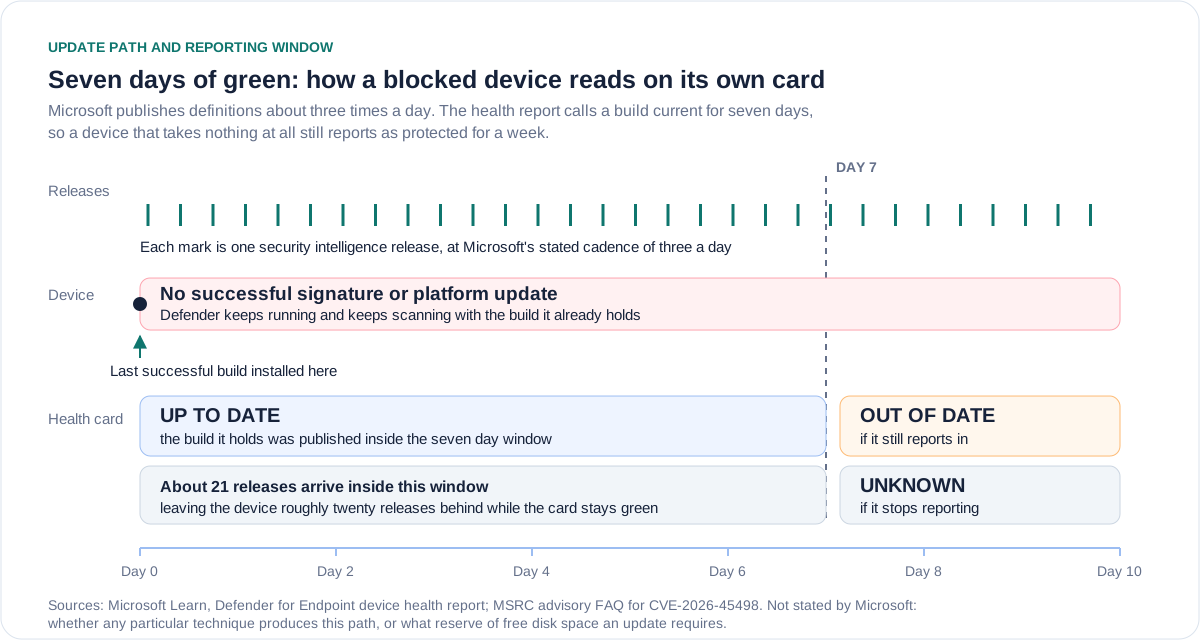
Microsoft's own answer to how often it ships malware definitions is written into the FAQ attached to a Defender security advisory: it "typically updates the malware definitions three times daily" and can raise that rate when needed. Microsoft's device health report for Defender for Endpoint treats a device's security intelligence as up to date if the build on that device was written in the past seven days. Seven days at three releases a day is 21 releases. A machine that installed a definition build on a Monday and then took nothing at all can be about twenty releases behind by the following Monday, and the card in the portal will still show it as up to date.
That arithmetic is not a vulnerability. It establishes nothing about a flaw in Defender, nothing about whether any device in your estate is blocked, and nothing about the tool that put this subject back in the news this week. It was equally true last year and on every quiet day since. What it establishes is narrower and more useful: the green state in the portal is a statement about the age of a signature build, not a statement that the update path is working.
That distinction is the whole of this story. A tool released on the weekend of 19 and 20 September claims to stop Defender taking signature and platform updates while it runs. It has no CVE, it is not in the CISA catalogue of known exploited vulnerabilities, and Microsoft has published nothing about it. What it does have is a headline calling it a zero-day.
What we published on 22 September, and what has actually changed
On 22 September we published Defender can report protected while its signature updates stall. From Microsoft's own documentation it established four things: the Defender for Endpoint health report counts security intelligence as up to date if the version was published in the last seven days; Microsoft ships definitions roughly three times a day, so a device can miss on the order of twenty releases while its tile stays green; a device that stops reporting for more than a week moves to Unknown rather than turning red; and an earlier update block flaw, CVE-2026-45498, was marked exploited in May, with a fix that could only reach machines whose updates were still working.
BleepingComputer's report of 22 September, headlined as a new Windows Defender zero-day that blocks Microsoft antivirus updates, concerns the same tool we wrote about: BigDiskBuster, released by Abdelhamid Naceri over the preceding weekend. The researcher describes it as a tool that, in his words, "completely denies defender from updating" while it runs in the background.
So the honest statement of what has changed in two days is this. The mechanism has not changed. The vulnerability record has not changed either: a keyword search of the National Vulnerability Database for the tool returned no results on 24 September, and the CISA catalogue published on 23 September, with 1,721 entries, contains nothing for it. What has changed is the volume of coverage and the appearance of a second published account describing the mechanism as disk exhaustion rather than a settings change. That description matters to defenders, and it is the reason to write again.
The same shape as May, not the same flaw
The May flaw is worth putting on the table precisely because it is so close in shape. Microsoft released CVE-2026-45498 on 19 May 2026 as a Microsoft Defender denial of service vulnerability, classified under CWE-400, uncontrolled resource consumption. Microsoft's record marks it publicly disclosed and exploited, with the release status Exploitation Detected. Microsoft scored it 4.0 and Low; the National Vulnerability Database scored the same record 7.5 and High, on a vector assuming network reach rather than local access. The last affected build of the Defender antimalware platform was 4.18.26030.3011, and the first fixed build was 4.18.26040.7. CISA added it to the known exploited vulnerabilities catalogue on 20 May with a federal remediation deadline of 3 June, fourteen days.
The technique now being described is also resource exhaustion: filling the disk so that Defender cannot write the update it is trying to fetch. Same class, same effect on the reader's estate, and the same consequence for reporting. It is not established, and I am not asserting, that it is the same flaw. Nothing in Microsoft's record, the NVD record or the coverage connects the two, the May issue was fixed in a platform build four months ago, and treating the resemblance as identity would be exactly the mistake this site exists to avoid. What the resemblance does support is a judgement about priority: Microsoft has already conceded, by shipping a fix and by CISA's decision to list it, that denying Defender its updates is a security problem and not merely a support problem.
Does the health report reveal it, or hide it for a week
This is the question that decides whether a security team finds a blocked device by Wednesday or by the following Tuesday, and Microsoft's documentation answers it precisely. Two clocks run. The first is the security intelligence publish time, meaning the date Microsoft released the build sitting on the device. The second is the signature refresh time, meaning the last time the device sent the reporting event at all. The report's page states the rule flatly: "Devices with a security intelligence publish time greater than seven days are considered out of date in the reports."
How Defender for Endpoint decides the security intelligence status of a device, from the up to date reporting rules on Microsoft Learn
| Last reporting event | Age of the signature build on the device | Reported status |
|---|---|---|
| Under 7 days | Under 7 days | Up to date |
| Under 7 days | Over 7 days | Out of date |
| Over 7 days | Under 7 days | Unknown |
| Over 7 days | Over 7 days | Unknown |
Read the first row against the cadence. For seven days after the last successful update, a device that is taking nothing at all reports Up to date, because the build it is holding was published inside the window. Roughly twenty newer releases exist by the end of that period. On day eight the status flips to Out of date, provided the device is still sending the reporting event. That is the good case, and it is a week late.
The bad case is rows three and four. If the device stops sending the reporting event for more than seven days, the status is marked Unknown, or No data available, whatever the client actually knows. Microsoft lists the ordinary reasons a device lands there: disconnected from the network, powered down or hibernating, Defender disabled, a Mac, cloud protection off, or a device that does not meet the prerequisites. A laptop on annual leave and a machine whose protection has been frozen arrive in the same bucket, wearing the same label, and that bucket is usually nobody's job.
Engine and platform are judged differently and no more helpfully here. A device counts as up to date only if its build is at or above the most recent monthly release, with a three day grace period from the day Windows Update ships it, and the same seven day reporting rule sends silent devices to Unknown. Because platform and engine move monthly, a device that misses a platform update can look correct until the next monthly build lands, and then only if it is still reporting.
Tamper protection is a settings lock, not a disk guarantee
Microsoft's stated control for this class of attack is tamper protection, and its documentation lists, among the settings that cannot be changed while it is enabled, the line "Security intelligence updates occur." Read quickly, that reads like a promise that updates will keep happening. Read against the rest of the page, it is a promise of something narrower: tamper protection "helps protect important security settings from being disabled or changed", it blocks attempts to modify Defender settings through the registry, and it prevents exclusions being edited. The page also says plainly that changes made through a management tool may appear to succeed while tamper protection blocks them.
Every item on that list is about configuration. Nothing on it is about the conditions an update needs in order to complete. A technique that leaves every Defender setting untouched and instead removes the free space an update must be written into is not changing a protected setting, so there is nothing for the setting lock to refuse. Microsoft has not commented on this tool and has published nothing about disk exhaustion and tamper protection, so this is inference from the two documents rather than a vendor statement. It is, however, the inference a defender should plan against, because the alternative is to assume a control covers a case its own documentation never claims.
What is on the record, and what is not
The six questions a security lead will be asked about this, answered against Microsoft's records, the NVD API and the CISA catalogue as they stood on 24 September 2026
| Question | On the record | Not established |
|---|---|---|
| Is there a CVE? | None. A keyword search of the NVD API for the tool name returned zero records on 24 September, and no Microsoft advisory names it. | That there is no defect. An absent CVE records an absent assignment, not an absent problem. |
| Is it in the CISA KEV catalogue? | No. Catalogue version 2026.09.23, 1,721 entries, holds nothing for it. The related May flaw, CVE-2026-45498, was added on 20 May with a 3 June deadline. | That it is out of scope for ever being listed. KEV lists CVEs with evidence of exploitation, and it has no CVE to list. |
| Does tamper protection mitigate it? | Tamper protection locks settings and registry changes, and lists that security intelligence updates occur. The reported technique changes no setting. | That Microsoft agrees. No vendor statement addresses this tool or disk exhaustion, so the reading is ours. |
| Has exploitation been observed? | No account read for this piece reports use against real organisations. The author published it as a proof of concept and called it buggy. | That it is not being used. Absence of reporting after two days is weak evidence either way. |
| Has any indicator been published? | None. One account notes that no independent researcher has confirmed the behaviour. | That nothing is detectable. Failed update events and a frozen signature publish time are observable without an indicator. |
| Does the fix need the channel the flaw blocks? | For the May flaw, yes. The fix was platform build 4.18.26040.7, and Microsoft's advisory explains that no action is required because definitions and the platform update automatically. | For this tool there is no fix at all, so the question does not yet arise. |
The last row is the trap, and it deserves to be said in one sentence: the remedy for an update blocking flaw is delivered by the update channel that the flaw blocks. Microsoft's own advisory for CVE-2026-45498 answers the question "Why is no action required to install this update?" by pointing at the default configuration, which keeps definitions and the platform current automatically. That answer is correct for the overwhelming majority of machines and useless for precisely the machines that matter, because a device whose update path is broken is the one device that will not receive the fix for the flaw that broke it. To Microsoft's credit, the same advisory says best practice is for customers to "regularly verify whether software distribution ... is working as expected". That sentence is the whole job, and almost nobody does it as a scheduled task.
What to query this week
All of this is defensive and none of it requires the tool or any knowledge of how it works. The field names below come from Microsoft's export API for Defender antivirus health details, and the event IDs from Microsoft's own event reference.
Take this with you
Defender update assurance, in the order worth doing
- Export the Defender antivirus health details for every device and sort on avSignaturePublishTime, oldest first. Read the list, not the summary cards, because the cards answer a seven day question and you need a tighter one.
- Set your own alert threshold at 48 hours of signature publish age rather than the seven days the portal uses. At three releases a day, 48 hours is already about six missed releases.
- Alert on devices that are checking in but not updating: lastSeenTime recent, avSignatureUpdateTime unchanged for more than 72 hours. That combination is the signature of a blocked update path rather than an absent device.
- Treat avIsSignatureUpToDate of Unknown and avIsPlatformUpToDate of Unknown as unresolved rather than as absent devices, count them weekly, and give the Unknown bucket one named owner with a date.
- Collect Windows Defender operational events 2000 and 2001 centrally, and alert where a device logs 2001, the security intelligence update failed, with no 2000 success in the following 24 hours.
- Keep the error code and update stage carried by event 2001. A failure at the install stage for lack of space is a different investigation from a failure at the download stage for lack of network.
- Compare avPlatformVersion per device against the current monthly platform release, since the May fix arrived as a platform build and a device stuck below it is still carrying that flaw.
- Add free disk space per endpoint to the same report and treat a device that is both short of space and behind on signatures as a security finding, not a capacity ticket.
- Record tamper protection state per device, and write next to it in your own documentation that it is a settings lock and not proof that an update completed.
- Verify one device by hand each week with Get-MpComputerStatus and compare AntivirusSignatureLastUpdated with what the portal claims for the same machine.
# On the endpoint: build, signature version, age and last successful update time
Get-MpComputerStatus | Select-Object AMProductVersion, AMEngineVersion,
  AntivirusSignatureVersion, AntivirusSignatureAge, AntivirusSignatureLastUpdated

# Update outcomes from the Defender operational log
# 2000 MALWAREPROTECTION_SIGNATURE_UPDATED, 2001 MALWAREPROTECTION_SIGNATURE_UPDATE_FAILED
Get-WinEvent -LogName "Microsoft-Windows-Windows Defender/Operational" -MaxEvents 200 |
  Where-Object Id -in 2000,2001 |
  Select-Object TimeCreated, Id, LevelDisplayName, Message

# Fleet wide, from the export device antivirus health details API, read these fields:
#   avSignaturePublishTime   when Microsoft released the build the device holds
#   avSignatureUpdateTime    when the device last applied a build
#   avIsSignatureUpToDate    True, False or Unknown
#   avPlatformVersion, avIsPlatformUpToDate
#   lastSeenTime, avMode, dataRefreshTimestamp
# Alert rule: lastSeenTime within 24 hours AND avSignatureUpdateTime older than 72 hours
Two configuration settings are worth reviewing at the same time, both documented by Microsoft. The catch up interval, set through Group Policy or with Set-MpPreference and the SignatureUpdateCatchupInterval parameter, defines how many days may pass before a catch up update is required. The out of date thresholds, defined by the Group Policy settings for the number of days before virus and spyware security intelligence are considered out of date, control when the client itself reports a problem and when it starts reaching for the next source in the fallback order. Microsoft's documented default before protection falls back to the security intelligence source is seven consecutive days of failure. Every one of those defaults is a week long. None of them has to be.
The question that exposes the gap
There is a reasonable case for calm here. The tool is a proof of concept its own author calls buggy, no CVE exists, nothing is in the KEV catalogue, and no organisation has reported being hit. Anyone who tells you today that this is an emergency is selling something, and the commercial incentive to describe a proof of concept as a zero-day runs in the same direction for news sites and for vendors.
The uncomfortable part is not the tool. It is what verifying the tool taught us about the instrumentation. If a security lead cannot answer, today, how many devices applied a definition build in the last 48 hours, then the estate is already in the condition the tool is designed to produce, and it got there by ordinary means: broken proxies, full disks, imaged machines that never completed their first update, servers where the platform update is postponed behind a monitoring service. The technique matters because it makes a common failure deliberate and quiet.
So the question to take to the next meeting is not whether Defender is vulnerable. It is this: what is the oldest signature publish time in the estate right now, who owns the devices sitting in the Unknown bucket, and how would either of those facts have reached you if nobody had read a headline this week?
This analysis was researched with Claude, made by Anthropic.
Key facts
Sources
- PrimaryMSRC vulnerability record for CVE-2026-45498, used for the exploited flag, CVSS vector, CWE, affected and fixed platform versions, and the FAQ statements on update cadence and why no action is requiredMicrosoft Security Response Centeraccessed 2026-09-24
- PrimaryThe human readable Security Update Guide page for CVE-2026-45498, which renders through JavaScript and could not be read directlyMicrosoft Security Response Centeraccessed 2026-09-24
- PrimaryNVD record for CVE-2026-45498, used for publication date, the two differing CVSS scores and the CISA-ADP exploitation decisionNIST National Vulnerability Databaseaccessed 2026-09-24
- PrimaryKnown Exploited Vulnerabilities catalogue JSON, used for catalogue version and entry count, the CVE-2026-45498 entry and its remediation deadline, and to establish that no entry exists for the new techniqueCISAaccessed 2026-09-24
- PrimaryDevice health Microsoft Defender Antivirus health report, used for the seven day rules, the up to date definitions and the Unknown bucketMicrosoft Learnaccessed 2026-09-24
- PrimaryTamper protection overview, used for the list of tamper protected settings on Windows and the description of what tamper protection doesMicrosoft Learnaccessed 2026-09-24
- PrimaryManage how and where Microsoft Defender Antivirus receives updates, used for update cadence, fallback order and the seven consecutive days defaultMicrosoft Learnaccessed 2026-09-24
- PrimarySecurity intelligence and product updates and support, used for the monthly platform and engine cadence and the N minus two support positionMicrosoft Learnaccessed 2026-09-24
- PrimaryApply protection updates to out of date endpoints, used for the catch up interval and the out of date reporting settings named in the checklistMicrosoft Learnaccessed 2026-09-24
- PrimaryMicrosoft Defender Antivirus event IDs and error codes, used for events 2000, 2001 and 1151, the signature age definition and the operational log channelMicrosoft Learnaccessed 2026-09-24
- PrimaryExport device antivirus health details API methods and properties, used for the exact field names in the query checklistMicrosoft Learnaccessed 2026-09-24
- PrimaryGet-MpComputerStatus reference, used for the endpoint side property names in the verification commandsMicrosoft Learnaccessed 2026-09-24
- Reported byThe report that prompted this piece, used for the release date, the researcher quote and the absence of a Microsoft commentBleepingComputeraccessed 2026-09-24
- Reported bySecond account of the same release, used for the described mechanism and the statement that no CVE, patch or advisory existsThe Hacker Newsaccessed 2026-09-24
- Reported byOur briefing of 22 September 2026, which this piece follows uppk-sharma.comaccessed 2026-09-24