At least seven victim actions, no named vulnerability: CloudSyncD launches on a typed password
Jamf Threat Labs describes a fake Zoom disk image that reaches a sudo launch only after at least seven victim actions, one of them a typed password. Jamf names no vulnerability, victim, actor or delivery route, and did not see the daemon run.
By Parminder Kumar Sharma · · 19 min read
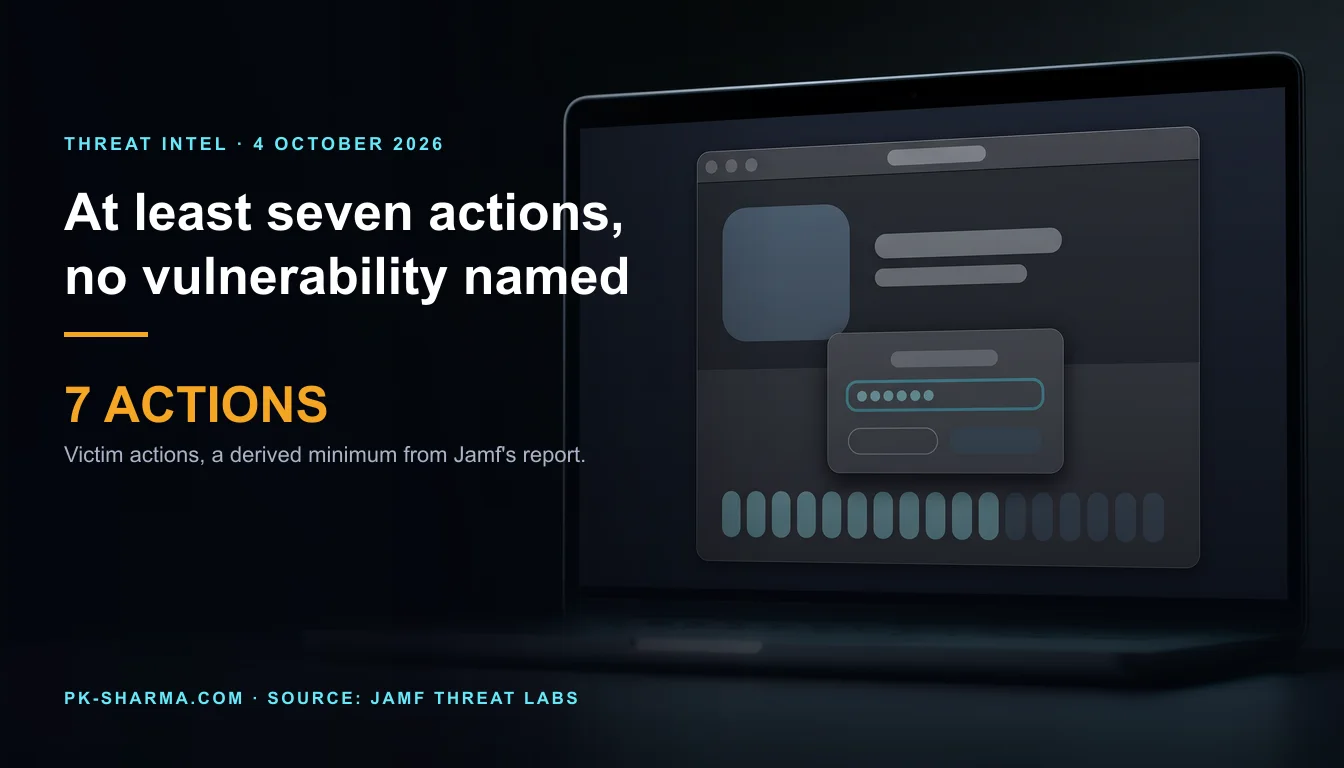
Seven things the victim has to do, and no flaw to exploit
Count the places in Jamf Threat Labs' report where a person has to do something for CloudSyncD to run. The victim launches the fake Zoom app, and macOS refuses. The background picture on the disk image then lists five instructions: open System Settings, go to Privacy & Security, scroll to the Security section, click Open Anyway, and enter an administrator password. Then the dropper's own dialog asks for the login password, and asks again until it is right. That is seven victim actions. The count is ours, derived from Jamf's description, and it is a minimum: Jamf does not say how the victim came by the disk image, and Apple's own override steps end with a confirmation click that Jamf's list does not mention.
What that does not establish is most of what a headline suggests. The report, dated 30 September 2026, names no vulnerability, no CVE and no exploit. The route from a disk image to a running implant is a password the victim types, handed to sudo. It names no victim and no number of victims, no actor, no country, and no way in which anyone was lured to the image. Jamf found the file through routine monitoring of VirusTotal. It also says it never saw the cloudsyncd daemon in use, so the name in the headlines describes a configuration entry, not something observed running. Nothing in any source we read shows that a UK organisation has been touched.
The design lesson sits in the same count. Apple's Gatekeeper refused the first launch. System Integrity Protection, in Jamf's account, defeated the dropper's attempt to avoid writing a file. Neither refusal is where the story turns, because the dropper had a person on hand: one prompt to override the block, another to hand over the password. A prompt is not a control when the author of the attack can write the instructions on the picture behind it.
Who said what, and when
Everything technical below comes from Jamf Threat Labs' own report, which is a vendor's research. Jamf sells Mac management and security products, and its report closes by noting that Jamf for Mac customers can set threat prevention, advanced threat controls and web protection to Block and Report. That is a vendor describing its own product beside its own research, which is normal and worth knowing. It does not make the findings wrong. SecurityWeek's article of 2 October is a secondary summary.
Dates in the CloudSyncD story and who stated each. Derived dates are our arithmetic.
- Date (2026)
- 15 September
- What happened
- Jamf first encounters CloudSyncD, in a build it calls plainly still under development
- Source
- Jamf report
- Date (2026)
- 17 September (derived)
- What happened
- Samples configured against live infrastructure, found 'after two days of monitoring'
- Source
- Jamf report
- Date (2026)
- 18 September, 01:50
- What happened
- Timestamp on a log excerpt from a live-domain build. Time zone and machine not stated
- Source
- Jamf report
- Date (2026)
- 30 September
- What happened
- Jamf publishes its report. MacTech summarises it the same day
- Source
- Jamf, MacTech
- Date (2026)
- 1 October
- What happened
- Hackread summarises it
- Source
- Hackread
- Date (2026)
- 2 October
- What happened
- SecurityWeek summarises it under a headline saying macOS users are targeted
- Source
- SecurityWeek
- Date (2026)
- 4 October, 12:00 BST
- What happened
- This briefing
- Source
- Our reading
| Date (2026) | What happened | Source |
|---|---|---|
| 15 September | Jamf first encounters CloudSyncD, in a build it calls plainly still under development | Jamf report |
| 17 September (derived) | Samples configured against live infrastructure, found 'after two days of monitoring' | Jamf report |
| 18 September, 01:50 | Timestamp on a log excerpt from a live-domain build. Time zone and machine not stated | Jamf report |
| 30 September | Jamf publishes its report. MacTech summarises it the same day | Jamf, MacTech |
| 1 October | Hackread summarises it | Hackread |
| 2 October | SecurityWeek summarises it under a headline saying macOS users are targeted | SecurityWeek |
| 4 October, 12:00 BST | This briefing | Our reading |
The arithmetic: from first sighting on 15 September to Jamf's report on 30 September is 15 days. To SecurityWeek it is 17 days, and to this briefing 19. Jamf's own gap, from a development build with a private-network address to samples configured for reachable domains, is two days, which puts the second sighting at about 17 September. Jamf reads that as a sign the operators "have moved from testing toward deployment". That is an inference from how the builds are configured, and the report does not describe use against anyone.
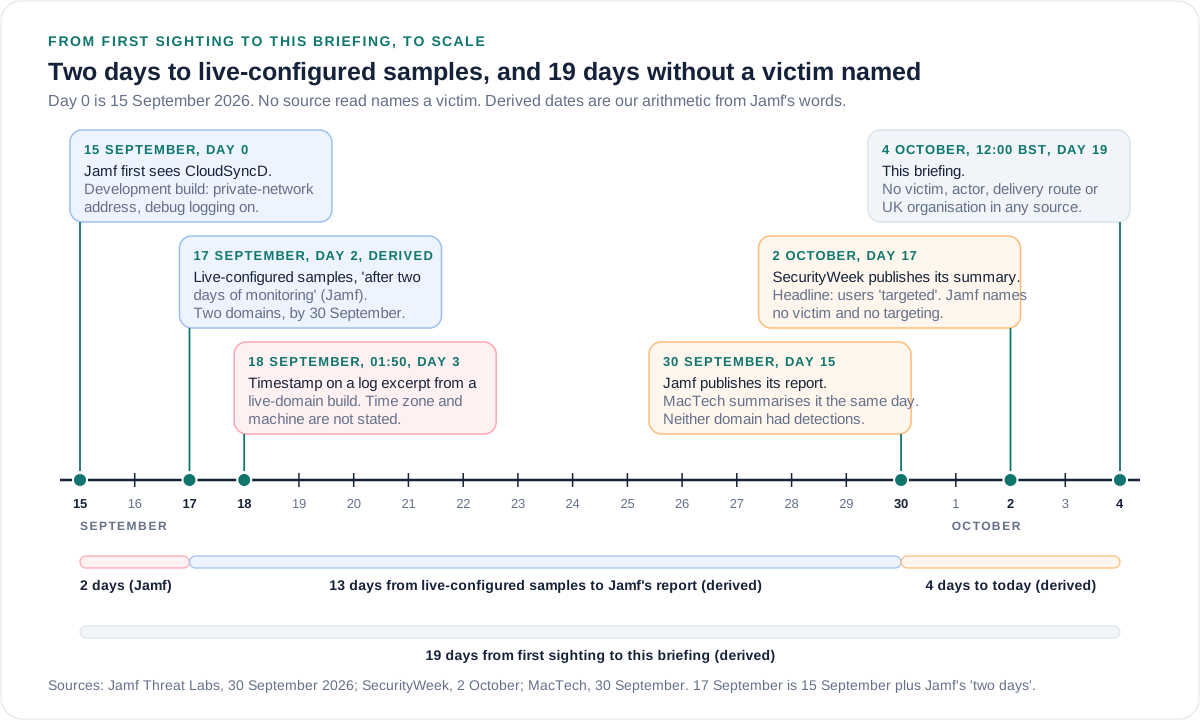
The log excerpt dated 18 September deserves one line of care. Jamf prints it as the first line of a recovered log, which records the endpoint and a host identifier, and does not say whose machine wrote it. We read it as probably Jamf's own test run of a live-domain build, which is inference. A timestamp on one log line is not a date of deployment.
SecurityWeek, 2 October 2026, against Jamf Threat Labs, 30 September 2026. Quotation marks are SecurityWeek's words.
- SecurityWeek's article
- The headline says macOS users are targeted.
- Jamf's report
- No victim, no targeting and no lure is described. The file was found by monitoring VirusTotal.
- SecurityWeek's article
- The infection starts with 'standard social engineering methods', and 'if the phish is successful' a disk image is delivered.
- Jamf's report
- How the image reaches anyone is not stated. No phish is described.
- SecurityWeek's article
- The malware 'runs through a daemon named CloudSyncD'.
- Jamf's report
- The name is in the encrypted configuration. No LaunchAgent, LaunchDaemon, rename or running process under that name was observed, and no task was delivered.
- SecurityWeek's article
- 'Since the malware has now reached deployment'.
- Jamf's report
- Builds configured for reachable domains indicate a move from testing toward deployment. Use against anyone is not described.
| SecurityWeek's article | Jamf's report |
|---|---|
| The headline says macOS users are targeted. | No victim, no targeting and no lure is described. The file was found by monitoring VirusTotal. |
| The infection starts with 'standard social engineering methods', and 'if the phish is successful' a disk image is delivered. | How the image reaches anyone is not stated. No phish is described. |
| The malware 'runs through a daemon named CloudSyncD'. | The name is in the encrypted configuration. No LaunchAgent, LaunchDaemon, rename or running process under that name was observed, and no task was delivered. |
| 'Since the malware has now reached deployment'. | Builds configured for reachable domains indicate a move from testing toward deployment. Use against anyone is not described. |
Where SecurityWeek quotes Jamf, the quotations match the report. The four lines above are the outlet's own framing, and we treat them as its inference.
Stated and not stated
The table separates what Jamf's report says from what it leaves out. "Not stated" means we read the whole page, including the indicator list, and found no sentence on the point.
What Jamf Threat Labs states and does not state, read in full on 4 October 2026 at about 12:00 BST
- Topic
- Delivery
- Stated
- A disk image, Zoom.dmg, that mounts as a volume named Zoom
- Not stated
- How it reached anyone: email, web page, advert, message or anything else
- Topic
- Victims
- Stated
- Nothing from a victim machine. The samples came from monitoring VirusTotal
- Not stated
- Any victim, any count, sector or country
- Topic
- Actor
- Stated
- Two domains registered in 2011 through one registrar. One C2 key and initialisation vector reused across builds
- Not stated
- Who runs it, any name, any link to another malware family
- Topic
- Vulnerability
- Stated
- None named
- Not stated
- Any CVE or exploit. The route is a typed password
- Topic
- Use
- Stated
- Builds configured for two reachable domains within two days
- Not stated
- Use against any person or organisation
- Topic
- Daemon
- Stated
- The name cloudsyncd in configuration, with a matching process disguise field
- Not stated
- A running daemon: no LaunchAgent, LaunchDaemon, rename or task was observed
- Topic
- Password
- Stated
- Checked with a directory service utility, written to a decoy settings file, used with sudo. The introduction says it is never recorded or sent anywhere
- Not stated
- Why 'never recorded' sits beside a file that holds it, or whether any build sends it
- Topic
- Detection
- Stated
- Neither domain carried detections on 30 September
- Not stated
- Today's status. The VirusTotal collection needs a sign-in, which we did not use
- Topic
- UK
- Stated
- Nothing
- Not stated
- Any UK victim, sector or organisation
| Topic | Stated | Not stated |
|---|---|---|
| Delivery | A disk image, Zoom.dmg, that mounts as a volume named Zoom | How it reached anyone: email, web page, advert, message or anything else |
| Victims | Nothing from a victim machine. The samples came from monitoring VirusTotal | Any victim, any count, sector or country |
| Actor | Two domains registered in 2011 through one registrar. One C2 key and initialisation vector reused across builds | Who runs it, any name, any link to another malware family |
| Vulnerability | None named | Any CVE or exploit. The route is a typed password |
| Use | Builds configured for two reachable domains within two days | Use against any person or organisation |
| Daemon | The name cloudsyncd in configuration, with a matching process disguise field | A running daemon: no LaunchAgent, LaunchDaemon, rename or task was observed |
| Password | Checked with a directory service utility, written to a decoy settings file, used with sudo. The introduction says it is never recorded or sent anywhere | Why 'never recorded' sits beside a file that holds it, or whether any build sends it |
| Detection | Neither domain carried detections on 30 September | Today's status. The VirusTotal collection needs a sign-in, which we did not use |
| UK | Nothing | Any UK victim, sector or organisation |
The password row is the one to read twice. Jamf's introduction says "the password is never recorded or sent anywhere". Its later sections say the dropper writes the typed password, concealed behind filler and an index of zero-width characters, to a settings file in the home folder. Both can be true if "recorded" means collected for the operator, which fits a host survey that carries no password. For a defender the practical reading is different: if this ran, the password may be sitting on the disk in a form Jamf shows how to recover.
The chain, and which protection met each step
Jamf's numbered execution chain has nine steps, drawn from detonating both builds in a sandbox. The diagram groups them into six and sets beside each what, if anything, met it. It draws only from Jamf's report and Apple's documentation, and it says "not stated" where Jamf is silent.
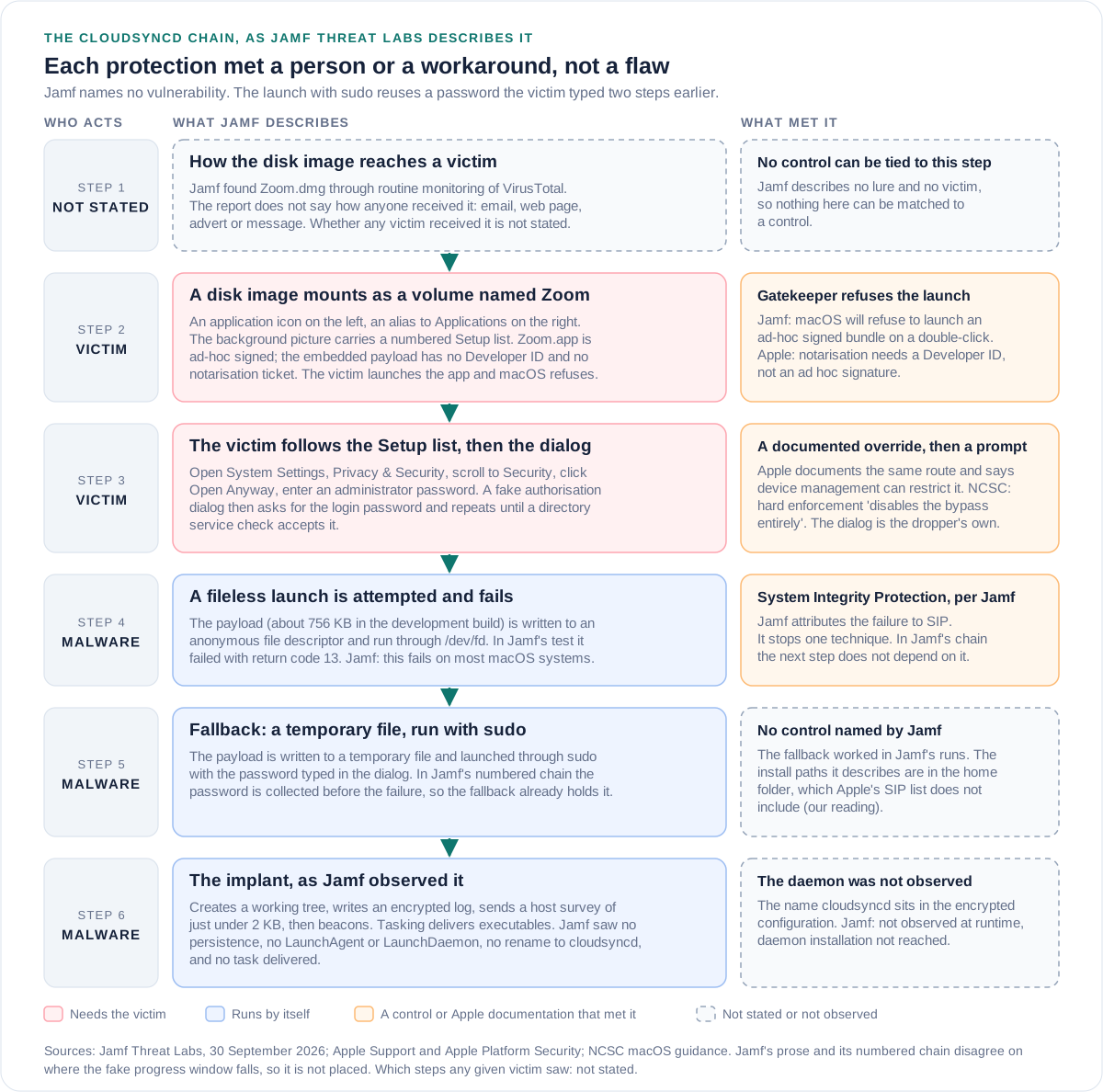
Two points on order. First, in Jamf's chain the password is collected at steps 3 and 4, the fileless launch fails at step 7 and the sudo launch is step 8. The fallback is therefore not the malware's answer to being blocked. It reuses a password the dropper already holds. Second, Jamf's prose says the "Downloading Zoom..." window appears once the password has been validated, while its numbered chain puts that window at step 2, before the dialog. The diagram does not place it.
The dropper as analysed is also unfinished in places. A package download is attempted three times and fails, the download address is empty in the builds Jamf holds, and the bundle swap that would open a real-looking app never ran in any detonation. What a victim would see after typing the password is not stated. In Jamf's runs it was a progress window advancing on its own with no download behind it.
Zoom, cloudsyncd and 'allow this' are labels, not controls
Five labels in this story do a job that has nothing to do with what they name. The point of each is to make the next click feel routine.
Each label against what Jamf's report and Zoom's own support pages show
- The label
- A disk image and an app called Zoom
- What it suggests
- The vendor's installer
- What the record shows
- Zoom's support pages name a package file, zoomusInstallerFull.pkg, from its Download Center. This is Zoom.dmg holding an ad-hoc signed app
- The label
- A daemon called cloudsyncd
- What it suggests
- A background sync service
- What the record shows
- A name in encrypted configuration, beside a process disguise field holding the same name. Jamf did not see it run as a daemon
- The label
- 'Enter your password to allow this'
- What it suggests
- An operating system authorisation
- What the record shows
- A dialog drawn by a class inside the dropper. Jamf: the password is checked with a directory service utility, then used with sudo
- The label
- 'Downloading Zoom...'
- What it suggests
- A download in progress
- What the record shows
- A window that advances on its own with no download behind it. The package download Jamf saw fails three times
- The label
- A jQuery path on a domain from 2011
- What it suggests
- Ordinary web script from an established site
- What the record shows
- A beacon address built to look like a script fetch. Both domains were registered in 2011 and sit behind Cloudflare. Jamf does not say who controls them or since when
| The label | What it suggests | What the record shows |
|---|---|---|
| A disk image and an app called Zoom | The vendor's installer | Zoom's support pages name a package file, zoomusInstallerFull.pkg, from its Download Center. This is Zoom.dmg holding an ad-hoc signed app |
| A daemon called cloudsyncd | A background sync service | A name in encrypted configuration, beside a process disguise field holding the same name. Jamf did not see it run as a daemon |
| 'Enter your password to allow this' | An operating system authorisation | A dialog drawn by a class inside the dropper. Jamf: the password is checked with a directory service utility, then used with sudo |
| 'Downloading Zoom...' | A download in progress | A window that advances on its own with no download behind it. The package download Jamf saw fails three times |
| A jQuery path on a domain from 2011 | Ordinary web script from an established site | A beacon address built to look like a script fetch. Both domains were registered in 2011 and sit behind Cloudflare. Jamf does not say who controls them or since when |
A password prompt is not strange in a genuine Zoom install, which is what makes it useful to an attacker. Zoom's macOS installation article, updated 28 March 2025, says that if you choose to install for all users of the computer you enter the administrator credentials for the device. It does not mention Open Anyway: it tells users to set Allow applications from to App Store and known developers. Apple's page on being asked for an administrator password carries one useful instruction: "Be sure you know which app is requesting this information." The dialog text Jamf quotes, "Enter your password to allow this", names no app at all.
What Apple's controls did, and what they were never meant to do
Gatekeeper and notarisation. Apple's Platform Security guide says Gatekeeper checks that downloaded software is from an identified developer, is notarised and has not been altered, and asks for approval before first opening. It adds that users can override Gatekeeper policies to open any software "unless restricted by a device management service". Apple's support page documents the override: open System Settings, click Privacy & Security, scroll down and click Open Anyway, then confirm. That is the same route as the Setup list Jamf describes on the disk image. The lure does not defeat the control. It reads the control's own instructions aloud to the victim.
Notarisation does not help once the override is taken. Apple's developer documentation says notarisation needs a Developer ID signature and tells developers not to use an ad hoc certificate, so a bundle signed ad hoc, as Jamf says this one is, could not carry a ticket as built. That makes the override the single point the whole chain depends on, and it is the one point a managed Mac can restrict. That last step is our inference: Jamf did not test a managed Mac.
System Integrity Protection. Apple says SIP restricts the root account on protected parts of the system: /System, /usr, /bin, /sbin, /var and apps pre-installed with macOS, while third-party installers can still write to /Applications, /Library and /usr/local. It applies to every process "regardless of whether that process is running sandboxed or with administrative privileges". Jamf attributes the failure of the dropper's fileless launch to SIP and says it fails on most Macs. The dropper then wrote a temporary file and ran it with sudo. That fallback worked in Jamf's runs, and the install paths Jamf describes are in the user's home folder, which Apple's list does not include. That reading is ours.
What a sudo prompt can do. Apple's SIP page describes the position before SIP in these words: "Software obtained root-level access when you entered your administrator name and password to install the software." SIP narrowed what root may modify. That it did not change what a typed password buys outside the protected parts is our reading of Apple's two pages, not a sentence in them.
So which control failed? None malfunctioned. The layer that carried the weight was the person at the prompt, and a prompt is a control only if the person can tell who is asking and the system lets them say no for good. Apple's design leaves the final say with the user unless a management service takes it away. That default is Apple's choice for consumers. For a business Mac it is a decision somebody should make deliberately.
The UK angle: no UK victim named, and controls UK organisations already cite
No source we read names a UK victim, sector or organisation. The UK material here concerns controls. One caution about the starting point: we assume, with no figure behind it, that many small UK organisations run a handful of Macs with little or no device management. If that is not your estate, the checklist still applies, but the case for it is weaker.
Cyber Essentials Requirements for IT Infrastructure v3.3, April 2026, asks for malware protection on every device in scope, using at least one of two options for a Mac: anti-malware software, or application allow listing, where "users must not be able to install any application that is unsigned or has an invalid signature". It also requires organisations to "use separate accounts to perform administrative activities only". The anti-malware wording does not mention Gatekeeper, so a certificate does not by itself tell you that Open Anyway is unavailable on your Macs.
The NCSC's macOS device security guidance, last reviewed on 13 May 2025, lists enforcing Gatekeeper among the essential profiles. It describes soft enforcement, where users "can bypass restrictions by right-clicking and manually approving the app", and hard enforcement, which "disables the bypass entirely", and says the long-term goal should be hard enforcement. It says it was last tested on macOS 14.6 and 15.5 in June 2025, and Apple's current support page describes Open Anyway in System Settings rather than a right-click. Test your hard-enforcement profile on your own macOS versions and confirm the Open Anyway button is not offered. The guidance's route to managed Macs is Automated Device Enrolment through Apple Business Manager and an MDM, so a new Mac arrives with its controls already on.
Earlier briefings on this site share one thread with this story, which is that a person is made the executor. Microsoft's MSP360 and ScreenConnect campaign used Zoom and Google Meet installation prompts among its lures, on Windows, through a genuine signed installer, and nothing connects it to CloudSyncD. Jamf's PamStealer also validated a typed password, through the PAM interface, and Jamf does not link it to CloudSyncD either. The ClickFix briefings, on a placeholder domain and on custom GPTs, show the same shape: the page does not run the code, the visitor does.
What Jamf gives you to hunt with
These are Jamf's artefacts, restated at the level a defender needs, with domains defanged. Jamf says every build shares the same install paths, daemon name and process disguise and that only the endpoint changes, so the on-host items should outlast the domains. Hashes are in Jamf's indicator list.
Hunting artefacts from Jamf's indicator list, with our cautions marked as ours
- Artefact
- Domains and path
- Where or in what form
- orchid-led[.]com and bjzhishang[.]com, path /macos/jquery.js
- Jamf's note, or ours
- Identical path on both, made to look like a script fetch. Expect new domains: only the endpoint changes
- Artefact
- Install folder and log
- Where or in what form
- A folder named cloudsync under the hidden .local/share folder in the user's home, with a log under .config/logs
- Jamf's note, or ours
- Jamf's highest-value triage artefact: the log yields the C2 address, the hardware UUID and the beacon history
- Artefact
- Decoy settings file
- Where or in what form
- A data.json under a hidden .config folder named for the build, zoom or cloudsync
- Jamf's note, or ours
- Hunt for the zero-width characters U+200B and U+200C inside JSON string values. It holds the typed password in recoverable form
- Artefact
- Command-line telemetry
- Where or in what form
- A process-execution event for a directory service check with the password in an argument
- Jamf's note, or ours
- Jamf: the highest-fidelity anchor. Ours: it also means your logs hold the password
- Artefact
- Privileged launch
- Where or in what form
- sudo run on a dot-prefixed temporary file whose name starts .s_
- Jamf's note, or ours
- Jamf: visible in the sudo command line, so hunt on the prefix
- Artefact
- Transient script
- Where or in what form
- A temporary script whose name starts .app_swap_
- Jamf's note, or ours
- Deletes itself, so unlikely to survive on a live host
- Artefact
- Tasked payloads
- Where or in what form
- A newly written or fileless Mach-O after a beacon, a temporary folder starting .op, and the provenance attribute stripped from a file before launch
- Jamf's note, or ours
- Jamf: tasking delivers executables, not shell commands, so look for new binaries rather than odd shell activity
- Artefact
- Not found by Jamf
- Where or in what form
- No LaunchAgent, no LaunchDaemon, no rename to cloudsyncd
- Jamf's note, or ours
- Absence in a sandbox is not absence on a victim, so still alert on new launch items
| Artefact | Where or in what form | Jamf's note, or ours |
|---|---|---|
| Domains and path | orchid-led[.]com and bjzhishang[.]com, path /macos/jquery.js | Identical path on both, made to look like a script fetch. Expect new domains: only the endpoint changes |
| Install folder and log | A folder named cloudsync under the hidden .local/share folder in the user's home, with a log under .config/logs | Jamf's highest-value triage artefact: the log yields the C2 address, the hardware UUID and the beacon history |
| Decoy settings file | A data.json under a hidden .config folder named for the build, zoom or cloudsync | Hunt for the zero-width characters U+200B and U+200C inside JSON string values. It holds the typed password in recoverable form |
| Command-line telemetry | A process-execution event for a directory service check with the password in an argument | Jamf: the highest-fidelity anchor. Ours: it also means your logs hold the password |
| Privileged launch | sudo run on a dot-prefixed temporary file whose name starts .s_ | Jamf: visible in the sudo command line, so hunt on the prefix |
| Transient script | A temporary script whose name starts .app_swap_ | Deletes itself, so unlikely to survive on a live host |
| Tasked payloads | A newly written or fileless Mach-O after a beacon, a temporary folder starting .op, and the provenance attribute stripped from a file before launch | Jamf: tasking delivers executables, not shell commands, so look for new binaries rather than odd shell activity |
| Not found by Jamf | No LaunchAgent, no LaunchDaemon, no rename to cloudsyncd | Absence in a sandbox is not absence on a victim, so still alert on new launch items |
Jamf's own recommendation is to set Jamf for Mac threat prevention, advanced threat controls and web protection to Block and Report. That is a product claim with no efficacy figure attached, and we did not test it.
What to do, in the order worth doing it
Cheapest and most revealing first. Nothing here needs a sample, and none of it assumes you have a Mac fleet team.
Take this with you
Checklist for UK organisations that run Macs
- Hunt back to 15 September 2026, the date of Jamf's first sighting, for the artefacts in the table above: the two domains, the cloudsync folder under the home directory, and settings files with zero-width characters. Assume more domains than the two Jamf lists.
- Say in writing where Zoom comes from: the vendor's Download Center or your managed software catalogue. Zoom's own pages name a package file from its Download Center, and a disk image sent to a person is not that route.
- On managed Macs, set the Gatekeeper restriction that stops users overriding it, then test on one Mac per macOS version in use whether the Open Anyway button is still offered. Apple's setting is described in terms of Control-click, and the NCSC calls the hard setting the one that disables the bypass entirely.
- Move everyday users to standard accounts and keep a separate managed administrator account, as Apple's deployment guide and Cyber Essentials describe. A standard user has no administrator password to type. Jamf does not say how the chain behaves for a standard account, so test it before relying on it.
- Where Macs are unmanaged, enrol them. Buy through an Apple authorised channel and use Automated Device Enrolment with an MDM, as the NCSC describes, so the restrictions above exist to be set.
- Alert on new LaunchAgents and LaunchDaemons, on disk images mounted from Downloads whose app is not signed by a developer you recognise, and on executables written under a user's home folder and run with sudo. Jamf saw no launch item in its runs, so do not rely on that alert alone.
- Treat process-execution logs from Macs as sensitive. If this chain ran, Jamf says the typed password appears in a command line, so the log holds it.
- Give staff one line: no instruction on a picture inside a disk image is ever a reason to open System Settings and override a block. Ask them to report the image, not delete it.
What we could not verify
The question this leaves
Jamf's own conclusion is that the attack still leans on "the oldest technique available": asking the user for their password. Nothing in the report suggests a clever flaw is needed, and nothing suggests the protections in macOS failed to work as Apple documents them.
So ask it of your own Macs. If a person on one of them did exactly what a picture on a disk image told them to do tonight, which setting, which log or which colleague would stop it, or even notice?
Key facts
Sources
- PrimaryCloudSyncD report of 30 September 2026, read in full including the indicator list; the source for the chain, the dates, the sizes and what was not observedJamf Threat Labsaccessed 2026-10-04
- PrimaryPlatform Security guide, Gatekeeper and runtime protection in macOS; used for what Gatekeeper checks and that users can override it unless device management restricts itAppleaccessed 2026-10-04
- PrimaryOpen apps safely on your Mac; used for the documented Open Anyway override stepsAppleaccessed 2026-10-04
- PrimaryAbout System Integrity Protection on your Mac; used for the protected paths, the writable paths and the wording on root-level accessAppleaccessed 2026-10-04
- PrimaryPlatform Security guide, System Integrity Protection; used for SIP applying to every process regardless of privilegeAppleaccessed 2026-10-04
- PrimaryNotarizing macOS software before distribution; used for the Developer ID requirement and the instruction not to use an ad hoc certificateAppleaccessed 2026-10-04
- PrimaryPlatform Deployment guide, Security payload settings; used for the Gatekeeper override restriction in device managementAppleaccessed 2026-10-04
- PrimaryPlatform Deployment guide, Set up local macOS accounts; used for standard accounts with a separate managed administratorAppleaccessed 2026-10-04
- PrimaryMac User Guide, If you are asked for an administrator name and password; used for the advice to know which app is askingAppleaccessed 2026-10-04
- PrimaryInstalling the Zoom desktop app on macOS, updated 28 March 2025; used for the package file name and the optional administrator credentials stepZoomaccessed 2026-10-04
- PrimaryDownloading the Zoom Workplace desktop or mobile app, updated 28 September 2026; used for the Download Center route and the package installerZoomaccessed 2026-10-04
- PrimaryZoom Download Center; the official download page the support articles point toZoomaccessed 2026-10-04
- PrimaryDevice security guidance, macOS, reviewed 13 May 2025; used for Gatekeeper soft and hard enforcement and MDM enrolmentNCSCaccessed 2026-10-04
- PrimaryDevice security guidance, Erasing devices; used for the point that scanning or deleting an app may not remove an infectionNCSCaccessed 2026-10-04
- PrimaryCyber Essentials Requirements for IT Infrastructure v3.3, April 2026; used for the malware protection options and separate administrator accountsNCSCaccessed 2026-10-04
- Reported byNews coverage of 2 October 2026; the pointer to the Jamf report, and where its framing goes beyond itSecurityWeekaccessed 2026-10-04
- Reported byNews coverage of 30 September 2026; used to confirm the date of the first coverageMacTechaccessed 2026-10-04
- Reported byNews coverage of 1 October 2026; used to cross-check the dates and the persistence statementHackreadaccessed 2026-10-04