A genuine, signed MSP360 installer, disguised as invites and updates, installed a second remote tool
Microsoft says a genuine, digitally signed MSP360 installer, run under lure names such as meeting invitations and PDF updates, put a remote management agent on devices, and that agent then installed ConnectWise ScreenConnect. The signature was true, but signed is not the same as approved.
By Parminder Kumar Sharma · · 20 min read
Five filenames, one installer, and 60 to 90 days
Microsoft's post of 29 September 2026, Phishing Abuses RMM Tools for Persistent Access, lists five example filenames: a VIP e-card invitation, a Zoom setup, a PDF reader and editor, an RSVP invitation and a statement that begins SSA.GOV. All five carry the same version string, v2.5.0.67, and Microsoft says many of the downloads it analysed contained "the same MSP360 RMM installer package". That package is not malware in any ordinary sense. Microsoft calls it legitimate, digitally signed remote management software, and it went on to install a second legitimate product, ConnectWise ScreenConnect.
Microsoft says its Defender Experts saw the campaigns in July 2026, and its post is dated 29 September. That is between 60 and 90 days, depending on which day in July you pick: 29 September minus 31 July is 60 days, and minus 1 July is 90 (our arithmetic). The text of the post gives no day.
Here is what that does not establish. The post does not say how many organisations or devices were affected, in which countries, or which of its "multiple industries" were hit. It names no threat actor and tracks the campaigns as unattributed activity. It does not say what the actor did after the credential-access stage, and the word ransomware appears in it once, inside the name of a mitigation rule. It names no country, so the United Kingdom is not mentioned. The UK material in this briefing concerns the controls UK organisations rely on, and it makes no claim about UK victims.
What the post does show is a chain in which every stage borrowed a name that controls are built to trust. The signer is the genuine vendor. The first tool is a product IT teams buy on purpose, and so is the second. The delivery used cloud hosts that most egress policies allow. That is the friendly-name fallacy applied to a whole intrusion: a comforting label is not a control, and "signed by the real vendor" does not mean "approved by you".
What Microsoft put on the record
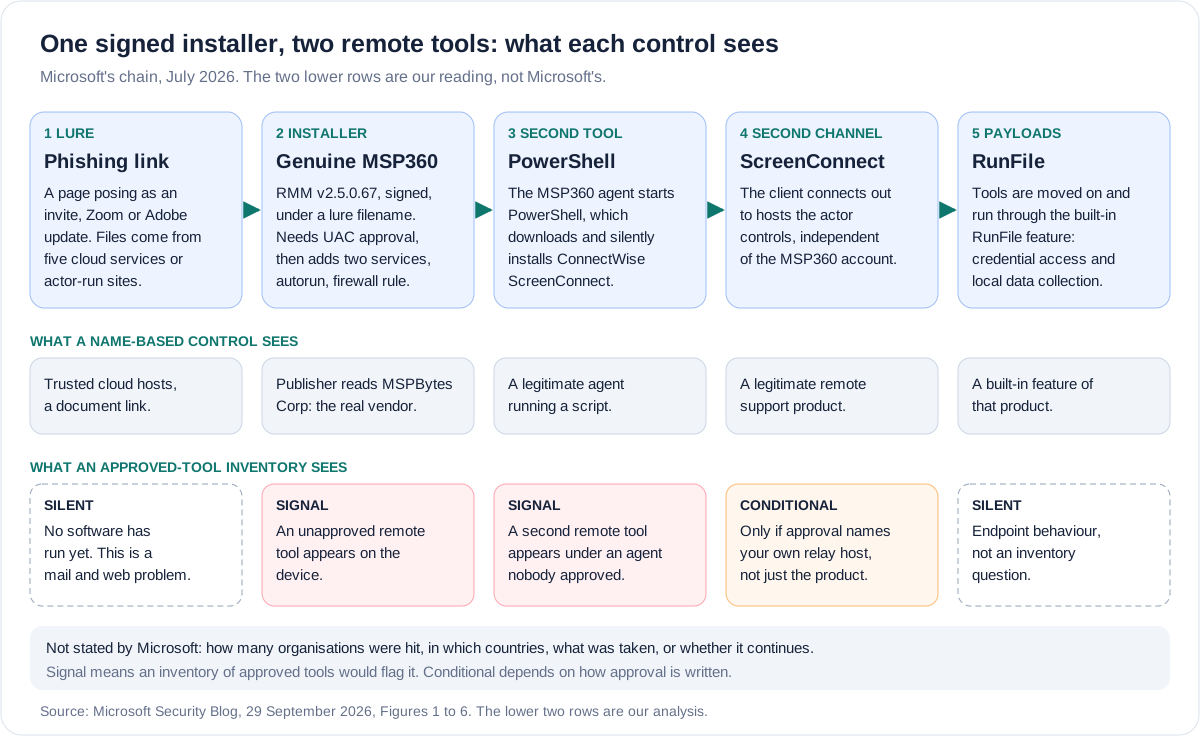
Microsoft describes the delivery in this order. Phishing emails led to actor-controlled landing pages that imitated document-sharing portals, invitation workflows, Adobe Reader and Zoom download pages and business collaboration platforms. The downloads came from actor infrastructure, from websites Microsoft assessed to be compromised, and from five legitimate cloud services: Amazon S3, Cloudflare R2, Dropbox, GitLab and Supabase. Microsoft lists seven lure themes: workplace meeting requests, Zoom and Google Meet installation prompts, Adobe Acrobat and PDF reader updates, RSVP invitations and e-cards, job offer documents, document review and signature requests, and DHL and package-delivery content. It says the actor could rotate delivery infrastructure quickly while serving the same installer under different names. Two of the lures carry US cues: a filename beginning SSA.GOV and, in Figure 2, a landing page imitating a tax document headed Form W-2. That is a read of the lure, not of the victims, and the other themes are generic. Figure 2 also shows the browser's own download warning, with a Keep button beside it.
The installer needed User Account Control elevation. Where the user approved it, the installer registered two Windows services named RMM.Agent.exe and RMM.Agent.Launcher.exe, created autorun registry entries for the tray components, and added an inbound firewall allow rule for the agent on UDP port 48678. Where elevation was refused or aborted, Microsoft says deployment stopped, with no evidence of services or persistence. It does not say how often each outcome occurred. A timestamp in Figure 4, a renamed install log ending 20260706160101, reads as 6 July 2026 at 16:01:01, which would be 85 days before publication. Microsoft does not caption it as a date, so we treat it as a hint and not a finding.
With the agent running, Microsoft says the MSP360 service launched PowerShell, which downloaded a ScreenConnect installer package from actor infrastructure and installed it silently. The ScreenConnect client then connected out to actor-controlled infrastructure, and the actor used ScreenConnect's RunFile feature to move tools onto the machine and run them. Microsoft lists 24 file names it frequently observed, several named to look like Windows, Defender or Phone Link components, and says several of the tools are commonly associated with credential access, information collection and reducing defender visibility. Its detection for the final stage is called "Possible theft of passwords and other sensitive web browser information". The post does not say what was taken.
Microsoft's 29 September 2026 post: what it states and what it leaves out. Source: Microsoft Security Blog, read in full including its figures.
| Question | Stated | Not stated |
|---|---|---|
| When | July 2026, seen by Microsoft Defender Experts; post dated 29 September | The day or week; whether the campaign continues |
| Who | Unattributed activity, no actor name | Any motive, or whether the separate Faronics activity is the same operator |
| Where and whom | Organisations "across multiple industries" | Any country, the UK included; any named industry; any count of organisations or devices |
| Delivery | Phishing links, landing pages, five named cloud services and actor sites | Email volume, senders, how targets were chosen |
| The installer | Genuine, signed MSP360 RMM v2.5.0.67; one hash; signing certificate since revoked | Whose certificate it was, who revoked it, and when |
| The account | The remote administration software was "legitimately obtained"; no ScreenConnect exploitation | Which MSP360 account or edition was used, or whether any account was compromised rather than created |
| The outcome | Information collection and credential-access operations | What was taken; any fraud, extortion or ransomware; any victim impact |
| Vendor action | No action by either vendor is mentioned | Whether MSP360 or ConnectWise acted (MSP360 says elsewhere that it did) |
Why a second remote tool
Microsoft's stated reason is redundancy. ScreenConnect created a "secondary remote-access channel", independent of MSP360, and the payloads then ran through ScreenConnect. Microsoft also describes separate July activity in which FaronicsDeployAgent.exe, a legitimate deployment and remote access application, played the MSP360 role and then downloaded and installed ScreenConnect. (Faronics sells Deploy as a cloud console for managing applications, updates and operating systems, with built-in remote control.) Microsoft reads that as showing the ScreenConnect step "was not limited to MSP360-based intrusions". So the first tool is replaceable and the second is the constant. The post calls the Faronics activity separate and does not say whether the same operator was behind both.
The pattern is not new on this site. Microsoft's 24 September Storm-2570 post had Atera downloading and installing Splashtop, and our briefing on it recorded six remote management tools used across one affiliate's intrusions. The fake payroll apps ended in ScreenConnect configured for unattended access. This campaign is unattributed, so no link to Storm-2570 is claimed.
Why the actor wanted two is not stated, and what follows is our inference. MSP360 says that blocking an account stops sign-in and management through its platform, and in the same passage warns that this is not confirmation that a device is free of "other unauthorized software". As we read Microsoft's Figure 6, the ScreenConnect client reaches a domain that is also in Microsoft's indicator list, on TCP port 8041. ConnectWise's documentation gives 8041 as the default relay port for on-premises ScreenConnect and 443 for its cloud service. That is consistent with a ScreenConnect server the actor ran itself, which a block at MSP360 cannot reach. Microsoft does not say so, and the post cannot tell us whether the actor chose the second tool for that reason, for its RunFile feature, or for both.
One thing this chain does not involve is a ScreenConnect vulnerability. Microsoft says it did not observe exploitation of ScreenConnect itself. CISA's Known Exploited Vulnerabilities catalogue, version 2026.09.30, holds four ConnectWise ScreenConnect entries, the newest added on 11 September 2026, and on Microsoft's account none is part of this chain. Patching a ScreenConnect server you run does nothing about a ScreenConnect server the actor runs.
MSP360 is a real product, and its vendor has answered
MSP360 describes its RMM product as an "all-in-one solution for MSPs and IT teams" to monitor and manage Windows, macOS and Linux endpoints. It is priced at $1.75 per endpoint per month, and the same page offers a Community Edition that is free for up to 50 endpoints, with the words "No contract or card required". The company behind it is MSPBytes, Corp., trading as MSP360, according to the terms on its own site. That name matters in the next section.
Microsoft's post records no action by MSP360, but MSP360 has published two accounts of its own. The first is a post about a code-signing certificate, dated 14 August and updated 22 September. It says attackers "renamed and rebranded the installer" over recent months, that its software then appeared in incident reports and was flagged by antivirus products because its certificate had been revoked, and that it had blocked "close to 2000 fraudulent accounts". It dates its own steps: a daily security review of suspicious accounts from 12 May 2026, protection against automated registration from 19 May, and mandatory business verification from 4 August before new accounts can customise installer branding or perform remote-management operations in RMM. It says it has obtained a new certificate after a full review by the certificate authority.
The second is a response to Microsoft's research, published on 30 September, the day after Microsoft's post. It says the vendor investigated, blocked accounts involved and strengthened verification and monitoring, and it reads Microsoft's findings as abuse of legitimate remote-management capabilities rather than exploitation of an identified vulnerability in MSP360 software. That last point is MSP360's reading. It is not a sentence in Microsoft's post.
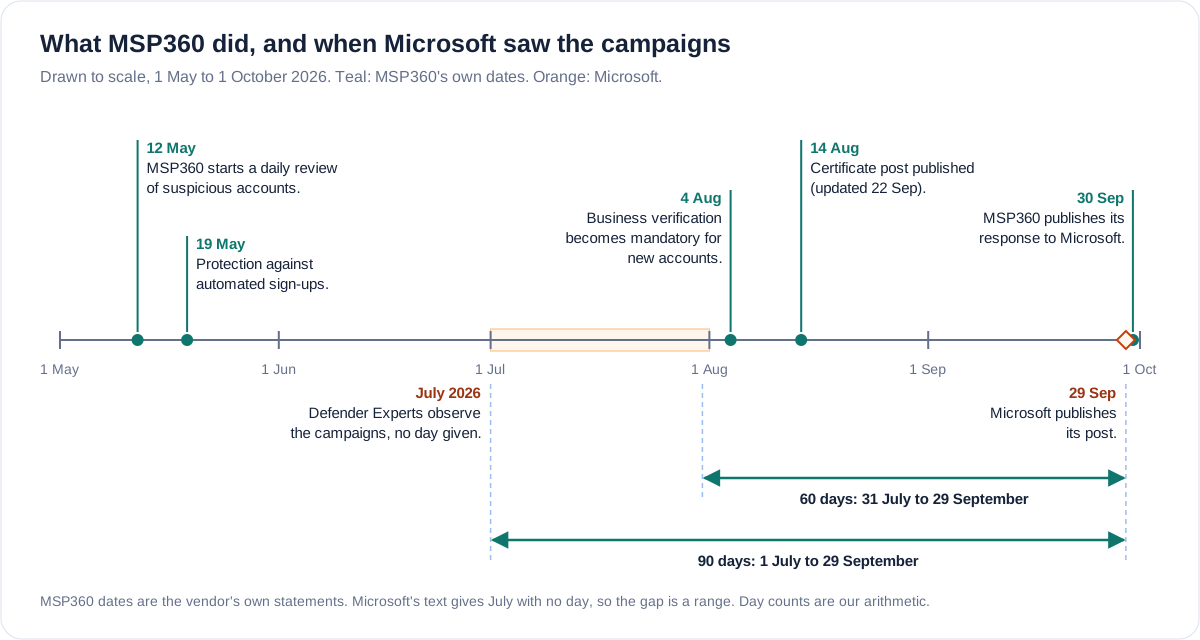
What the dates support, and what they do not. MSP360's steps of 12 May and 19 May came before Microsoft's July sightings, and business verification on 4 August came 4 days after the end of July and 34 days after its start (our arithmetic), so the campaigns Microsoft saw were seen before that verification was mandatory. The vendor's phrase "over recent months" and its May review suggest abuse that began before July, which would make Microsoft's July window one slice rather than the whole. That is inference. Neither document says when the abuse began.
The figure of close to 2000 counts accounts, not victims, and it is self-reported. It does not appear in Microsoft's post, and neither document ties the blocked accounts to the cases Microsoft saw. On the question Microsoft leaves open, whether the MSP360 account used was legitimate or compromised, the vendor's word is "fraudulent", which points to accounts created for abuse rather than customer accounts taken over. That describes the accounts MSP360 blocked, not Microsoft's particular cases. The vendor's own pages show the other side of it: a free edition with no card, and a verified-account requirement that its Code of Conduct post already described on 23 June without saying what the verification involved. Business verification, the stricter step, followed on 4 August.
A signature says who made it, not whether you approved it
Microsoft's Figure 3 shows the Windows security prompt for one of the downloaded files. The Publisher line reads MSPBytes Corp, the name of the company that trades as MSP360. The filename the user ran was a lure name. The prompt told the user something true that was no use to them. MSP360's own advice to end users is to check the file's digital signature and "confirm the publisher matches the software vendor you intended". That works for a person who knows that a Zoom installer should not be signed by a backup and RMM company. It cannot be the control, because it depends on every recipient knowing every publisher.
The detection record shows the same gap. Microsoft lists six detections: one Defender Antivirus signature, SupportScam:Win32/RogueMSP.MU!MTB, for delivery of the masqueraded v2.5.0.67 installer, and five Defender for Endpoint behaviour alerts, among them "Suspicious usage of remote management software" and "Uncommon remote access software". Only the signature is specific to this installer. The post does not say when it shipped, and MSP360 says antivirus products began flagging its software after it appeared in incident reports, attributing the current flags to the revoked certificate. CISA wrote in 2023, about ScreenConnect and AnyDesk used in a refund scam, that RMM use "generally does not trigger antivirus or antimalware defenses". Nearly four years on, the publisher line in Microsoft's screenshot was accurate. Accuracy was not the missing ingredient; approval was.
For UK readers the nearest control is in the Cyber Essentials requirements. Version 3.3, dated April 2026, asks that every in-scope device uses at least one of the options it lists, which are anti-malware software and application allow listing, where only approved applications, "restricted by code signing", may execute. Neither option mentions remote management tools. The term RMM does not appear in the document, and remote administration appears only in its scope rules for externally managed services. A device certified by the first option has no list of approved applications to compare anything against. A device on the second is protected only if approved means approved by name, publisher and instance, and not signed by anybody. That is a reading of the scheme's floor, not a criticism of it, and nothing in Microsoft's post says any Cyber Essentials organisation was affected.
What an inventory and default-deny list of approved remote tools would and would not catch in this chain. Source: our reading of the stages in Microsoft's post.
| Stage | Caught? | Why |
|---|---|---|
| Lure email and landing page | No | An inventory sees software, not mail. This is email filtering and training. |
| Signed MSP360 installer runs | Yes, if MSP360 is not approved | Default deny blocks it whoever signed it. It fails if you run MSP360 and approve by publisher alone. |
| Agent starts PowerShell and installs ScreenConnect | Yes, as an alert | A second remote tool appears under an agent nobody approved. |
| ScreenConnect client connects out | Only if approval names your relay | Approval by product name passes an actor's ScreenConnect. Approval by your own relay hostname does not. |
| RunFile payloads run | No | This is endpoint behaviour, covered by the credential-access detections, not by an inventory. |
Default deny beats deny by signer, for a practical reason. Blocking the publisher certificate, which Microsoft lists and which is a reasonable containment step, blocks everything that signer ships, and a rule for MSPBytes Corp may also catch MSP360's other products, such as Backup, which MSP360 says was hit by the same certificate problem. The certificate on the sample has also since been revoked, so a rule keyed to that one certificate says nothing about installers signed with the replacement. A list of what you approve does not need to know who the next signer is.
The hunting window is shorter than the campaign
Microsoft publishes four advanced hunting queries. One finds the installer by its hash. One finds the MSP360 agent launching PowerShell that then installs an MSI package. One finds ScreenConnect clients connecting to hosts that PowerShell session contacted. One finds files launched through ScreenConnect's RunFile feature from its temporary folders. Every one looks back 30 days. Microsoft Learn says advanced hunting covers "up to 30 days" of raw Defender XDR data, extendable with a Microsoft Sentinel workspace or by streaming the data out.
Thirty days before today, 1 October, is 1 September. Microsoft's July sightings are 62 to 92 days before today. Run as written, the queries can find activity that is still going on. They cannot find July.
To look at July you need retention beyond 30 days: a SIEM, proxy and DNS logs, email gateway logs. The endpoints keep their own evidence too. Microsoft says the installer recorded events under the event source "MSP360 RMM Agent installer", its Figure 4 shows them going to the Windows Application log, and a successful install leaves a program folder, two services, autorun entries and a firewall rule. A device that has those and no approved MSP360 deployment is the finding.
Microsoft's indicator list has 30 file hashes (the installer, four agent service files and 25 tools) and seven domains that ScreenConnect clients contacted. We have not reproduced the domains. Three are .cfd names and four are hostnames beneath other registered domains whose owners Microsoft does not describe, so block the entries exactly as listed, not their parent domains, and take them from Microsoft's table, which is the copy that will be corrected.
What the post does not establish
Claims a reader might draw from the coverage of this campaign, and whether the sources support them. Sources: Microsoft Security Blog, MSP360 posts, as read for this briefing.
| Claim | Established? | Why |
|---|---|---|
| UK organisations were targeted | No | No country is named in Microsoft's post |
| Ransomware or fraud followed | No | The post stops at credential access and collection; ransomware appears once, in a rule name |
| MSP360's software was vulnerable or compromised | No | Abuse of legitimate features; the no-vulnerability reading is MSP360's |
| ScreenConnect was exploited | No | Microsoft says it did not observe exploitation of ScreenConnect itself |
| Blocking the MSP360 account ends the intrusion | No | In the chain described, ScreenConnect remains after the MSP360 agent is cut off; MSP360 warns that blocking is not proof of a clean device |
| MFA on your approved RMM console would have stopped this | No | The agent arrived as a download, not through an approved console; MSP360 makes the same point |
| The campaign is over | Not stated | The post gives only July; MSP360 says abuse ran over recent months |
| Close to 2000 accounts means close to 2000 victims | No | It is MSP360's count of blocked accounts, not a count of victims |
The MFA row deserves a sentence. Microsoft's first mitigation is to enforce multi-factor authentication on approved RMM systems. That is good hygiene and it protects your own consoles. In this chain the agent arrived as a phishing download, not through any console your organisation approved. Whether the MSP360 account behind the installer was the actor's own or someone else's is not stated, and the vendor's word "fraudulent" points to the former. Either way, MFA on your own consoles does not stop an agent that arrives as a download. MSP360 draws the same distinction, saying that protecting your own console accounts does not by itself stop someone introducing a separate attacker-controlled installation.
Method and interest
Both vendors have something to sell. Microsoft's mitigation list leans on its own features: the block certificate action in Defender for Endpoint, an attack surface reduction rule, cloud-delivered protection and Defender detections, and its queries are written for Defender tables. One listed rule, blocking process creation from PsExec and WMI, matches nothing in the chain the post describes, since PsExec appears only in that bullet. That does not make the advice wrong. It means the controls should be read as categories to ask of whatever stack you run: application control, publisher or certificate blocking, and behavioural alerting on remote tools.
MSP360 sells RMM, and its posts present the company as the responsible vendor, promote its trust centre, and in its Code of Conduct post cite a Huntress statistic. Huntress's own release says RMM abuse rose 277 per cent year on year in 2025 and made up 24 per cent of the incidents it observed. Huntress sells managed security, and the figure is context, not a measure of this campaign. MSP360's account counts and dates are its own and we could not check them independently. The attribution gap cuts the other way: nobody is named, so nothing here accuses a person or a group.
What to do, in the order worth doing it
Take this with you
Checks for UK IT teams, in order
- Write down which remote management and remote support tools are approved in your estate, including the ones your managed service provider uses. For each, record the signer, the account or tenant, and the relay or console hostname, not only the product name.
- Inventory what is actually installed and running: remote management agents, services, autorun entries and the publishers behind them, on every endpoint. Any agent you did not approve is an incident until shown otherwise, whether it is MSP360, ScreenConnect, Faronics Deploy or anything else.
- Enforce default deny for remote management tools with application control, using App Control for Windows, AppLocker or your endpoint product's equivalent, approving by publisher plus file or instance. Run it in audit mode first, and do not block a publisher wholesale if you run other products from the same signer.
- Alert on new remote tool installs: a new service, autorun entry or inbound firewall rule for a remote management agent, an install launched from a Downloads folder, and any second remote tool arriving on a device that already has one. Alert on the behaviour of an agent launching PowerShell to install software, not on the product name, because Microsoft saw the same chain start from Faronics.
- Check ScreenConnect relay hostnames. Any ScreenConnect client should reach your own instance and nothing else. Alert on clients that connect anywhere else, review outbound traffic on TCP 8041 if you do not run an on-premises ScreenConnect server, and load the seven domains and hostnames from Microsoft's indicator table into DNS and proxy blocking.
- Restrict software install rights. Use standard accounts for daily work and separate administrator accounts, as Cyber Essentials v3.3 requires, with no standing local administrator rights. Microsoft says the install stopped where elevation was refused.
- Hunt back further than 30 days. Search SIEM, proxy, DNS and email logs from at least 1 July, and check endpoints for the Application log source, program folder, services, autorun entries and firewall rule Microsoft describes.
- If an unapproved install is found, reset the passwords of the accounts used to install it and investigate further if a system-level account was used, as Microsoft advises. Look for a second remote tool before closing the case, treat browser-saved credentials on the device as exposed, and report abuse of MSP360 software through its Trust and Safety Center.
- Train for the lure, not the tool: meeting invitations, PDF reader updates, Zoom and Google Meet install prompts, RSVP e-cards, job offers, signature requests and delivery notices. The rule is that nobody installs software from an emailed link, and an unexpected prompt to approve elevation goes to the service desk through a channel you already hold. A browser's Keep button is not an approval.
- Ask your managed service provider and your vendors which remote tools they use on your estate, under which account, and how you would tell their installation from an impostor's.
The question that exposes the gap
Ask your service desk this. If a validly signed installer from a real vendor you have never bought put a remote management service on a finance laptop tonight, and that service installed a second remote tool from another real vendor within minutes, which of your controls would treat either one as anything other than software, and which alert would put a human in front of it before the second tool connected out?
If the honest answer is that both were allowed because both were signed, then the signature was doing a job nobody gave it.
Key facts
Sources
- PrimaryPhishing Abuses RMM Tools for Persistent Access, 29 September 2026, read in full including Figures 1 to 6, the detection table, four hunting queries, the ATT&CK list and the indicator list; the source of the chain, the lures, the detections and the attribution statementMicrosoft Security Research and Microsoft Defender Expertsaccessed 2026-10-01
- PrimaryRMM Abuse: 5 Practical Lessons for MSPs from Microsoft's Research, 30 September 2026, the vendor's response to Microsoft's report; used for the vendor's account of blocked accounts, verification and the lessons it drawsMSP360accessed 2026-10-01
- PrimaryCode Signing Certificate Update: RMM and Connect, published 14 August and updated 22 September 2026; used for the revoked certificate, close to 2000 fraudulent accounts blocked and the dated safeguards of 12 May, 19 May and 4 AugustMSP360accessed 2026-10-01
- PrimaryMSP360 Trust and Safety Center, used for the vendor's stated abuse monitoring, its reporting channel and its advice to verify the digital signatureMSP360accessed 2026-10-01
- PrimaryMSP360 RMM product page, used for the vendor's description of the product, its price and the free Community EditionMSP360accessed 2026-10-01
- PrimaryRMM and Remote Desktop Vendors Need a Code of Conduct, 23 June 2026; used for the vendor's statement that console access requires a verified account, including for the free Community Edition, and for the Huntress statistic it citesMSP360accessed 2026-10-01
- PrimaryMSP360 Terms and Conditions, used to confirm that MSPBytes, Corp. trades as MSP360, the publisher name in Microsoft's Figure 3MSP360accessed 2026-10-01
- PrimaryProtecting Against Malicious Use of Remote Monitoring and Management Software, AA23-025A, last revised 26 January 2023; used for the statement that RMM use generally does not trigger antivirus defences and for the allow-listing adviceCISA, NSA and MS-ISACaccessed 2026-10-01
- PrimaryCyber Essentials: Requirements for IT Infrastructure v3.3, April 2026; used for the malware protection options, the application allow listing wording and the separate administrator accounts requirementNCSCaccessed 2026-10-01
- PrimaryRequired ports for ConnectWise ScreenConnect, used for the default relay ports: 443 for ScreenConnect Cloud and 8041 for on-premises installationsConnectWiseaccessed 2026-10-01
- PrimaryKnown Exploited Vulnerabilities catalogue, version 2026.09.30; used to count the ConnectWise ScreenConnect entries and the date of the newestCISAaccessed 2026-10-01
- PrimaryAdvanced hunting overview in Microsoft Defender XDR, updated 10 September 2026; used for the 30-day limit of raw data and the ways to extend itMicrosoftaccessed 2026-10-01
- PrimaryHuntress 2026 Cyber Threat Report press release, 17 February 2026; used for the 277 per cent and 24 per cent RMM abuse figures, a vendor statistic given as context onlyHuntressaccessed 2026-10-01
- PrimaryFaronics Deploy product page, used for the vendor's description of the product that Microsoft says played the MSP360 role in separate activityFaronicsaccessed 2026-10-01
- Reported byCoverage of Microsoft's post, 30 September 2026; used as a pointer to the primary source onlyThe Hacker Newsaccessed 2026-10-01