Calendar phishing arrives with zero clicks on Google Workspace's default; Sublime's 33,000% is a projection
Google Workspace's documented default adds every invitation to the calendar, and Outlook adds a tentative entry on receipt, so a calendar lure needs no click to arrive. Sublime's "exponential growth" has a number, and its 33,000% total is a projection that its own monthly figures do not reproduce.
By Parminder Kumar Sharma · · 21 min read
Zero actions to arrive, at least one to be harmed
A calendar phishing lure needs zero actions from its victim to reach the victim's calendar, if the calendar is on the setting its vendor documents as the default. Google Calendar Help says of the option From everyone that "All invitations are automatically added to your calendar". Google's Workspace Updates post of 20 July 2022 says the default option is to show invitations from everyone, and its post of 14 August 2026 says the new admin control starts at From everyone. Microsoft's Learn page, last updated on 30 January 2024, says that when an invitation arrives Outlook "automatically adds the meeting to your calendar as a tentative meeting". All three pages were read on 11 October 2026, and the count of zero actions to arrive is derived from them. The Guardian's column of 11 October 2026 reports the same behaviour from Sublime Security. This briefing checked it against Google's and Microsoft's own pages, because the column is a pointer and not a source.
The column also says Sublime has seen "exponential growth". The number behind that phrase exists, and it is Sublime's own. Its post of 17 September 2026 lists monthly increases of 282% for June, 338% for July and 1,216% for August, then 1,426% for the first half of September, and projects 2,852% for the whole month. Read as increases, those steps multiply to about 6,500 times from May to the projected September. The post prints about 33,000%, which is 331 times (derived; the working is in the section on the number, below). Whether that is a slip or a different method the post does not say. TechRadar's headline of 18 September states it in the past tense: calendar-based phishing "has jumped 33,000% since May" (only the headline was read).
What none of this establishes matters as much as the count. No source read counts the victims of calendar phishing, the entries delivered or the credentials lost. Sublime's own post says its example reached "an undisclosed number of targets". No case read says whether a click or a call followed. No source compares calendar lures with email lures for success: Sublime says the two-pronged approach more than doubles the chance of success, and in the same sentence says that the math gets fuzzy. And nobody read has measured whether tightening the settings breaks legitimate invitations at scale.
The control matters too. The one setting Google documents for this, Only if the sender is known, is not the Workspace default. Until 14 August 2026, which is 58 days before this briefing (derived), Google's own words were that "administrators can only choose the default value for new users"; the same release now lets an administrator cap what existing users may choose. For Microsoft 365 user mailboxes, no tenant setting that stops the entry was found in the pages read.
Why the mail filter misses it: the entry is made separately from the email
An invitation is an email with a calendar part, or a calendar message that reaches the calendar by another route. The standard for the calendar protocol, RFC 5546, named the risk in December 2009: implementations could automatically incorporate requests into a calendar, which "presents the opportunity for a calendar to be flooded with requests". It saw flooding, not phishing, and the feature is the same seventeen years on. The standard's email binding, RFC 6047, says authentication is done by S/MIME signing and that unsigned messages "may not be trusted". Neither document mentions SPF, DKIM or DMARC (counted), so a calendar that wanted the sender's authentication result would have to take it from the mail system, and no page read says Google's or Microsoft's does.
The mail filter judges the email. The calendar acts on the invitation. Sublime says calendar entries are still created when a secure email gateway blocks the message or a filter sends it to junk. Microsoft says the same of Outlook: even after the email is removed, Outlook "automatically creates a calendar entry during delivery", and the entry stays active. Microsoft's fix is a Defender change announced on 11 September 2025, 395 days before this briefing (derived): Hard Delete now removes the entry with the email. Entries a user added by hand from an .ics attachment are not removed, and an entry can come back if the sender resends the invitation. The column says it does not matter if the email lands in spam. Sublime's account and Microsoft's description support that for entries created at delivery; the Google pages read do not address it.
The vendors' examples avoid a domain block in three ways. A free Gmail address, because Sublime says most of the attacks it sees are sent over Google infrastructure, with Microsoft next. A burner organisation on a legitimate platform, such as a conferencing or booking service. And, in Cofense's paper of 3 June 2026, platform mail forwarded unchanged, so that its SPF, DKIM and DMARC results still pass. Mimecast's report of 17 June 2026 says a campaign sent from Google mail hosts passed SPF, DKIM and DMARC. Cofense does not say whether the forwarded copies reached any calendar. One Sublime example shows the limit of the technique: a platform that sent an Add to Calendar link and no calendar file, which would not add itself.
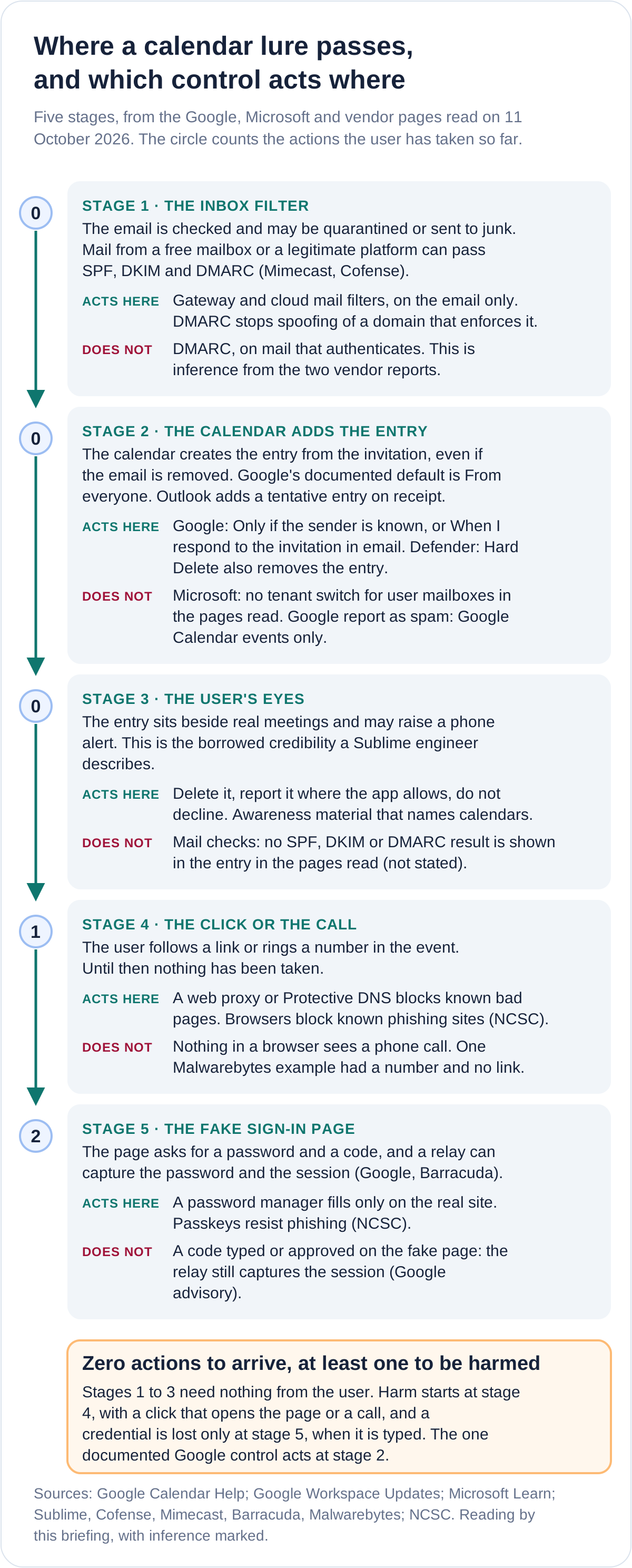
Two limits on the chain. Sublime says calendar files "will automatically add themselves to calendars by default with most providers"; this briefing checked Google and Microsoft only. Apple's iCloud and Mac pages describe invitations arriving as notifications to accept, decline or Report Junk, and say nothing about adding them automatically; that was not tested. And the chain describes a lure that arrives as a real invitation. The section on the label, below, shows how many things share the name.
The number behind "exponential", and why the total does not add up
Sublime's post of 17 September 2026 is the only source read that prints a month-by-month series. It gives percentages over the previous month and no counts. The table sets each figure beside the multiple it implies, under both ways a reader could take "X% over".
Sublime Security, 17 September 2026, as printed, with the multiples derived by this briefing. Compounding uses June, July, August and the projected September.
| Step, as printed | If X% is an increase | If X% is a multiple of |
|---|---|---|
| June over May: 282% | 3.82 times | 2.82 times |
| July over June: 338% | 4.38 times | 3.38 times |
| August over July: 1,216% | 13.16 times | 12.16 times |
| First half of September over all of August: 1,426% | 15.26 times | 14.26 times |
| September projected over August: 2,852% | 29.52 times | 28.52 times |
| May to September, the four monthly steps compounded | About 6,500 times | About 3,306 times |
| Printed total: about 33,000% | 331 times | 330 times |
Three things stand out. First, the printed total does not follow from the printed steps. The four steps compound to about 6,500 times under the first reading and about 3,306 times under the second, against about 331 or 330 times in the post: a gap of 19.7 or 10.0 times (derived). Under the second reading the post's own projection works exactly, because 2,852 is twice 1,426, which fits that reading more closely, and the printed total is then one tenth of the compounded percentage, which is 330,559%. The post shows no working, so this briefing cannot tell a slip from a method.
Second, "the first half of September" is about half a month set against a whole one, so 1,426% is not a monthly rate, and the September figure is a projection from it. The post calls the June and July increases "slow and steady"; they are 3.8 and 4.4 times a month under the first reading. Third, none of it is a count. The number of attacks in May, the number of Sublime customers across those months and what the post counts as a calendar-based attack are not stated, and growth in customers alone could move a count of detections.
Other vendors publish growth and volume figures too. None publishes a base.
Growth and volume figures read in vendor posts, 11 October 2026. Rates marked derived are this briefing's arithmetic and assume a smooth rate.
| Source and date | What it states | What it does not state |
|---|---|---|
| Sublime, 29 December 2025 | A preliminary "nearly 22x" rise in malicious calendar-based attacks, first to second half of 2025, for Sublime customers. | Counts, the base or a final figure. Derived: 1.67 times a month, 4.7 times a quarter. |
| Sublime, 21 January 2026 | In Q4 2025, over 20% of callback phishing attacks used calendar invites. | How many callback attacks that was. |
| KnowBe4, 5 June 2026 | Calendar invite phishing up 49% over the past six months, from its Phishing Threat Trends report, volume 7. | The baseline, the window's dates and the population: the report is behind a form. Derived: 1.07 times a month. |
| Mimecast, 17 June 2026 | 43k emails within a month abusing calendar invites, and a quishing campaign of over 4k. | Which month, whose mail, or how many reached a calendar. |
| Check Point, 17 December 2024 | About 300 brands affected and over 4,000 phishing emails in four weeks. | Whether any invitation reached a calendar without a response. |
| Cofense, 12 August 2026 | Invitation-themed emails are almost 15% of malware campaigns and just over 3% of credential phishing campaigns. | Calendar entries: the figure counts e-invitation spoofs, not invitations that land in a calendar. |
Two of those rates can be set side by side, and they sit 14.8 times apart (derived): Sublime's 22 times for the second half of 2025 and KnowBe4's 1.49 times for its six months. They cover different windows and different customers, and neither can be combined with the other. The honest summary of "exponential growth" is a rapid rise reported by several email-security vendors from their own telemetry, one monthly series whose headline total does not reproduce, and no published count of anything.
Which settings stop it, and which do not
The Guardian column advises turning off automatic accepting, accepting only from known senders in Google Calendar, and deleting or reporting instead of declining. The table checks each against the vendors' own pages and adds the controls the column does not mention.
Controls, as documented in the pages read on 11 October 2026. Google Admin Help was last updated on 9 October 2026; the Calendar Help pages carry no date.
| Control | What the documentation says | What it does not do, or does not state |
|---|---|---|
| Google: Only if the sender is known | Events are added automatically if the sender is in your contacts, in your organisation or someone you previously interacted with. Otherwise you get an invitation email. New invitations only. | Does not remove entries already there, or stop a lure from a known or compromised sender. After you accept or confirm a sender, later invitations appear automatically. Google warns it might reveal to senders that they are not in your contacts. |
| Google: When I respond to the invitation in email | The strictest option: an event is added only after you respond to the email notification. | The email and its link still arrive. A response goes to the organiser. |
| Google Workspace admin: ceiling and default | Since 14 August 2026 an administrator can set the least restrictive level users may choose, for new and existing users. The control starts at From everyone. | Not stated: how many organisations have changed it. Before the release administrators could only set the default for new users. |
| Google: Report as spam | Removes the event, and the whole series if it recurs. | Works only for events sent from Google Calendar. Events created by another provider, app or service cannot be reported as spam. |
| Google on Android: app permissions | Spam calendars can come from apps with calendar access, and Google says to review which apps have it. | Not a control for invitations that arrive by email. |
| Microsoft: Outlook and Exchange Online | Outlook adds a tentative entry on receipt. Set-CalendarProcessing is documented as effective only on resource mailboxes, and for user mailboxes AutomateProcessing is AutoUpdate and cannot be changed. | No tenant setting that stops the entry on user mailboxes was found. Microsoft describes the Outlook tracking option as keeping responses out of the inbox, not as stopping the entry. |
| Microsoft Defender: Hard Delete | Removes the calendar entry with the meeting-invite email (Message Center, 11 September 2025). | Clean-up, not prevention. Does not remove entries added by hand from an .ics attachment. The entry can return if the sender resends. |
| Mail flow rule on attachment extension | Microsoft documents a condition that matches an attachment's file extension, so external mail with .ics attachments can be held. | Not stated: whether it matches a calendar part that is not an attachment. An intelligence analysis manager at Cofense told the Guardian that filtering a platform out would also block its legitimate invitations. |
| DMARC enforcement | NCSC: DMARC stops phishers spoofing your domain. | Mimecast and Cofense report invitations that passed SPF, DKIM and DMARC. Inference: enforcement stops a spoof of an enforcing domain, not an invitation that authenticates. |
| Declining the invitation | Google: the organiser gets a notification when you respond. Microsoft: organisers can generally see who declined. | That a decline confirms a live address is the column's and Sublime's claim, and is inference. The documents say only that the organiser is told. |
| Passkeys and security keys | NCSC: passkeys are resistant to phishing because they cannot be intercepted, reused or stolen like passwords. | Cyber Essentials v3.3 also accepts push prompts and one-time codes as MFA, and Google's June 2026 advisory says relay pages capture the session despite MFA. |
Three results are worth stating plainly. The column's advice is right for Google and the documentation supports it, with two caveats the column omits: report-as-spam is limited to events sent from Google Calendar, and the known-senders setting treats anyone you have interacted with as known. For Microsoft 365 the column's advice has no counterpart in the pages read, which is consistent with Sublime's own note that it had not verified a similar mitigation. Google's June 2026 fraud and scams advisory names calendar phishing and fake renewal notices added directly to Google Calendar, gives no count, and does not mention the setting.
What the sources do not establish
Questions a reader would ask, with what the sources read state and do not state, 11 October 2026.
| Question | Stated | Not stated |
|---|---|---|
| How many victims? | Sublime's remote-management example went to "an undisclosed number of targets". | Any victim count, loss or credential count in any source read. |
| Did a click or call follow? | Examples of lures with a link, a phone number or both (Sublime, Cofense, Malwarebytes, Barracuda). | Whether anyone clicked or called in any of them. |
| Is it more successful than email phishing? | Sublime: two routes more than double the chance, then "the math gets fuzzy". | A success rate for either route. |
| Does Google's default add an invitation with no response? | Yes for the Workspace default (2022 and 2026 posts) and for the From everyone option. | The default for a personal Google account: Calendar Help lists three options without naming one. No account was tested. |
| Does Outlook add every external invitation? | A tentative entry on receipt (Learn, 2024) and an entry created during delivery of malicious invites (Microsoft, 2025). | A statement of the default for external senders on user mailboxes. |
| Does the entry show the email's authentication result? | Authentication in the calendar standard is by S/MIME signing, not mail checks. | Any sentence in the Google or Microsoft pages read that the calendar shows SPF, DKIM or DMARC results. |
| Do tighter settings break legitimate invitations? | Google: invitations from unknown senders still arrive as email. A Cofense manager told the Guardian that blocking a platform blocks legitimate invitations. | Any measurement of the cost, in any source. |
| What do the platforms say? | Cofense says the mail is sent through the platform's own system. Google's June 2026 advisory names the technique. | A Zoom statement on misuse of its invitation mail: none was found. |
"Calendar phishing" is phishing delivered where the filter does not look
The label says calendar, and the mechanism is delivery. A threat detection engineer at Sublime Security told the Guardian that it is "the same technique, just using a different delivery method". The sources read bear that out, and show how loosely the label is used. Cofense's post of 17 February 2026 is about calendar invitations, and its two examples are emails styled as Microsoft and Google invitations that lead to a fake sign-in page; the post does not say an entry reached a calendar. Cofense's counts of 12 August 2026 are about e-invitation brands such as party-invitation sites. Fortra, in an undated post on a booking-link variant, says the sample should be presented as a booking-flow variant, "not an .ics invite campaign". Sublime's own Add to Calendar example added nothing by itself. So the name covers at least four things, and only one is a lure that lands in a calendar with no action.
A comforting label is not a control, and this one nudges a defender towards a calendar-settings fix for what is a phishing problem. The setting changes where the lure first appears. What decides the outcome is the same set of controls that decides every phishing outcome: reporting, an origin-checking password manager or passkey, and session revocation. Earlier briefings show the same pattern of a comforting surface: Chromium's lookalike checks fail open for any character or brand not on their lists; the custom GPT incidents showed a trusted-looking address that proved nothing; and a fake installer behind a Google ad showed a trusted place used as the delivery. The calendar is another trusted place.
Each source has an interest. Sublime and Cofense sell email security, and both sell the removal of calendar entries: Sublime's remediation went generally available on 9 December 2025, and Cofense's Vision 3.0 post of 28 August 2025 describes Calendar Quarantine. KnowBe4 sells training and describes removing invites from every synced calendar. Google and Microsoft sell the calendars: Google's advisory names the technique and prints no count, and Microsoft's 2025 notes describe the gap in Outlook's own delivery. This is a statement of interest, not an accusation. The figures are checkable, and the ones used here were checked.
UK: the NCSC's guidance, where to report, and what Cyber Essentials does not reach
The NCSC's phishing guidance for organisations (published 5 February 2018, reviewed 13 February 2024, version 2.0) is written about emails and texts, and the word calendar does not appear in it (counted). Its four layers still map onto the problem: make it hard for attackers to reach users, help users report, protect the organisation from the effects of undetected phishing, and respond quickly. Its warning applies with extra force here: "Phishing mitigations often place too much emphasis on users being able to spot phishing emails." The layers that do not depend on spotting the lure are the ones that hold. The guidance advises password managers, some of which "will not autofill on fake websites", and says staff must feel able to report even after clicking.
The NCSC's Suspicious Email Reporting Service asks for the email to be forwarded to the address on its page, and its landing page names five things that can be reported: emails, texts, phone calls, websites and adverts. A calendar entry is not named. For a lure that arrives with an email, forwarding works. For an entry that arrived with no email to forward, the website and phone-call routes are the nearest fit; that is inference, because the NCSC pages do not say so. The NCSC says it acts on every message it receives, and its pages give more than 58 million reported scams and 256 thousand scams removed across 454,800 URLs as of July 2026. For a loss or a hacked account, the NCSC points to Report Fraud in England, Wales and Northern Ireland and to Police Scotland in Scotland. This briefing prints no reporting address and no number; use the NCSC page.
Cyber Essentials requirements for IT infrastructure v3.3, published in April 2026, never mention calendars: the text contains no match for calendar, phishing, invitation or meeting (counted from the text extraction). It requires multi-factor authentication for cloud services and counts FIDO2 passkeys as MFA. For malware protection it requires that anti-malware software "prevent connections to malicious websites over the internet". Those reach the fake-page stage. They do not reach the calendar setting, an entry that arrives with no action, or a call to a number in an event, and on the face of the text nothing requires an organisation to change the setting; that is this briefing's reading, not an NCSC statement. The list of acceptable factors also includes push notifications and one-time codes sent by email, SMS or app, which a relay page of the kind Google's advisory describes can pass on (inference).
The practical gap for UK staff is awareness material. Both documents speak of email, text messages and attachments. A member of staff who has learned to distrust links in email has not learned that the diary can carry one. The Sublime engineer's phrase, borrowed credibility, is the right name: the entry sits beside the weekly one-to-one. Mimecast's June 2026 report says its campaign was global but more targeted towards the UK, Germany and the US.
If an entered credential opens a mailbox that holds personal data, the ICO's guidance applies: a notifiable personal data breach must be reported "within 72 hours of becoming aware of the breach, where feasible". Not every compromise is notifiable. The point for this briefing is that the clock starts on awareness, and the log check below is how awareness is established.
Earlier briefings on this site cover the stages after the entry. Microsoft's count of Star Blizzard campaigns found nine of 13 were event invitations, usually with no attachment. A drawn Google window relayed passwords and MFA codes, Talos's Google relay forwarded the codes people typed, and the EvilTokens takedown described a phish MFA cannot stop. GOV.UK One Login shows the passkey caveat: the phishable route stays open beside the safe one. Fortra's summary of a Health-ISAC piece of 25 June 2026 says its CalPhishing research found .ics files used with ConsentFix to steal session tokens, and a HackRead headline listed on Fortra's site ties CalPhishing to the EvilTokens kit; neither article was read beyond those pages.
What to do, in order
Take this with you
Defender actions, in the order worth doing
- Set the calendar invitation option to known senders, or respond-first for high-risk teams. In Google Workspace go to Admin console, Apps, Google Workspace, Calendar, Advanced settings, and choose the least restrictive level users may select and the default. Since 14 August 2026 that ceiling binds existing users too, with a rollout of up to 15 days from that date. Test with a harmless invitation from an external test account.
- For Microsoft 365, record that no tenant switch for user mailboxes was found in the documentation read, and rely on the steps below plus Defender Hard Delete for removal. Re-check Microsoft's pages before relying on this.
- At the gateway, hold or strip external invitations that carry links or phone numbers from senders not seen before. Microsoft documents a mail flow condition on attachment extension; test it against real invitations first, because platforms send legitimate ones.
- Warn on invitations from newly seen external senders. A first-time sender, a free mailbox and a brand mismatch are signals the vendors name.
- Tell users to delete or report an unexpected entry, and not to decline it, click it or ring the number in it. Google's report as spam works only for events sent from Google Calendar, so give the fallback: delete the entry and report the email or link by the NCSC route.
- Put calendar entries into the awareness material and the report button, including entries that arrive with no email, with the no-blame message the NCSC guidance asks for.
- Move staff to passkeys or security keys and a password manager that checks the origin, so that a credential typed into a fake page is not enough. Treat push and code-based MFA as relayable.
- When a user reports a click, check sign-in logs for that account: unfamiliar devices, unexpected MFA prompts and new sessions near the time of the click, as Barracuda lists them.
- If a credential was entered, revoke sessions and reset the password first. Then remove the entry and the email, and decide whether personal data was reachable, which starts the ICO clock.
The question that exposes the gap
If a stranger can put an entry in every staff calendar with no action from anyone, and the entry stays after the email is gone, which of your controls would see it before somebody rings the number in it?
Key facts
Sources
- PrimaryGoogle Calendar Help, Manage invitations in Calendar: the three options for adding invitations and what each does. The page carries no date. Read on 11 October 2026.Googleaccessed 2026-10-11
- PrimaryGoogle Workspace Admin Help, Automatically add events to calendars, last updated 2026-10-09 UTC: the admin ceiling and default, and the three admin option names.Googleaccessed 2026-10-11
- PrimaryGoogle Workspace Updates, 14 August 2026: administrators can now set which invitation options users may choose, for new and existing users; the control is From everyone by default; before it, administrators could only set the default for new users.Googleaccessed 2026-10-11
- PrimaryGoogle Workspace Updates, 20 July 2022: the known-senders option, the statement that the default option is to show invitations from everyone, and availability to personal Google accounts.Googleaccessed 2026-10-11
- PrimaryGoogle Calendar Help, Respond to event invitations: when you respond the organiser gets a notification; after you accept or confirm a sender, invitations appear automatically.Googleaccessed 2026-10-11
- PrimaryGoogle Calendar Help, Report inappropriate calendar invitations and events: report as spam works only for events sent from Google Calendar and removes the event.Googleaccessed 2026-10-11
- PrimaryGoogle Calendar Help, Block calendar spam on Android: app permissions as a route for calendar spam, and the known-senders setting.Googleaccessed 2026-10-11
- PrimaryGoogle's June 2026 frauds and scams advisory, 8 June 2026: names Calendar Phishing and fake renewal notices added directly to Google Calendar invites, and AITM kits that capture the password and session cookie despite MFA. No count and no mention of the setting.Googleaccessed 2026-10-11
- PrimaryMicrosoft Learn, Remove a tentative meeting that's automatically added to your calendar, updated 2024-01-30: Outlook adds a received invitation as a tentative meeting.Microsoftaccessed 2026-10-11
- PrimaryMicrosoft Learn, Set-CalendarProcessing: effective only on resource mailboxes; AutomateProcessing is AutoUpdate for user mailboxes and cannot be changed there.Microsoftaccessed 2026-10-11
- PrimaryMicrosoft 365 Message Center item MC1151684, 11 September 2025, read from a public archive of the item: Outlook creates a calendar entry during delivery; Hard Delete now removes it; entries added by hand from an .ics are not removed.Microsoftaccessed 2026-10-11
- PrimaryMicrosoft Defender for Office 365 blog, 24 November 2025: the same change to Hard Delete, with the notes that entries can be restored by resending the invite and that .ics entries are untouched.Microsoftaccessed 2026-10-11
- PrimaryMicrosoft Learn, Remediate malicious email delivered in Office 365: Hard delete purges the message and the corresponding calendar entry for meeting invite messages.Microsoftaccessed 2026-10-11
- PrimaryMicrosoft Learn, mail flow rule conditions and exceptions: the condition that matches an attachment's file extension.Microsoftaccessed 2026-10-11
- PrimaryMicrosoft Support, Attendees can see others' responses to a meeting invitation: organisers have generally been able to see who accepted, tentatively accepted or declined.Microsoftaccessed 2026-10-11
- PrimaryMicrosoft Support, Change how Outlook processes read receipts and meeting responses: the Automatically process meeting requests and responses option, described as keeping responses out of the inbox.Microsoftaccessed 2026-10-11
- PrimaryApple Support, calendar event invitations on iCloud.com: invitations as notifications or email, and Report Junk. No statement on automatic adding.Appleaccessed 2026-10-11
- PrimaryApple Support, Reply to invitations in Calendar on Mac: Accept, Decline, Maybe, and Report Junk for an unwanted invitation from an unknown sender.Appleaccessed 2026-10-11
- PrimarySublime attack spotlight, 17 September 2026: the monthly percentages, the projection and the printed total of about 33,000%; the Google-infrastructure share; an example reaching an undisclosed number of targets. Read in full. Sublime sells email security.Sublime Securityaccessed 2026-10-11
- PrimarySublime attack spotlight, 3 November 2025: entries still created when the email is blocked; the Google Workspace setting advice; the note that no Microsoft 365 mitigation was verified.Sublime Securityaccessed 2026-10-11
- PrimarySublime attack spotlight, 9 July 2026: examples across conferencing and booking platforms; calendar files that add themselves by default with most providers; one platform whose Add to Calendar link would not add itself.Sublime Securityaccessed 2026-10-11
- PrimarySublime blog, 29 December 2025: the preliminary nearly 22x rise from the first to the second half of 2025 for Sublime customers, and the remark that the math gets fuzzy.Sublime Securityaccessed 2026-10-11
- PrimarySublime blog, 21 January 2026: in Q4 2025 over 20% of callback phishing attacks used calendar invites.Sublime Securityaccessed 2026-10-11
- PrimarySublime documentation: calendar remediation and the Google Workspace setting tip. The page carries a line addressed to AI agents, which was ignored.Sublime Securityaccessed 2026-10-11
- PrimarySublime blog, 9 December 2025: general availability of automatic removal of malicious calendar events.Sublime Securityaccessed 2026-10-11
- PrimaryCofense blog, 17 February 2026: two examples of emails styled as Microsoft and Google calendar invitations leading to a fake sign-in page. No count. Cofense sells email security.Cofenseaccessed 2026-10-11
- PrimaryCofense Intelligence paper, 3 June 2026: platform mail with text fields abused and forwarded unchanged, passing SPF, DKIM and DMARC; a conferencing example with an automatically generated calendar file.Cofenseaccessed 2026-10-11
- PrimaryCofense Intelligence, 12 August 2026: invitation-themed emails almost 15% of malware campaigns and just over 3% of credential phishing campaigns; these are e-invitation spoofs, not calendar entries.Cofenseaccessed 2026-10-11
- PrimaryCofense blog, 28 August 2025: Calendar Quarantine, and the statement that malicious invitations auto-populate in Exchange calendars.Cofenseaccessed 2026-10-11
- PrimaryKnowBe4 Threat Lab, 5 June 2026: calendar invite phishing up 49% over six months, four vectors, and recommendations. KnowBe4 sells training and email security.KnowBe4accessed 2026-10-11
- PrimaryKnowBe4 Phishing Threat Trends Report volume 7 page: the 49% figure and a claim that 84.4% of successful phishing attacks pass DMARC. The report itself is behind a form and was not read.KnowBe4accessed 2026-10-11
- PrimaryMimecast Threat Intelligence Hub, 17 June 2026: 43k emails within a month abusing calendar invites; messages from Google mail hosts passed SPF, DKIM and DMARC; targets more towards the UK, Germany and the US.Mimecastaccessed 2026-10-11
- PrimaryBarracuda blog, dated 6 August 2026 and marked updated 17 September 2026: invitations added with little or no interaction, identity indicators to check, and phishing-resistant MFA. No counts.Barracudaaccessed 2026-10-11
- PrimaryCheck Point blog, 17 December 2024: about 300 brands and over 4,000 phishing emails in four weeks, and Google's statement recommending the known-senders setting.Check Pointaccessed 2026-10-11
- PrimaryFortra FIRE team post, undated page: a booking-link variant that the post says is not an .ics invite campaign. Read in a browser tab, because a plain request returned 403.Fortraaccessed 2026-10-11
- PrimaryFortra FIRE team post on Outlook Groups and CalPhishing: calendar artefacts surviving mail remediation. No counts.Fortraaccessed 2026-10-11
- PrimaryFortra page summarising a Health-ISAC piece, 25 June 2026: .ics files used with ConsentFix to steal session tokens. Only the summary was read.Fortraaccessed 2026-10-11
- PrimaryMalwarebytes blog, 13 March 2026: fake renewal notices in calendars whose only call to action is a phone number. No number is reproduced here. Malwarebytes sells consumer security.Malwarebytesaccessed 2026-10-11
- PrimaryRFC 5546, iTIP, December 2009: section 6.1.5, flooding a calendar by automatically incorporating requests.IETFaccessed 2026-10-11
- PrimaryRFC 6047, iMIP, December 2010: authentication by S/MIME, and unsigned messages may not be trusted.IETFaccessed 2026-10-11
- PrimaryNCSC, Phishing attacks: defending your organisation, published 5 February 2018, reviewed 13 February 2024, version 2.0: four layers, DMARC, password managers, no-blame reporting. No mention of calendars.National Cyber Security Centreaccessed 2026-10-11
- PrimaryNCSC, Phishing scams: how to spot and report them: five reportable categories, and the July 2026 counts.National Cyber Security Centreaccessed 2026-10-11
- PrimaryNCSC, Report a scam email: forwarding, what happens next, and Report Fraud and Police Scotland for loss or a hacked account.National Cyber Security Centreaccessed 2026-10-11
- PrimaryNCSC, Passkeys: what you need to know: passkeys are resistant to phishing.National Cyber Security Centreaccessed 2026-10-11
- PrimaryCyber Essentials requirements for IT infrastructure v3.3, April 2026: MFA for cloud services, passkeys, acceptable factors and malware protection. Read from the text extraction saved for briefing 283, searched for calendar, phishing, invitation and meeting: no matches.National Cyber Security Centreaccessed 2026-10-11
- PrimaryICO, Personal data breaches: a guide: report a notifiable breach within 72 hours of becoming aware, where feasible.Information Commissioner's Officeaccessed 2026-10-11
- PrimaryZoom Acceptable Use Guidelines Enforcement Report: lists a Spam/Phishing dismissal reason. No statement on misuse of invitation mail was found.Zoomaccessed 2026-10-11
- Reported byConsumer scams column of 11 October 2026 (published 07:00 BST) on calendar phishing: the pointer for this briefing, read in full. It quotes a threat detection engineer at Sublime Security and an intelligence analysis manager at Cofense. Neither is named here.The Guardianaccessed 2026-10-11
- Reported byArticle of 18 September 2026 whose headline says calendar-based phishing has jumped 33,000% since May. Only the headline and date were read; the body did not load as text.TechRadaraccessed 2026-10-11