GitLab's issue by email address is a credential, and GitLab presents it as an address
Aikido Security showed that the private address GitLab gives every user for filing issues carries an account-wide token that never expires. GitLab's own documentation confirms it ignores IP allowlists and works where two factor authentication is enforced.
By Parminder Kumar Sharma · · 20 min read
Seven properties, six pages
Count the pages. To learn what a single GitLab incoming email address can do, a reader has to assemble seven separate properties from six separate pages of GitLab's own documentation, and the most that any one page carries is two.
The token overview page says the token does not expire, and that each user has one token which is included in their project-specific email addresses, plural. The issue creation page says the issue that arrives is created with your user as the author. The merge request page says a patch attachment is applied to the branch named in the subject line, and that the branch is created if it does not already exist. The group access page says incoming email is not subject to IP restrictions. The incoming email administration page says the feature works without two factor authentication, even on an instance where two factor is enforced. The CI/CD job token page says a job token takes the access level of the user who triggered the pipeline.
Put those seven sentences in one paragraph and you are looking at a credential. Leave them on six pages and you are looking at an email address with a copy button next to it.
That count does not establish that GitLab hid anything. Every sentence above is published, most of it has been published for years, and two of the surfaces were sharpened in July 2026 in response to the research that prompted this briefing.
It does not establish a vulnerability either. There is no CVE, no patch and no security advisory. A keyword search of the National Vulnerability Database for GitLab incoming email token returns zero results.
It does not establish that anyone has been attacked this way. No incident has been reported, and none is claimed here.
And it does not establish that every exposed address is dangerous, because the damage is bounded by the role of the person whose address it is. A Guest cannot commit code, so a Guest's leaked address cannot either.
What it does establish is a gap between how the thing is presented and what the thing is. That gap is the story, and it is the kind of story that has no patch.
The research is by Joe Leon at Aikido Security, published on 23 September 2026 as Send GitLab an email, push to main. Claims that rest on Aikido's testing are labelled as such throughout. Everything else was checked against GitLab's documentation as it stood on 24 September 2026, and the exact sentences are set out in the source list.
What the address actually is
GitLab projects carry a button labelled Email work item to this project. Select it and you are shown an address built from a project reference, a token and a suffix, of the general shape incoming+PROJECT-ID-TOKEN-issue@incoming.gitlab.com. Send anything to it and an issue appears in that project, authored by you.
The middle segment is the credential. GitLab's token overview page lists it in the prefix table as the incoming mail token, prefix glimt-, in the same family as personal access tokens (glpat-), deploy tokens (gldt-) and runner authentication tokens (glrt-). Sixteen token prefixes are listed there.
The same page carries a second table, headed Available scopes, which sets out what each kind of token can reach across API access, registry access and repository access. That table has ten rows. The incoming mail token is not one of them.
So GitLab's own token reference names it a token, admits it to the family, gives it a prefix, and then does not say what it reaches.
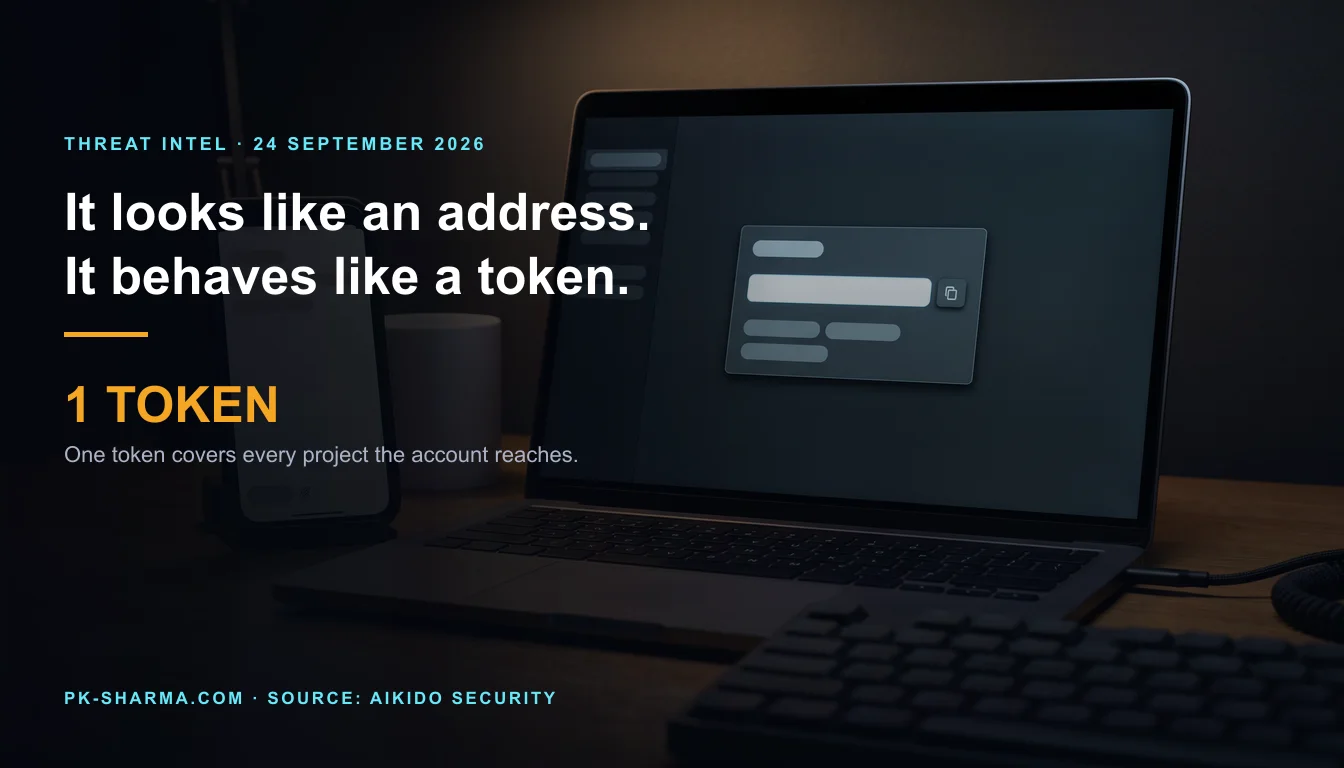
GitLab does state the scope, in a sentence that is easy to read past: "Each user has an incoming email token that does not expire. The token is included in your personal project-specific email addresses."
One token. Plural addresses. The token is a property of the account; the address is a property of the account plus a project reference. Aikido tested what that means in practice by opening the dialog in five different projects, private ones included, and finding the glimt- segment identical in all five. GitLab's sentence and Aikido's test agree, which is the strongest kind of verification available here.
The boundary, drawn
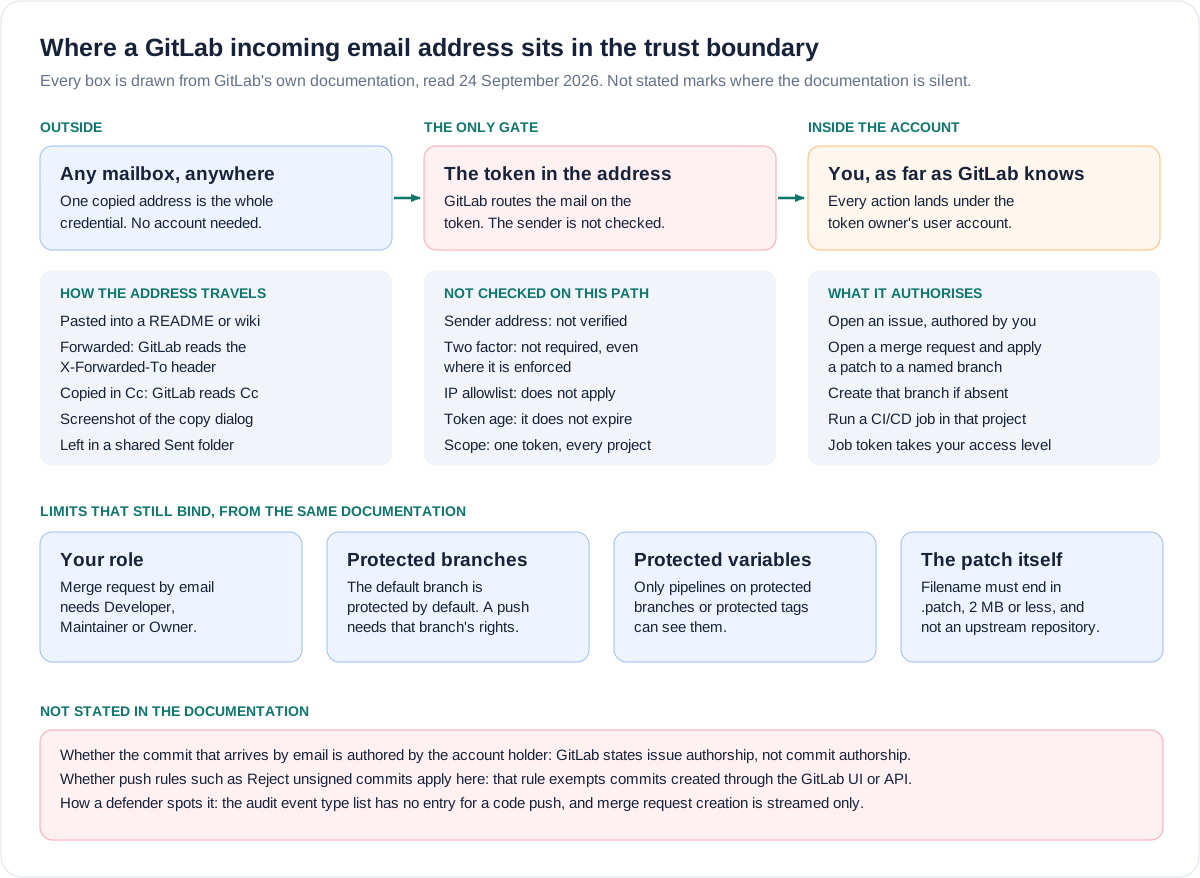
What the holder can do, and what they cannot
Overclaiming here would be the same failure this site exists to catch in other people's work, so here is the precise version.
A holder of the address can open an issue in the referenced project, authored by the account holder. They can change the suffix from issue to merge request and open a merge request instead. They can attach a file whose name ends in .patch, and GitLab will apply it to the branch named in the subject line; if that branch does not exist, GitLab creates it from the repository HEAD. If the patch touches .gitlab-ci.yml and the account holder's role allows a pipeline to run, the job runs, and the job token in that pipeline carries the access level of the user who triggered it.
They cannot do any of that without a role. Creating a merge request by email requires the Developer, Maintainer or Owner role, or an explicit permission to create merge requests in that project.
They cannot target an upstream repository. GitLab documents the exact refusal message for that attempt.
They cannot send patches totalling more than 2 MB, and an attachment is only treated as a patch if its filename ends in .patch.
They cannot push to a protected branch unless the account holder could. GitLab protects the default branch by default, and where Allowed to push and merge has not been configured, the documented default behaviour is that no one can push.
They cannot reach a project they cannot name. Routing needs the project path and numeric ID alongside the token. Public projects publish both; for a private project an attacker needs an information leak naming it, though Aikido notes the numeric ID is guessable.
And they cannot trigger anything from an automatic mailer. GitLab ignores incoming mail carrying an Auto-Submitted header with any value other than no, or X-Autoreply: yes.
Each claim checked against GitLab's own documentation, read 24 September 2026. The right column separates what the vendor states from what only the researcher tested.
| Claim | Where it rests | Status |
|---|---|---|
| The token does not expire | Token overview page, in terms | Stated by GitLab |
| One token spans every project the account can reach | Token overview page: one token, plural addresses | Stated by GitLab |
| Incoming email ignores IP allowlists | Group access page, security implications list | Stated by GitLab |
| It works where two factor is enforced | Incoming email administration page | Stated by GitLab |
| A patch is applied, and a missing branch created | Merge request creation page | Stated by GitLab |
| A job runs with the triggering user's access level | CI/CD job token page | Stated by GitLab |
| The sender is never verified | No check described on any page; an open GitLab issue proposes adding one | Not stated, and implied by the proposal |
| The resulting commit is authored by the account holder | Authorship is stated for issues, not for commits | Tested by Aikido, not stated by GitLab |
| A push to main in particular | Depends on who may push to that protected branch | Conditional, not automatic |
Is it treated as a secret anywhere in GitLab?
The question the finding turns on is not whether GitLab warns you. It does. The question is whether the warning describes what the credential is.
Today the dialog and the token settings page both say to keep the address private, and both say that anyone who knows it can create issues or merge requests as if they were you. That wording is recent. GitLab merge request 247431, titled "Align incoming email token capability across UI and docs", was created on 28 July 2026 and touched the personal access tokens page, the Email work item dialog, the token overview documentation, the issue creation documentation, the group access documentation and the secret detection documentation. Aikido's screenshots of the older wording are dated the same day.
Before that change, the token settings page told users the incoming email token "cannot be used to access any other data". That sentence has gone, which is the right outcome.
What replaced it is a sentence about issues and merge requests. A reader who takes it at face value concludes that the worst case is unwanted tickets. The worst case is a commit on a branch, a pipeline run, and whatever that pipeline can read.
Three things are true at once, and holding all three is the honest position. GitLab warns you. The warning is not false. The warning does not describe the capability.
There is a second comforting label in this story, and it is the one that will hurt more organisations. IP allowlist sounds like a perimeter. Teams turn it on at the edge of a corporate VPN and believe they have drawn a boundary around a project.
GitLab's group access page says otherwise, in a bulleted list headed Security implications that opens by conceding the feature is "not a complete firewall". Among the exceptions: users can always use reply by email; users can create issues and merge requests by email with their incoming email token, because incoming email is not subject to IP restrictions; and IP restrictions do not apply to runner registration or when runners request or update CI/CD jobs.
Aikido tested the boundary directly. It restricted a private project to a single IP address that was not its own. GitLab blocked the browser and rejected the git clone. It accepted the email.
How an address gets out, reasoned from the mechanism
Aikido spent an afternoon searching public documentation and surfaced about a dozen live incoming email addresses in READMEs, contributing guides and support pages. Nearly every one had been published deliberately, by a maintainer telling users where to send bug reports. A few belonged to well known open source projects.
That is the headline path, and it is not user error. An email address is the one identifier that exists to be handed out.
The rest follows from the mechanism, and it is worth reasoning from the documentation rather than inventing incidents.
GitLab does not only read the To line. Its incoming email page lists the headers in which it will accept a configured address, in the order it checks them: To, Delivered-To, X-Delivered-To, Envelope-To or X-Envelope-To, Received, X-Original-To, X-Forwarded-To and Cc. That list exists so that forwarding and aliasing work. It also means the address survives being forwarded and being copied in, and that a message reaching the GitLab mailbox by any of those routes gets processed.
Four practical exposures follow from that, and from the fact that the token never expires:
- A forwarded thread. Someone forwards a bug report that was originally sent to the address. The address is now in a second mailbox, sitting in a header GitLab will read.
- A shared or inherited inbox. Use the address once and it is in your Sent folder permanently. A team mailbox, a handover, a legal hold export or a departing employee's archive all carry it forward.
- A screenshot. The dialog exists in order to display the address. A screenshot of it in a ticket, a runbook, an onboarding deck or a recorded screen share is the credential in full, and no scanner reads it.
- A mailing list archive. Copy the address on a post to a public list and the archive publishes it, permanently and searchably.
Duration is the part that compounds. An address pasted into a contributing guide in 2019 is live today unless someone reset it. Aikido notes that tokens minted before the glimt- prefix existed carry no distinguishing marker, which means historical secret scanning would not have flagged them. The oldest exposures are the ones least likely ever to have been noticed.
Rotation, and what rotation costs
It can be rotated, by the user and only by the user. Select your avatar, then Edit profile, then Access, then Personal access tokens, and under Incoming email token select reset this token. The same reset link is reachable from the Email issue to this project dialog.
Because there is one token per account and it is embedded in every project address, resetting it necessarily invalidates every address that account holds, all at once. GitLab does not spell that consequence out in the reset instructions. It follows directly from GitLab's own description of the token as one value included in your addresses, plural. Anyone a maintainer had invited to file bugs by email stops being able to, until the new address is circulated.
Whether the old address stops working is, in those words, not stated. GitLab's instruction to reset the token immediately on suspicion of a leak only makes sense if it does, and this briefing treats that as the intended behaviour while noting that the documentation does not say it outright.
What a job running as a user actually reaches
This is the part most worth getting right, because it is where the coverage has been loosest.
GitLab is explicit: "The token receives the same access level as the user that triggered the pipeline, but has access to fewer resources than a personal access token." The job token page then lists those resources, and the list is finite and published.
It includes the container registry for the job's own project, the package registry, the Terraform module registry and secure files. It includes full access to the Badges, Deployments, Environments, Packages, Releases and Release links APIs. It includes a defined set of read endpoints across branches, commits, files, job artifacts, merge requests and notes. It cannot authenticate GraphQL requests. Pushing to the repository with a job token requires the project to have Allow Git push requests to the repository turned on, which is not the default. Reaching another project's resources requires that project's job token allowlist.
So the job is not a free pass to the estate. It is the triggering user's access, narrowed.
CI/CD variables are the sharper question, and the answer turns on one setting.
A variable marked Protected is available only to pipelines that run on a protected branch or a protected tag. A job on a branch that has just been created is not on a protected branch, so it does not see protected variables. It sees every variable that is not marked protected.
That is the real test for a team reading this. Not whether someone could run a job, but whether the deployment credentials, cloud keys and registry passwords in your projects are marked Protected, and whether the branch protection that makes Protected mean anything is configured at all.
GitLab warns on the same page that the other setting people reach for is not a control: "Masking a CI/CD variable is not a guaranteed way to prevent malicious users from accessing variable values." Masked and protected are different words for a reason.
How an organisation would even know
Assume it happened. A commit exists on a branch, attributed to a real employee, and that employee did not write it. What in GitLab tells you?
Less than you would like.
GitLab's audit event type list is comprehensive for configuration changes and runs to hundreds of entries. It has no event type for a code push at all. It does have merge_request_create, described as "A merge request is created", and in the Saved to database column that row reads No, meaning it is available only as a streamed event, to an external destination, on Ultimate. Group and project audit events are themselves Premium and Ultimate features.
So a Free or Premium customer looking at the audit dashboard will not find the merge request, and no customer will find the push. The audit interface carries a further documented limit that bites here: text based searching in audit event details is not supported, and filtering is restricted to the author and a rolling thirty day date range.
The same list contains a reset event for runner tokens and none for the incoming email token, so an organisation cannot even confirm from audit data that its people have rotated.
The one genuinely strong detection surface exists only if you run GitLab yourself.
Incoming email is a real IMAP mailbox that your administrator configured, and every one of these messages passes through it. The sending address, the Received chain, the recipient key and the attachment are all in the message before GitLab ever touches it. If you run self managed GitLab and you retain that mailbox, you can log and alert on it. A message addressed to a recipient key ending in merge request, carrying a .patch attachment, from a sender outside your organisation, is the signature you are looking for.
On GitLab.com you do not hold that mailbox, and you do not get that signal.
What to check this week, in order
Take this with you
In this order, because each step narrows the next
- Decide whether anyone in your organisation actually files issues or merge requests by email. For most teams the answer is no, and that answer makes everything below simpler.
- If the answer is no, tell every user to reset the incoming email token: avatar, Edit profile, Access, Personal access tokens, then reset this token under Incoming email token. There is no administrator bulk action, so this is a communications exercise rather than a configuration change.
- Search everything you publish. Grep repositories, wikis, the public documentation site, support pages, README and CONTRIBUTING files for the strings incoming plus, for glimt, and for the incoming email domain your instance uses.
- Search inward as well. The same strings in a shared mailbox, a runbook, a knowledge base article, a screenshot library or an onboarding deck are the same credential in a place no scanner looks.
- On self managed GitLab, check whether incoming email is switched on at all, and switch it off if nothing depends on it. On GitLab.com there is no equivalent switch, for administrators or for users.
- On self managed GitLab, if you keep the feature, start logging the incoming mailbox and alert on messages carrying a patch attachment addressed to a merge request recipient key.
- Open your CI/CD variable lists and confirm that every deployment credential, cloud key and registry password is marked Protected. Masked is not protected.
- Check Job token permissions on your most sensitive projects: whether Allow Git push requests to the repository is turned on, and who sits on the authorised groups and projects allowlist.
- Review Allowed to push and merge on your protected branches. The question is not whether main is protected. It is who may push to it.
- Stop treating an IP allowlist as a boundary around a project, and reread the security implications list on GitLab own group access page with your architecture in mind.
- On Ultimate, confirm that an audit event streaming destination is configured, because merge request creation is never saved to the database.
- Test whether your push rules actually stop a commit created from an emailed patch, in a scratch project, before assuming that they do.
# Self-managed only. Is incoming email switched on for this instance?
grep -n "incoming_email_enabled" /etc/gitlab/gitlab.rb

# GitLab's own check that the mailbox is reachable and correctly configured
sudo gitlab-rake gitlab:incoming_email:check

# After changing incoming_email_enabled, GitLab documents that both are needed
sudo gitlab-ctl reconfigure
sudo gitlab-ctl restart
Method, interest and the vendor position
Both parties have a commercial interest here and neither disqualifies the finding.
Aikido sells secret scanning. Its write-up closes by saying its Betterleaks scanner now identifies more GitLab incoming email token formats than any other secret scanner, GitLab's own included, and it recommends two further Aikido products alongside. That is a commercial position attached to a research finding. It does not weaken the finding, because the finding is reproducible from GitLab's published documentation by anyone with a browser, which is how this briefing checked it.
GitLab's position, as Aikido reports it, is that this is a token like any other, and that any leaked token leads to bad outcomes. That is true of every credential. It is also precisely why the presentation matters. A personal access token is generated behind a warning, given an expiry, shown once, and is a thing nobody pastes into a README. This one is an address with a copy button, and people publish it on purpose.
GitLab has moved some way. It removed the sentence that was wrong, added merge requests to both surfaces, and documented the IP restriction exception. Its issue tracker carries a public issue, number 617883, titled "Email verification for incoming email token actions", which proposes accepting these emails only from an address verified on the token owner's account. That single change would end most of this. As of 24 September 2026 the behaviour is unchanged.
The question that exposes the gap
Every organisation running GitLab can produce an inventory of its personal access tokens. Someone can pull the list, with owners, scopes and expiry dates, because GitLab shows it and auditors ask for it.
Now ask your GitLab administrator for the equivalent list of incoming email tokens. Who holds one? Which of them have been published somewhere? When was each last rotated?
There is no such list. GitLab does not offer one. An administrator cannot revoke in bulk. No audit event records a reset. Aikido tried to notify the account holders it found and reported mixed results, because there is no mechanism for that either.
A credential your organisation cannot enumerate is a credential it cannot govern. This one was handed out with a copy button, and it does not expire.
Sources
- PrimarySend GitLab an email, push to main, by Joe Leon, 23 September 2026. The primary research write-up. Used for the disclosure timeline, the account-wide token test across five projects, the IP allowlist test, the count of live addresses found in public documentation, the attacker constraints and GitLab's reported position.Aikido Securityaccessed 2026-09-24
- PrimaryGitLab token overview. Used for the incoming email token not expiring, one token being included in all project-specific addresses, the glimt- prefix, the sixteen-row prefix table, the ten-row Available scopes table that omits this token, and the reset procedure.GitLabaccessed 2026-09-24
- PrimaryCreate issues. Used for the Email work item to this project flow, the statement that the issue is created with your user as the author, the keep it to yourself warning and the reset path from the dialog.GitLabaccessed 2026-09-24
- PrimaryCreate merge requests. Used for creation by email, the Developer, Maintainer or Owner role requirement, the subject line naming the source branch, patch attachments being applied, the branch being created from HEAD if absent, the 2 MB patch limit, the .patch filename rule and the upstream repository refusal.GitLabaccessed 2026-09-24
- PrimaryGroup access and permissions. Used for the security implications list, the statement that IP restriction is not a complete firewall, and the statement that incoming email is not subject to IP restrictions.GitLabaccessed 2026-09-24
- PrimaryIncoming email administration. Used for the accepted and rejected header lists, the statement that incoming email features work without two factor authentication even where it is enforced, the offering scope, and the incoming_email_enabled configuration and rake check.GitLabaccessed 2026-09-24
- PrimaryCI/CD job token. Used for the token taking the access level of the triggering user, the published list of reachable resources, the GraphQL exclusion, the Allow Git push requests setting and the job token allowlist.GitLabaccessed 2026-09-24
- PrimaryCI/CD variables. Used for protected variables being available only to pipelines on protected branches or tags, and for the warning that masking is not a guaranteed control.GitLabaccessed 2026-09-24
- PrimaryProtected branches. Used for the default branch being protected by default and for the documented default behaviour that no one can push when Allowed to push and merge is not configured.GitLabaccessed 2026-09-24
- PrimaryPush rules. Used for the Reject unsigned commits rule exempting commits created through the GitLab interface or API and validating only commits pushed from external Git clients.GitLabaccessed 2026-09-24
- PrimaryAudit event types. Used for the absence of any code push event, for merge_request_create being marked not saved to the database, and for the presence of a runner token reset event and the absence of an incoming email token reset event.GitLabaccessed 2026-09-24
- PrimaryAudit events. Used for group and project audit events being Premium and Ultimate features, and for the documented search limits of the audit interface.GitLabaccessed 2026-09-24
- PrimaryMerge request 247431, Align incoming email token capability across UI and docs, created 28 July 2026. Used for the date and scope of the wording change across the interface and documentation.GitLabaccessed 2026-09-24
- PrimaryIssue 617883, Email verification for incoming email token actions. Used for the outstanding proposal to accept these emails only from an address verified on the token owner's account.GitLabaccessed 2026-09-24
- PrimaryNVD keyword search for GitLab incoming email token, returning zero total results. Used to establish that no CVE record exists for this behaviour.NIST National Vulnerability Databaseaccessed 2026-09-24
- Reported byA Leaked GitLab Issue Email Address Lets Anyone Push Code and Run CI Jobs as You, 23 September 2026. Secondary coverage, used only to confirm that GitLab issued no patch, advisory or CVE and gave no statement to press by publication.The Hacker Newsaccessed 2026-09-24