Windows Update certificates expire 17 May and 19 June 2027; Server 2016 support ends 125 days before
Microsoft says a set of Windows Update certificates expires on 17 May and 19 June 2027 and that unsupported Windows will lose Windows Update. Its own lifecycle page ends Server 2016 support on 12 January 2027, 125 days before the first date, and the notice never mentions ESU.
By Parminder Kumar Sharma · · 23 min read
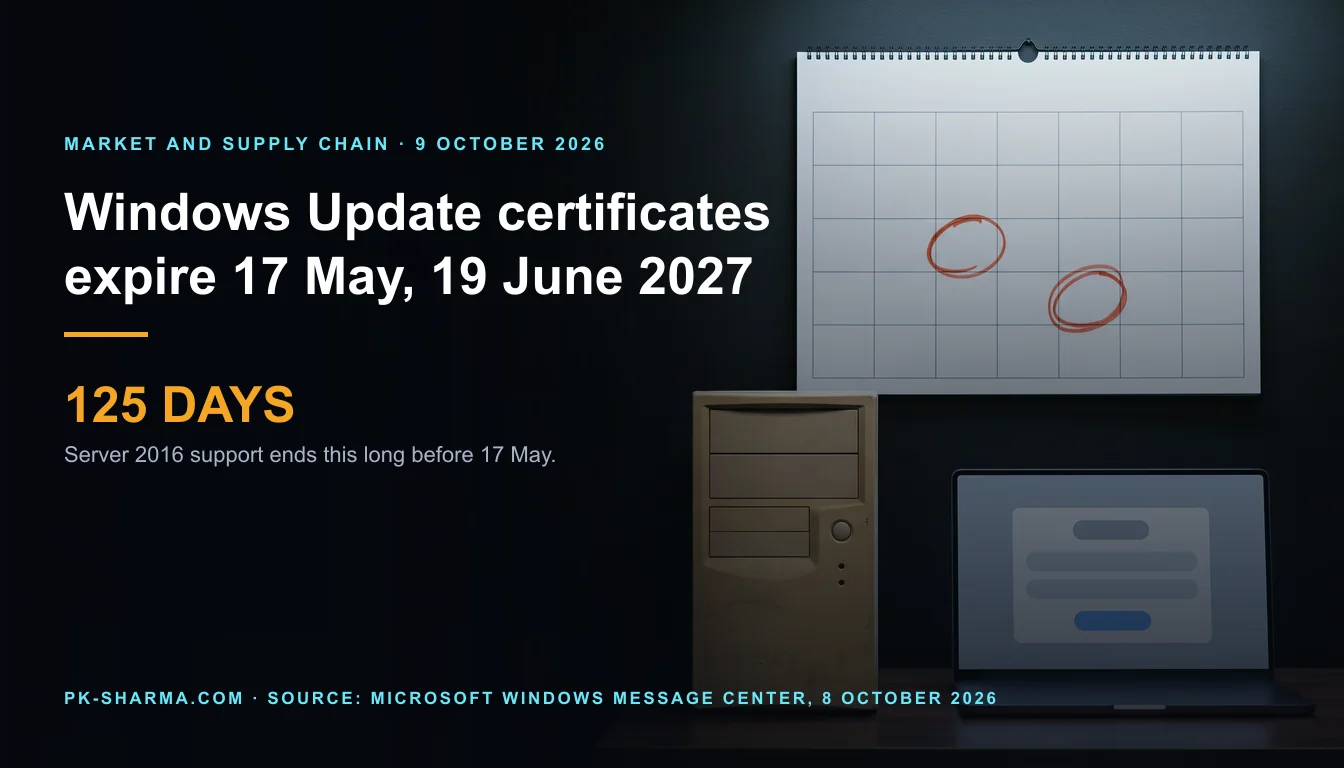
Microsoft asks Server 2016 owners to act 125 days after Server 2016 support ends
Microsoft's lifecycle page ends extended support for Windows Server 2016 on 12 January 2027. Microsoft's notice of 8 October 2026, Prepare for Windows Update certificate rotation in 2027, lists Server 2016 among the versions that must install the July 2026 security update or later before 17 May 2027. That is 125 days after extended support ends (derived). The notice sets a second date, 19 June 2027, 33 days later (derived), for every other version it names. Counted from Friday 9 October 2026, the first date is 220 days away and the second is 253 (derived).
The arithmetic establishes less than it seems to. It does not show that a Server 2016 machine loses Windows Update on 17 May. Microsoft's Windows Server ESU page says Server 2016 Extended Security Updates start on 12 January 2027, with Azure Arc as the route Microsoft's blog names, and the notice never mentions ESU. So the Server 2016 row can only be meaningful for a machine that is still receiving updates after 12 January, which means one under ESU (inference), and the notice does not say which machines it is addressed to. It does not say how many devices are affected. It does not say whether the dates will move. And it does not say what happens, on either date, to a device on a version that has already ended but holds the replacement certificates.
What it does show is that "supported" is a moving label. On Microsoft's own dates, Windows 11 24H2 Home and Pro, Windows 11 23H2 Enterprise and Education, Windows Server 2016 and Windows 10 Enterprise LTSC 2021 all leave ordinary support before the first certificate date, and only some can be kept on a support footing by buying ESU. And the check that costs least, whether a device has the July 2026 update, has already been due for some time: the NCSC's 7 days for operating system updates ended on 21 July 2026, 80 days ago (derived from the 14 July release).
Method: every figure is read from a Microsoft page unless it is marked derived (arithmetic on Microsoft's dates), inference (this briefing's reading) or UK source. BleepingComputer's report of 9 October 2026 is the pointer to Microsoft's notice and matches it. Microsoft sells Extended Security Updates and Windows licences, and the notice tells owners of old Windows to upgrade.
What the table says, counted
Microsoft publishes the same table twice: as a bullet list in the Windows message centre and as a table in the blog post. The action is always the same: a named monthly security update, or later, before a date. The notice gives no KB numbers; the build numbers that match each month are in the section on finding the estate.
Microsoft's action table for the Windows Update certificate rotation, as printed in the Windows IT Pro Blog on 8 October 2026
| Windows version, as Microsoft names it | Action Microsoft states | Before |
|---|---|---|
| Windows 11, version 25H2 and later | None | No date |
| Windows 11, version 24H2 and Windows Server 2025 | Install the September 2025 security update or later | 19 June 2027 |
| Other Windows 11 versions in support and Windows Server 2022 | Install the July 2026 security update or later | 19 June 2027 |
| Windows 10 versions in support | Install the July 2026 security update or later | 19 June 2027 |
| Windows 10 Enterprise 2019 LTSC, Windows Server 2019, Windows Server 2016 | Install the July 2026 security update or later | 17 May 2027 |
| Other Windows versions | Upgrade to a supported version of Windows client or server | No date: "they'll lose access to Windows Update services" |
Counted, the table has six rows and names nine product groups in four buckets: one needs nothing (Windows 11 25H2 and later), two must reach the September 2025 update by 19 June 2027, three the July 2026 update by 19 June 2027, and three the July 2026 update by 17 May 2027 (derived count). The sixth row, "Other Windows versions", is open: it names no version and gives no date.
On Microsoft's Windows 11 release page, "version 25H2 and later" covers three versions today: 25H2, 26H1 and 26H2, the last generally available since 29 September 2026. The same page says 26H1 is "not designed as a feature update for existing devices", so a fleet on 24H2 reaches the "no action" row through 25H2 or 26H2, not 26H1.
Microsoft names no version as "other". The table below sets the end dates on Microsoft's Windows client, Windows Server and lifecycle pages against the open row and against the versions that end first. Placing a version in "other" is this briefing's reading, not Microsoft's.
Versions that Microsoft's own pages show as ended, or ending before 17 May 2027, and the gap to 17 May 2027 (days derived)
| Version and edition | End date on Microsoft page | Days before 17 May 2027 |
|---|---|---|
| Windows Server 2012 and 2012 R2, extended support | 10 Oct 2023 | 1,315 |
| Windows 11 22H2 Home and Pro | 8 Oct 2024 | 951 |
| Windows 10 22H2, without ESU | 14 Oct 2025 | 580 |
| Windows 11 22H2 Enterprise and Education | 14 Oct 2025 | 580 |
| Windows 11 23H2 Home and Pro | 11 Nov 2025 | 552 |
| Windows 11 24H2 Home and Pro | 13 Oct 2026 | 216 |
| Windows 10 Enterprise LTSB 2016; Server 2012 and 2012 R2 ESU year 3 | 13 Oct 2026 | 216 |
| Windows 11 23H2 Enterprise and Education | 10 Nov 2026 | 188 |
| Windows Server 2016; Windows 10 Enterprise LTSC 2021 | 12 Jan 2027 | 125 |
Two rows need care. Windows 10 version 22H2 is shown as "End of updates" on the Windows 10 release page, yet ESU devices still receive updates: business ESU year two ends 12 October 2027 and year three 10 October 2028 per the ESU FAQ, and consumer ESU ends 12 October 2027 per Microsoft's consumer page. Read against those pages, "Windows 10 versions in support" can only mean 22H2 under ESU or an LTSC edition (inference); the notice does not say so. And Windows Server 2012 and 2012 R2 appear in no row of the notice, yet Microsoft's ESU table lists them until 13 October 2026.
What the notice states, and what it leaves out
The mechanism first. Microsoft says what the certificates are for, not what they are.
Microsoft's notice, the mechanism: what the message centre item and blog post state and do not state
| Question | Stated by Microsoft | Not stated |
|---|---|---|
| Which certificates | "Certificates used to establish trusted connections to Windows Update"; the blog adds that Windows Update uses certificate-based trust to confirm devices connect to authoritative Windows Update servers | Names, subjects, thumbprints or issuers; whether they are roots, intermediates or others; what else they sign |
| How a device is protected | "Devices must contain the replacement certificates to continue receiving updates after the applicable expiration date"; supported, updated versions "already have the necessary updated certificates" | A way to check that a device holds them; in the pages read, the update level is the only proxy |
| Which update carries them | Named by month: September 2025 or July 2026, or later | Any mention in those updates' own release notes (see below) |
| 17 May versus 19 June | Three products by 17 May, the rest by 19 June; "A set of these certificates will expire on May 17, 2027 and June 19, 2027" | Why the three older products are earlier; which set covers which version; what happens to Windows 11 between 17 May and 19 June |
| Unsupported versions | "will lose access to Windows Update services and won't receive any updates as a result"; the advice is to upgrade | Any fix for them (the page points to none); the date a given unsupported version loses access |
| What "access" covers | Affected devices "will stop connecting and receiving all types of updates from Windows Update" | Whether Defender updates, drivers, the Microsoft Store, Windows Update for Business or Autopatch are included; none is named |
| Extended Security Updates | ESU exists for Windows 10 22H2 (to 2027 or 2028), Windows 10 Enterprise LTSC 2021 (on sale from 1 Sep 2026) and Server 2016 (from 12 Jan 2027) | Any mention of ESU in the notice, so whether ESU-covered devices are the "in support" rows is not stated |
| An ended version that holds the certificates | The message centre tests the certificates ("without the replacement certificates"); the blog tests support status | Which test governs, for example a Windows 11 24H2 Home device that took the September 2025 update and left support on 13 October 2026 |
The last row is the one that decides the most devices, and Microsoft answers it with two different sentences. The message centre item says devices "without the replacement certificates will lose access". The blog post says devices on unsupported versions "will lose access", "as a result" of getting no updates. If the first test governs, an ended version that already holds the certificates keeps access; if the second, it does not. Neither page says (inference: the first reading fits a mechanism, the second fits a policy).
The manual route is the Microsoft Update Catalog. The blog tells owners of supported but out-of-date devices to "use Microsoft Update Catalog to directly download and install required updates". Microsoft's Catalog page, last updated 28 September 2026, says the Catalog "offers updates for all operating systems that Microsoft currently supports". It says nothing about versions Microsoft does not support, and the notice does not say whether the Catalog stays open to them.
Nothing in the updates' own release notes describes the change. This briefing searched the full text of seven Microsoft pages, the July 2026 updates for Windows 11 24H2 and 25H2 (KB5101650), Windows 10 22H2 and LTSC 2021 (KB5099539), Server 2016 (KB5099535), Server 2019 and Windows 10 LTSC 2019 (KB5099538), Server 2022 (KB5099540) and Server 2025 (KB5099536), and the September 2025 update for Windows 11 24H2 (KB5065426), for "rotation", "Windows Update certificate", "May 17, 2027" and "June 19, 2027". None appears. The certificate text in those pages is chiefly about Secure Boot, which Microsoft says was "set to expire starting in June 2026", a separate certificate problem with separate dates that the Windows Update notice does not mention. A headline that says "Windows certificates are expiring" covers at least two unrelated Microsoft changes.
"In support" is doing five jobs in that table
The notice says most devices need no action if they run "an in-support version of Windows" and are current. On Microsoft's own pages the phrase covers five different things, and they do not all stay true until the certificate dates:
- Windows 11 24H2: Home and Pro "will reach end of updates on October 13, 2026" (KB5101650); Enterprise and Education run to 12 October 2027.
- Windows 10 22H2: "End of updates" since 14 October 2025 on the release page, with ESU to 12 October 2027 (consumer, and business year two) or 10 October 2028 (business year three).
- Windows 10 Enterprise LTSC 2021: ends 12 January 2027, with its own ESU on sale from 1 September 2026, $61 USD per device for year one or $45 with Intune or Autopatch (Microsoft's planning post). IoT Enterprise LTSC 2021 is outside that offer and runs to 13 January 2032. The enable ESU page says LTSB and LTSC releases "are NOT covered via the Windows 10 ESU program", which is the 22H2 programme.
- Windows Server 2016: extended support ends 12 January 2027, and ESU starts the same day, through Azure Arc and for three more years in Azure (Windows Server blog, ESU page). The ESU FAQ table lists Windows 10 and Windows Server 2012 and 2012 R2 and not Server 2016, so Microsoft's own pages differ.
- Windows 10 Enterprise 2019 LTSC, Windows 10 IoT Enterprise LTSC 2019 and Windows Server 2019: extended support to 9 January 2029.
So "in support" on 8 October 2026 and "in support" on 17 May 2027 are different sets of devices (derived from the dates above). The friendly label is not a control: the question for each device is which row it will be in on the date, and whether it holds the update by then.
The WSUS exception says less than it appears to
Microsoft's wording is one sentence in the message centre item and the blog post: the change "does not apply to devices receiving updates from Windows Server Update Services (WSUS)". Configuration Manager is not mentioned in either. Three things on Microsoft's other pages bear on it:
- A WSUS server "connects to Microsoft Update to download updates", which Microsoft calls synchronisation, and "at least one WSUS server on your network must be able to connect to Microsoft Update" (WSUS plan, WSUS overview).
- Configuration Manager's software updates synchronisation "connects to Microsoft Update to retrieve software updates metadata", unless it is pointed at another WSUS server (Configuration Manager).
- WSUS "is deprecated and is no longer adding new features", but "continues to be supported for production deployments" (WSUS overview, page last updated 5 May 2025).
What the notice does not say is whether WSUS-managed devices need the same update, where a WSUS client gets its trust, or whether the upstream server's own synchronisation with Microsoft Update is covered by the rotation. Two readings are open (inference). One: the exception is about clients, which take content from your server and do not test Windows Update's certificates. Two: the upstream server still connects to Microsoft's service, so its operating system and update level are what matter, and the WSUS role runs on Windows Server, which Microsoft's WSUS overview says it applies to as Server 2016, 2019, 2022 and 2025. The second reading would put a Server 2016 or Server 2019 WSUS server in the 17 May row. Microsoft's pages support neither reading, so the safe course is to treat the upstream server as in scope until Microsoft says otherwise.
A client "receiving updates from WSUS" may not receive all of them from WSUS. Microsoft's WSUS deployment page warns that a policy blocking Windows Update internet locations "can break Windows Store connectivity", which suggests some traffic of a managed client still goes to Microsoft's service (inference). The exception does not define "receiving updates from" for mixed or dual-scan clients.
Offline, virtual and embedded estates
Microsoft's notice, estates and routes: what it states and does not state
| Estate | What Microsoft states elsewhere | Not stated in the notice |
|---|---|---|
| Offline or air-gapped devices | WSUS servers in a network isolated from the internet can be fed by exporting update metadata and content from a connected server to media and importing it ([WSUS plan](https://learn.microsoft.com/en-us/windows-server/administration/windows-server-update-services/plan/plan-your-wsus-deployment)) | Any mention of offline devices, or whether imported content is affected |
| Virtual machines and images | ESU for Windows 10 is free on Windows 365, Azure Virtual Desktop and Azure virtual machines ([ESU](https://learn.microsoft.com/en-us/windows/whats-new/extended-security-updates)) | Any mention of images or cloud services. An image built before July 2026 lacks the update (inference) |
| IoT and embedded | Dates: IoT Enterprise LTSC 2019 to 9 Jan 2029; LTSC 2021 to 12 Jan 2027, extended to 13 Jan 2032; Windows 11 IoT Enterprise LTSC 2024 to 10 Oct 2034 | Whether IoT editions sit in the same rows as their Enterprise twins |
| Windows 11 Enterprise LTSC 2024 | Same build line as 24H2 (26100); support to 9 Oct 2029 ([release page](https://learn.microsoft.com/en-us/windows/release-health/windows11-release-information)) | Which row it is in: 24H2 (September 2025) or "other in-support" (July 2026) |
Where the notice is silent, the test in Microsoft's own sentence still works: "Devices must contain the replacement certificates." For an offline device or a template that is never updated, the notice's test is the update level, not whether the device is online. An air-gapped server that never touches Windows Update is not affected by losing it, but it also never gets the new certificates, so the day it is first connected after the dates is the day the question arises (inference).
What "lose access" covers, and what stays open
The blog says affected devices stop receiving "all types of updates from Windows Update". It names none of them. Microsoft's Defender update page lists Windows Update as one of several ways to install security intelligence and engine updates, alongside WSUS, a software update point, a file server and the Windows Security app, and says platform updates can also come from the Windows Update Catalog. It also says cloud-delivered protection "is always on and requires an active connection to the internet". The notice says nothing about whether Defender's own update channel is affected, and this briefing cannot establish it.
The NCSC's obsolete products guidance states the general risk: anti-malware products "may not be updated when running on an unsupported operating system". That is a general statement, not a finding about Microsoft Defender after 17 May or 19 June.
What the UK sources say
Cyber Essentials sets a clock that UK suppliers are assessed against. The Requirements for IT Infrastructure v3.3 (April 2026, read from the NCSC PDF) define "licensed and supported software" as software "a vendor has committed to support by providing regular vulnerability fixes", where the vendor "must provide the future date when they will stop providing these". Section 3, Security Update Management, then requires all in-scope software to be licensed and supported and to be "removed from devices when it becomes unsupported", or removed from scope "by using a defined sub-set that prevents all traffic to or from the internet". Critical or high-risk fixes must be installed within 14 days.
By that definition, Server 2016's vendor date is 12 January 2027: from 13 January a Server 2016 machine in scope has to be removed, isolated or covered by something that makes it supported (inference from the definition). The PDF does not mention Extended Security Updates, so how an assessor treats ESU is not in the document read.
UK sources read for this briefing, and what each does and does not say about the rotation
| Source | What it says | What it does not say |
|---|---|---|
| Cyber Essentials requirements v3.3, April 2026 (NCSC PDF) | Supported means a vendor date for the end of fixes; unsupported software removed or isolated; 14 days for critical and high fixes | Anything about Windows Update, certificates or ESU |
| NCSC, "Put in place a policy to update by default", v2.1, reviewed 1 May 2026 | Update completed within 5 days for internet-facing software, 7 days for operating systems and applications, 14 days for internal or air-gapped software | Any vendor-specific date; the 7 days apply to updates "published", so the July 2026 update was due by 21 July (derived) |
| NCSC, "Obsolete products", v2.1, reviewed 13 May 2025 | "The only fully effective way to mitigate this risk is to stop using the obsolete product"; if not, treat devices as untrusted, block email and browsing, zone the network | Any statement about Windows Update access after support ends |
| NHS England, "Windows 10 end of support October 2025", last edited 26 June 2025 | All trusts and ICBs "must transition to Windows 11" | Anything after October 2025, including ESU and certificates |
| NHS England, DSPT Data Security Standard 8, edited 8 October 2025 (2023-24 standard) | "No unsupported operating systems, software or internet browsers are used within the IT estate"; accepts that not all can be upgraded | Anything about the Windows Update rotation |
No UK source read here mentions the rotation. Cyber Essentials and the NCSC treat "supported" as a vendor commitment with a date, so the notice's real effect on a UK assessment is indirect: it moves forward the day a device with no update path becomes a finding, and it makes the question "which devices are on which row" an assessment question. The same arithmetic on another vendor's support dates is in brief 241, and the 14-day clock applied to an advisory is in brief 272. This briefing found no NHS England statement after October 2025 on Windows 10 devices still in use; none is claimed.
What an organisation has to decide before May 2027
For each device that is not on the no-action row, there are four choices, and Microsoft's pages say different things about each.
The four choices for a device on an ended or ending version, with what Microsoft's pages say
| Choice | What Microsoft states | What it does not say |
|---|---|---|
| Upgrade in place or reimage | No action once on Windows 11 25H2 or later; devices that do not meet Windows 11 requirements "might not be able to install Windows 11" ([lifecycle FAQ](https://learn.microsoft.com/en-us/lifecycle/faq/windows)) | How many of your devices fail the requirements |
| Replace | Microsoft names Windows 11 Enterprise LTSC 2024 as the move from LTSC 2021 ([planning post](https://techcommunity.microsoft.com/blog/windows-itpro-blog/plan-for-windows-10-enterprise-ltsc-2021-end-of-support/4539866)) and Windows Server 2025 or Azure for Server 2016 ([Windows Server blog](https://www.microsoft.com/en-us/windows-server/blog/2026/02/25/planning-ahead-for-windows-server-2016-end-of-support/)) | Lead times, or the build a new device ships at |
| Buy ESU, where it is sold | Windows 10 22H2, business: $61 USD per device for year one, doubling each year for up to three years ([ESU](https://learn.microsoft.com/en-us/windows/whats-new/extended-security-updates), page last updated 17 Nov 2025); year ends 13 Oct 2026, 12 Oct 2027, 10 Oct 2028. Consumer to 12 Oct 2027 ([consumer page](https://www.microsoft.com/en-gb/windows/extended-security-updates)). LTSC 2021: separate offer, $61 or $45 with Intune or Autopatch, from 1 Sep 2026 ([planning post](https://techcommunity.microsoft.com/blog/windows-itpro-blog/plan-for-windows-10-enterprise-ltsc-2021-end-of-support/4539866)). Server 2016: from 12 Jan 2027, through Azure Arc and for three more years in Azure ([ESU page](https://www.microsoft.com/en-us/windows-server/extended-security-updates)) | Whether ESU devices count as "in support" for the notice; any Server 2016 ESU price (none read); any ESU for Windows 11 24H2 Home and Pro or for IoT LTSC 2021 |
| Isolate | Not discussed in the notice. The NCSC and Cyber Essentials describe isolation (UK section) | Whether an isolated device that keeps working after the dates still needs the update |
ESU is cumulative: Microsoft says a year-two purchase also needs year one. If a business enrolled for Windows 10 year one only, that coverage ends on 13 October 2026, four days from this briefing. Prices on Microsoft's pages are in US dollars and carry a date; this briefing makes no claim about UK prices it did not read.
Finding the estate: build numbers, update source, image age
Microsoft's own plan is three steps: identify devices on older or unsupported versions, keep supported devices current, and make an upgrade plan before May and June 2027. The first step needs a field most inventories already hold, the build number. The table below gives the build Microsoft lists for each month the notice names. A device on the same version with a higher revision number after the dot has the update or a later one, because Microsoft says the monthly releases are cumulative (inference for the comparison; the cumulative statement is Microsoft's, on the Windows 11 release page).
Build numbers of the updates the notice names, from Microsoft's release health pages (build is the number Microsoft lists for that update)
| Product | July 2026 update (KB, build) | September 2025 update (KB, build) |
|---|---|---|
| Windows 11 24H2 and 25H2 | KB5101650, 26100.8875 and 26200.8875 | KB5065426, 26100.6584 (24H2) |
| Windows 11 23H2 | KB5099414, 22631.7376 | Not needed |
| Windows 10 22H2 and LTSC 2021 | KB5099539, 19045.7548 and 19044.7548 | Not needed |
| Windows 10 LTSC 2019 and Server 2019 | KB5099538, 17763.9020 | Not needed |
| Windows Server 2016 | KB5099535, 14393.9339 | Not needed |
| Windows Server 2022 | KB5099540, 20348.5386 | Not needed |
| Windows Server 2025 | KB5099536, 26100.33158 | KB5065426, 26100.6584 |
Add three fields the build number does not give. The update source: WSUS, Configuration Manager, Windows Update or Windows Update for Business, because the notice treats them differently. The image age: any golden image or template built before July 2026 (or, for 24H2 and Server 2025, before September 2025) lacks the update. And the last time each device was online, because an offline device that has never installed the update has the same exposure as a neglected one. Microsoft offers no method for checking that a device holds the replacement certificates, so the update level is the only evidence.
A dated plan, to scale
The diagram draws Microsoft's two dates and the end dates of the versions near its list on one axis, to scale. The gap between 12 January and 17 May is the stretch in which Server 2016 and Windows 10 Enterprise LTSC 2021 are out of support but the notice still asks for an update.
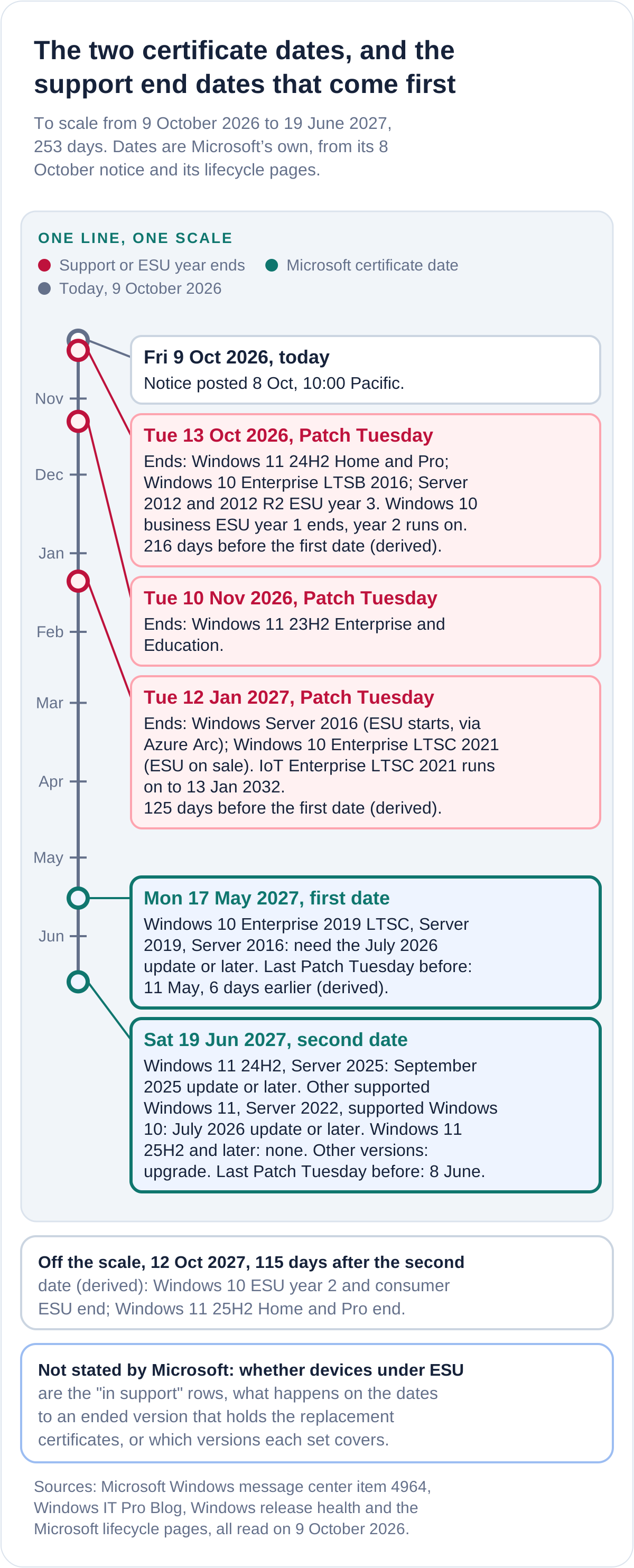
The plan, with dates. Patch Tuesday is the second Tuesday of the month, per Microsoft's Windows 11 release page.
- Tuesday 13 October 2026: Patch Tuesday. Windows 11 24H2 Home and Pro, Windows 10 Enterprise LTSB 2016 and Server 2012 and 2012 R2 ESU year 3 end. Business ESU year 1 ends. Take the update and start the inventory.
- Tuesday 10 November 2026: Windows 11 23H2 Enterprise and Education ends.
- Tuesday 12 January 2027: Windows Server 2016 and Windows 10 Enterprise LTSC 2021 end. Any device still there is on a version with no path except isolation or ESU where sold.
- Tuesday 11 May 2027: the last Patch Tuesday before 17 May, six days earlier (derived). Friday 14 May is the last working day before the date.
- Monday 17 May 2027: first certificate date.
- Tuesday 8 June 2027: the last Patch Tuesday before 19 June, 11 days earlier (derived).
- Saturday 19 June 2027: second certificate date. Friday 18 June is the last working day before it.
What to do, in order
Take this with you
Defender actions, in the order worth doing
- List every Windows device with edition, version, build number, update source, last-online date and image age. Microsoft names this as its first step.
- Separate the devices at or above the July 2026 build in the build-number table (September 2025 for 24H2 and Server 2025) from those below it. Those below are already outside the NCSC 7-day clock.
- Mark the devices whose version ends before 19 June 2027 on Microsoft's dates: Windows 11 24H2 Home and Pro, 23H2 Enterprise and Education, Server 2016 and Windows 10 Enterprise LTSC 2021.
- For every Server 2016, Server 2019 and Windows 10 LTSC 2019 device, put 11 May 2027 in the plan as the last Patch Tuesday before the first date.
- Treat the upstream WSUS server, and any server that synchronises with Microsoft Update, as in scope until Microsoft says the exception covers it.
- Decide upgrade, replace, isolate or ESU per device and record it; for Cyber Essentials, record how each unsupported device is removed or kept out of scope.
- Rebuild or patch golden images and templates to the July 2026 update, and check that cloned virtual machines inherit it.
- Ask your Microsoft account team three questions in writing: whether an ended version holding the certificates keeps access, whether ESU devices are in the "in support" row, and what the WSUS exception covers.
- Record 17 May and 19 June 2027 in the risk register with the owner of each device group, and re-read Microsoft's notice on each Patch Tuesday for changes.
What is not established, and what could not be read
Not established: how many devices are affected; whether Microsoft will move either date; the names and scope of the certificates; what Microsoft's own Defender platform does after the dates; what an ended version holding the replacement certificates loses; and how a Cyber Essentials assessor treats ESU. Not read: any Microsoft statement beyond the three forms of the 8 October notice and the pages they link, any Microsoft page on the certificates themselves (none was found in the pages read), and any UK public-sector statement after October 2025 on this change. The consumer ESU page, the lifecycle and release pages and the KB pages are as published on 9 October 2026 and change monthly.
The question this leaves
Microsoft has given 220 days to the first date. Which of your Windows devices are on a version that Microsoft's own lifecycle pages say will have ended before 19 June 2027, and could your inventory list them today, with the build number that shows whether each holds the July 2026 update?
Key facts
Sources
- PrimaryItem 'Prepare for Windows Update certificate rotation in 2027', dated 2026-10-08 10:00 PT, read in full in a browser tab: the two dates, the five actions by version, the WSUS sentence. Microsoft sells ESU and Windows licences.Microsoft, Windows message centeraccessed 2026-10-09
- PrimaryThe full notice (version 2.0, 8 October 2026), read in full: the six-row table, the three outcome paragraphs, the Microsoft Update Catalog route, the action plan.Microsoft, Windows IT Pro Blogaccessed 2026-10-09
- PrimaryThe discussion post linked from the blog (8 October 2026), read in full: one paragraph and links to Autopatch, Windows Update for Business and Intune pages; no replies when read.Microsoft, Microsoft Community Hubaccessed 2026-10-09
- PrimarySupported versions of Windows client, last updated 2026-09-29: end-of-updates dates for Windows 11 24H2, 25H2, 26H1, 26H2 and Windows 10 22H2, LTSC 2019 and 2021, LTSB 2016.Microsoft, Windows release healthaccessed 2026-10-09
- PrimaryWindows Server release information: mainstream and extended end dates for Server 2016, 2019, 2022 and 2025 and the KB and build of each monthly update.Microsoft, Windows release healthaccessed 2026-10-09
- PrimaryWindows 11 release information: versions, builds, KB numbers, the second-Tuesday release cadence and the note that 26H1 is not designed as a feature update for existing devices.Microsoft, Windows release healthaccessed 2026-10-09
- PrimaryWindows 10 release information: 22H2 'End of updates', LTSC 2021 end date, LTSB 2016 extended end 2026-10-13, KB and build of the July 2026 update.Microsoft, Windows release healthaccessed 2026-10-09
- PrimaryWindows Server 2016 lifecycle: extended end date 12 January 2027.Microsoft, Microsoft Lifecycleaccessed 2026-10-09
- PrimaryWindows Server 2019 lifecycle: extended end date 9 January 2029.Microsoft, Microsoft Lifecycleaccessed 2026-10-09
- PrimaryWindows Server 2022 lifecycle: mainstream end 13 October 2026, extended end 14 October 2031.Microsoft, Microsoft Lifecycleaccessed 2026-10-09
- PrimaryWindows Server 2025 lifecycle: extended end 14 November 2034.Microsoft, Microsoft Lifecycleaccessed 2026-10-09
- PrimaryWindows Server 2012 R2 lifecycle: extended end 10 October 2023, ESU year 3 ends 13 October 2026.Microsoft, Microsoft Lifecycleaccessed 2026-10-09
- PrimaryWindows 10 Home and Pro lifecycle: 22H2 retired 14 October 2025.Microsoft, Microsoft Lifecycleaccessed 2026-10-09
- PrimaryWindows 10 Enterprise LTSC 2019 lifecycle: extended end 9 January 2029.Microsoft, Microsoft Lifecycleaccessed 2026-10-09
- PrimaryWindows 10 Enterprise LTSC 2021 lifecycle: mainstream end 12 January 2027.Microsoft, Microsoft Lifecycleaccessed 2026-10-09
- PrimaryWindows 10 IoT Enterprise LTSC 2021 lifecycle: mainstream end 12 January 2027, extended end 13 January 2032.Microsoft, Microsoft Lifecycleaccessed 2026-10-09
- PrimaryWindows 11 Home and Pro lifecycle: end dates by version, 24H2 13 October 2026, 23H2 11 November 2025, 22H2 8 October 2024.Microsoft, Microsoft Lifecycleaccessed 2026-10-09
- PrimaryWindows 11 Enterprise and Education lifecycle: 24H2 12 October 2027, 23H2 10 November 2026, 22H2 14 October 2025.Microsoft, Microsoft Lifecycleaccessed 2026-10-09
- PrimaryESU availability and end dates table: Windows 10 year ends 13 October 2026, 12 October 2027, 10 October 2028; Windows Server 2012 and 2012 R2 year 3 ends 13 October 2026.Microsoft, Microsoft Lifecycle FAQaccessed 2026-10-09
- PrimaryWindows 10 ESU programme page, last updated 17 November 2025: business price of 61 US dollars per device for year one, doubling yearly for up to three years; cumulative; free on Windows 365 and Azure.Microsoft, Microsoft Learnaccessed 2026-10-09
- PrimaryEnable Windows 10 ESU, last updated 22 April 2026: prerequisites KB5066791 and KB5072653; LTSB and LTSC releases are not covered via the Windows 10 ESU programme.Microsoft, Microsoft Learnaccessed 2026-10-09
- PrimaryWindows 10 Consumer ESU page: enrolment possible until the programme ends on 12 October 2027; no cost with settings sync, 1,000 Rewards points or a one-time 30 US dollars.Microsoft, Microsoft Windowsaccessed 2026-10-09
- PrimaryPlan for Windows 10 Enterprise LTSC 2021 end of support (5 August 2026): end 12 January 2027; separate ESU on sale from 1 September 2026 at 61 US dollars, 45 with Intune or Autopatch; not for IoT Enterprise LTSC.Microsoft, Windows IT Pro Blogaccessed 2026-10-09
- PrimaryExtended Security Updates for SQL Server and Windows Server: Windows Server 2016 extended support ends and its ESU starts on 12 January 2027; ESU enabled by Azure Arc; three more years in Azure.Microsoft, Windows Serveraccessed 2026-10-09
- PrimaryPlanning ahead for Windows Server 2016 end of support (25 February 2026): extended support ends 12 January 2027; ESU announced through Azure Arc.Microsoft, Windows Server Blogaccessed 2026-10-09
- PrimaryKB5101650, July 2026 update for Windows 11 24H2 and 25H2: full text searched for the rotation (not found); states 24H2 Home and Pro end of updates on 13 October 2026.Microsoft, Microsoft Supportaccessed 2026-10-09
- PrimaryKB5099539, July 2026 update for Windows 10 22H2 and LTSC 2021: full text searched (not found); Secure Boot certificate note; LTSC 2021 end date.Microsoft, Microsoft Supportaccessed 2026-10-09
- PrimaryKB5099535, July 2026 update for Windows Server 2016: full text searched (not found); end dates for LTSB 2016 and Server 2016.Microsoft, Microsoft Supportaccessed 2026-10-09
- PrimaryKB5099538, July 2026 update for Windows Server 2019 and Windows 10 LTSC 2019: full text searched (not found).Microsoft, Microsoft Supportaccessed 2026-10-09
- PrimaryKB5099540, July 2026 update for Windows Server 2022: full text searched (not found).Microsoft, Microsoft Supportaccessed 2026-10-09
- PrimaryKB5099536, July 2026 update for Windows Server 2025: full text searched (not found).Microsoft, Microsoft Supportaccessed 2026-10-09
- PrimaryKB5065426, September 2025 update for Windows 11 24H2: full text searched (not found).Microsoft, Microsoft Supportaccessed 2026-10-09
- PrimaryWSUS overview, last updated 5 May 2025: a WSUS server must be able to connect to Microsoft Update; WSUS is deprecated but supported.Microsoft, Microsoft Learnaccessed 2026-10-09
- PrimaryPlan your WSUS deployment, last updated 28 July 2026: synchronisation with Microsoft Update; the disconnected export and import option.Microsoft, Microsoft Learnaccessed 2026-10-09
- PrimaryConfiguration Manager software updates introduction, last updated 19 July 2026: synchronisation connects to Microsoft Update.Microsoft, Microsoft Learnaccessed 2026-10-09
- PrimaryDeploy updates using WSUS, last updated 17 June 2025: policy settings and the warning about Windows Store connectivity.Microsoft, Microsoft Learnaccessed 2026-10-09
- PrimaryMicrosoft Update Catalog how-to, last updated 28 September 2026: the Catalog offers updates for all operating systems that Microsoft currently supports.Microsoft, Microsoft Learnaccessed 2026-10-09
- PrimaryMicrosoft Defender Antivirus security intelligence and product updates, last updated 14 May 2026: the routes by which intelligence and platform updates are installed.Microsoft, Microsoft Learnaccessed 2026-10-09
- PrimaryLifecycle FAQ for Windows: monthly quality updates require a supported version; Windows 11 minimum system requirements.Microsoft, Microsoft Lifecycle FAQaccessed 2026-10-09
- PrimaryRequirements for IT Infrastructure v3.3, April 2026, read as the NCSC PDF: definition of licensed and supported software; security update management requirements; 14 days; sub-set definition.NCSC, Cyber Essentialsaccessed 2026-10-09
- Primary'Put in place a policy to update by default', version 2.1, published 12 February 2024, reviewed 1 May 2026: 5, 7 and 14 day timescales.NCSCaccessed 2026-10-09
- Primary'Obsolete products', version 2.1, published 29 June 2021, reviewed 13 May 2025: risks and mitigations for unsupported software; the antivirus caveat.NCSCaccessed 2026-10-09
- Primary'Windows 10 end of support October 2025', last edited 26 June 2025: trusts and ICBs must transition to Windows 11.NHS England Digitalaccessed 2026-10-09
- PrimaryData Security Standard 8, unsupported systems, last edited 8 October 2025, relating to the 2023-24 (version 6) standard.NHS England Digitalaccessed 2026-10-09
- Reported byNews report of 9 October 2026 that points to the message center item; used as the pointer only and checked line by line against Microsoft's pages.BleepingComputeraccessed 2026-10-09