Outlook's .msix block adds two extensions to a 133-entry list, in two clients, with no abuse figure
Microsoft's Message Center post MC1488841 says Outlook on the web and new Outlook for Windows will block .msix and .msixbundle from early November 2026. It gives no abuse figure, no day and no word on classic Outlook; Microsoft's own 2023 MSIX abuse reports describe links, not attachments.
By Parminder Kumar Sharma · · 9 min read
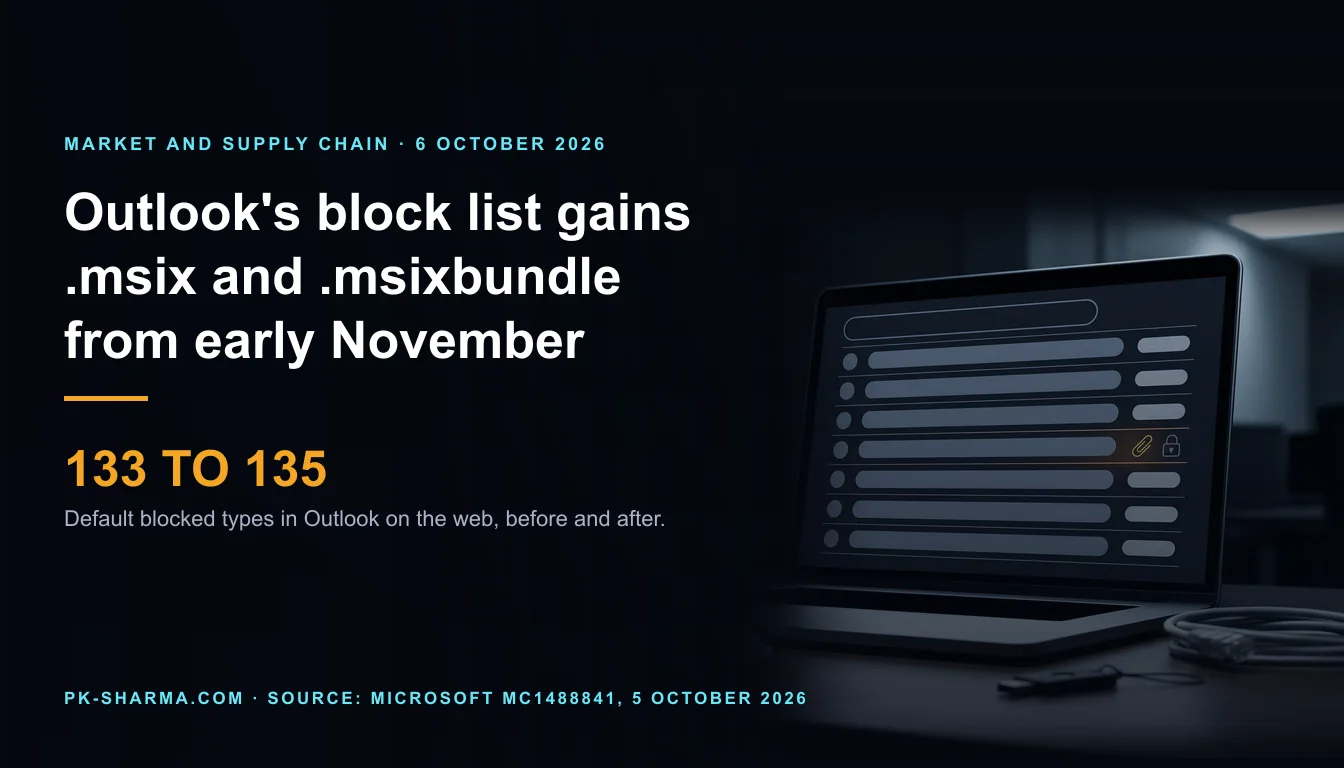
133 entries become 135, from a date Microsoft gives only as a month
Microsoft's Message Center post MC1488841, published at 22:40 UTC on 5 October 2026, says .msix and .msixbundle (Windows application packages and bundles) will be added to the BlockedFileTypes list in every Outlook on the web mailbox policy, default and custom. Microsoft Learn's page for Set-OwaMailboxPolicy, updated on 8 September 2026, lists 133 default entries and neither is among them: the default goes from 133 to 135 (our count). The related package type .appx joined the list from April 2020, per the Exchange Team's blog: 79 months before these two (our count, to November 2026).
The window is a month, not a date: rollout "begins in early November 2026 and is expected to complete by mid-November 2026". Read as 1 and 15 November, that is 26 and 40 days from Tuesday 6 October. Microsoft gives no day, so those markers are ours.
What that does not establish. Not that .msix attachments have been abused in email: the post gives no abuse figure, only "ongoing efforts to strengthen security" and a wish to protect against "potentially unsafe file attachments". Not that every client is covered: it names Outlook on the web and new Outlook for Windows, and is silent on classic Outlook, Outlook for Mac and the mobile apps. Not that other routes are closed: Microsoft's own 2023 reports of MSIX abuse describe web pages and Teams links, not attachments. And a signed package is not a safe one.
What the notice states and what it does not
What Message Center post MC1488841 states, and what it leaves out. Read 6 October 2026. Quoted wording is Microsoft's.
- Point
- Clients
- Stated
- Outlook on the web, new Outlook for Windows, Exchange Online.
- Not stated
- Classic Outlook, Outlook for Mac, iOS and Android.
- Point
- Window
- Stated
- Early to mid-November 2026, in Worldwide, GCC, GCC High and DoD.
- Not stated
- A day, or a tenant order.
- Point
- Mechanism
- Stated
- Added to BlockedFileTypes in all OWA mailbox policies, default and custom.
- Not stated
- Whether a type already allowed stays allowed.
- Point
- Effect
- Stated
- Users can no longer open or download them.
- Not stated
- Whether old messages are covered (our inference: yes).
- Point
- Reason
- Stated
- "Ongoing efforts to strengthen security" against "potentially unsafe file attachments"; the types are "infrequently used".
- Not stated
- Any abuse figure, incident or campaign.
- Point
- Admin control
- Stated
- Add to AllowedFileTypes before rollout; no action if unused.
- Not stated
- A tenant-wide switch, or who is affected.
- Point
- Other routes
- Stated
- Nothing.
- Not stated
- Links, archives, Teams, other mail systems.
| Point | Stated | Not stated |
|---|---|---|
| Clients | Outlook on the web, new Outlook for Windows, Exchange Online. | Classic Outlook, Outlook for Mac, iOS and Android. |
| Window | Early to mid-November 2026, in Worldwide, GCC, GCC High and DoD. | A day, or a tenant order. |
| Mechanism | Added to BlockedFileTypes in all OWA mailbox policies, default and custom. | Whether a type already allowed stays allowed. |
| Effect | Users can no longer open or download them. | Whether old messages are covered (our inference: yes). |
| Reason | "Ongoing efforts to strengthen security" against "potentially unsafe file attachments"; the types are "infrequently used". | Any abuse figure, incident or campaign. |
| Admin control | Add to AllowedFileTypes before rollout; no action if unused. | A tenant-wide switch, or who is affected. |
| Other routes | Nothing. | Links, archives, Teams, other mail systems. |
A list that grows in steps, and an order that matters
This is the fifth step. The Exchange Team announced 41 extensions in September 2019 and added 2 in 2020 and 5 in 2022; a Message Center post of 9 June 2025 added 2. Those four account for 50 of the 133 (our script check against Learn's list). Each time: a named list of extensions, called rarely used, and a property that undoes it.
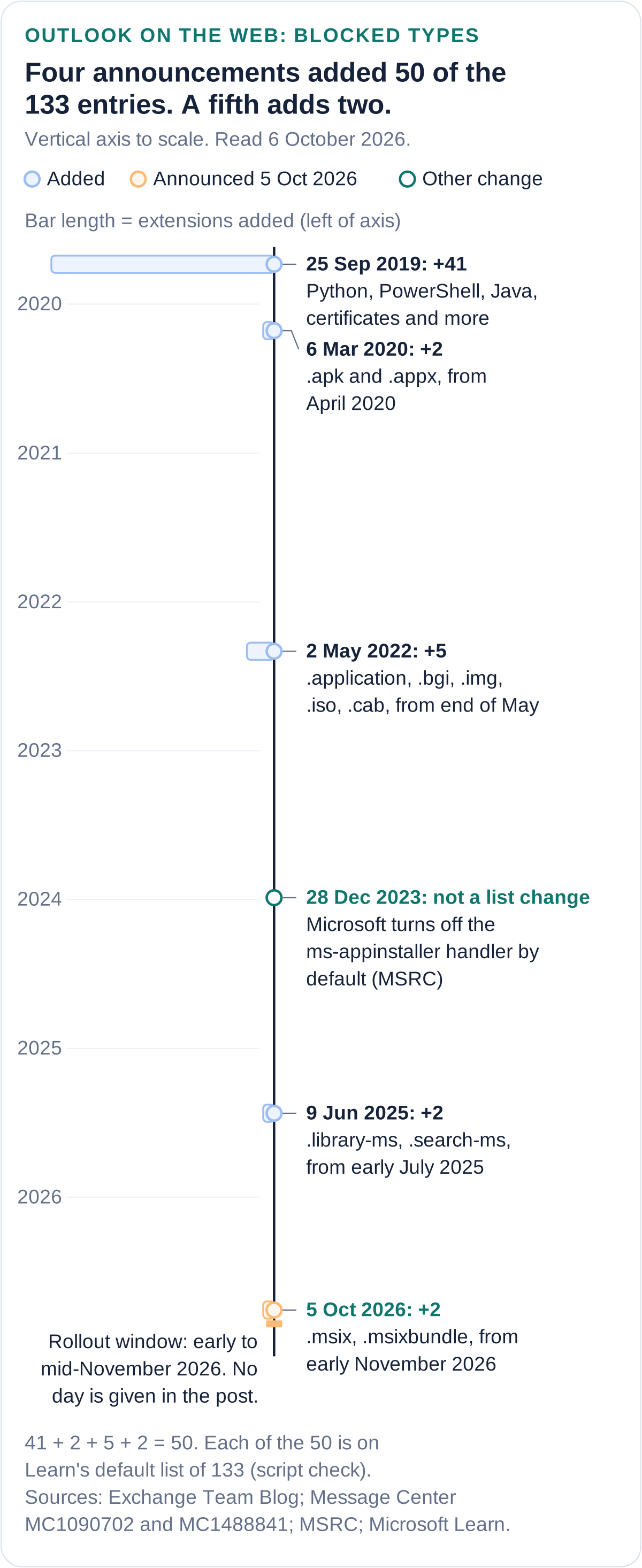
Order matters. The 2019 post said Microsoft would not add an extension to BlockedFileTypes if it was already in AllowedFileTypes; the 2026 post does not repeat that. Learn says the Block list overrides the Allow list. So allow before the rollout; afterwards the fix is to remove the type from BlockedFileTypes.
A blocklist matches a name in one client family
"Blocked file types" reads as a control that stops installers arriving. It is a list of extensions, checked in two named clients, that an administrator can switch off per policy with one property. The Register's "naughty step" implies a punishment; the file is not judged, only its name. Microsoft's own support page names three ways round a block: a cloud link, a zip and a renamed extension.
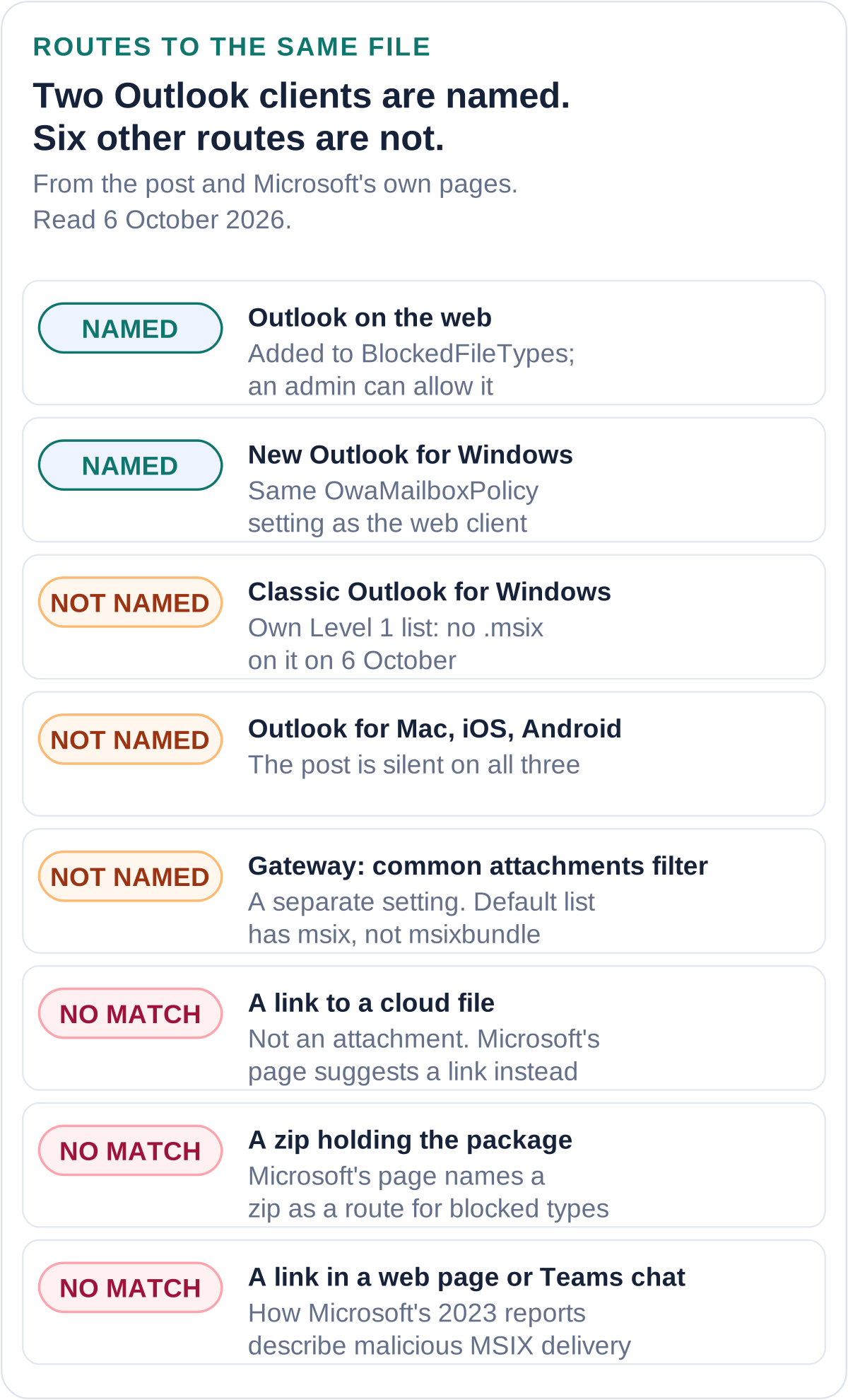
What Microsoft reported in 2023. Microsoft Threat Intelligence (28 December 2023) described signed malicious MSIX packages reached through malicious advertisements and Teams chat links; Microsoft disabled the ms-appinstaller handler by default. Email appears only in one actor's profile, as phishing emails with links. Red Canary (12 January 2024) saw three clusters between July and December 2023, each drawn in by malicious advertising or search poisoning. Neither describes attachments or gives an email volume: not proof none were sent, only no primary that says so.
A gateway control may already cover this. Learn says the common attachments filter in Exchange Online anti-malware policies rejects messages with listed types, by default with a non-delivery report, and its default list already includes msix and appx but not msixbundle. It is on by default in new policies and in the default policy of organisations created after 1 December 2023; older or edited tenants may differ. It acts on the message in transit (our reading), so it covers clients the post does not name.
A signature is not an approval. Learn says all MSIX packages must be signed. Microsoft's 2023 account says it worked with certificate authorities to revoke code signing certificates that malware abused. A valid signature says who signed, not that you approved.
What the NCSC and Cyber Essentials say
What UK guidance says about attachment filtering and application control, and what it leaves out. Read 6 October 2026.
- Source
- NCSC phishing guidance (modified 14 September 2026)
- Says
- Filtering can use attachment types. Share files through an access-controlled cloud account, not as attachments.
- Does not say
- Which types. Anything about MSIX.
- Source
- NCSC malware guidance (modified 28 July 2026)
- Says
- Filter to "only allow file types you would expect to receive".
- Does not say
- Any extension by name. Who decides what is expected.
- Source
- Cyber Essentials v3.3 (April 2026), malware protection
- Says
- Names malicious email attachments as a source. Needs at least one of anti-malware or allow listing: approved applications, "restricted by code signing".
- Does not say
- An attachment filter. MSIX.
| Source | Says | Does not say |
|---|---|---|
| NCSC phishing guidance (modified 14 September 2026) | Filtering can use attachment types. Share files through an access-controlled cloud account, not as attachments. | Which types. Anything about MSIX. |
| NCSC malware guidance (modified 28 July 2026) | Filter to "only allow file types you would expect to receive". | Any extension by name. Who decides what is expected. |
| Cyber Essentials v3.3 (April 2026), malware protection | Names malicious email attachments as a source. Needs at least one of anti-malware or allow listing: approved applications, "restricted by code signing". | An attachment filter. MSIX. |
Microsoft's change is its default, not a UK requirement, and none of these mentions it. The NCSC's wording is allow-by-expectation, the reverse of extending a named block list (our reading). Cyber Essentials allow listing needs both an approval and a valid signature; Learn says one App Control rule can cover a whole packaged app, by signer or package family name.
Before November: a checklist for UK Exchange Online administrators and MSPs
The post says no action is needed if you do not rely on the types. This order tests that first. Items marked as our judgement are ours, not Microsoft's.
Take this with you
In the order worth doing
- Open MC1488841 in your own tenant and note its dates. Posts are tenant specific and can be revised; check weekly to mid-November.
- Find out whether the types already reach mailboxes. Read EnableFileFilter and FileTypes in your anti-malware policies: with the filter on and the default list, .msix is rejected at the gateway and .msixbundle is not. Adding it there covers every client (our judgement).
- Count who legitimately receives them: in Defender for Office 365 advanced hunting, search attachment records for both extensions. Raw data goes back 30 days unless you extend retention.
- Allow per policy, not tenant-wide. Find each affected user's OwaMailboxPolicy and add the extensions to AllowedFileTypes only on the policy covering the people who need them, before rollout. Afterwards the Block list wins.
- Tell developers, software distribution and any supplier that emails packages that attachments stop opening in two clients from early November.
- Check that Intune, Configuration Manager or another channel carries your packages, so nobody needs the email route.
- Decide what may run, not only what may arrive: an App Control or AppLocker rule on packaged apps, by signer or package family name, so an unapproved package fails even if signed (our reading of Cyber Essentials).
- Settle your position on classic Outlook, Mac and mobile. Classic Outlook has its own Level 1 list and policies, not OwaMailboxPolicy; blocking .msix there is a separate change.
Get-MalwareFilterPolicy | Format-List Identity,EnableFileFilter,FileTypeAction,FileTypes
Get-OwaMailboxPolicy | Format-List Name,IsDefault,AllowedFileTypes,BlockedFileTypes
Get-CasMailbox -Identity <user> | Format-List OwaMailboxPolicy
EmailAttachmentInfo
| where Timestamp > ago(30d)
| where FileName endswith ".msix" or FileName endswith ".msixbundle"
| summarize Messages = dcount(NetworkMessageId) by SenderFromAddress, RecipientEmailAddress
What we could not verify
The question this leaves
On the day someone double-clicks a package that arrived by a link, a zip or classic Outlook, which control in your tenant says no: a list of extensions in two clients, or a rule that checks whether you approved the package?
Key facts
Sources
- PrimaryMicrosoft 365 Message Center post MC1488841, 'Microsoft Outlook: Update to default blocked file types in OwaMailboxPolicy', read in full as a copy; used for the clients, the early to mid-November 2026 window, the BlockedFileTypes mechanism, the admin recommendation and the reasons given. The archive says to treat a tenant's own Message Center as the source of truthMicrosoft 365 Message Center (copy in a community archive)accessed 2026-10-06
- PrimaryThe raw Graph record for MC1488841 and its history file: start time 2026-10-05T22:40:18Z, last modified 2026-10-05T22:40:41.823Z, one captured version, category planForChange, severity normalMicrosoft 365 Message Center (raw record in a community archive)accessed 2026-10-06
- PrimaryMessage Center post MC1090702, 9 June 2025, 'Update to Default blocked file types in Outlook web and new Outlook for Windows': .library-ms and .search-ms added from early July 2025; used for the 2025 step in the timelineMicrosoft 365 Message Center (copy in a community archive)accessed 2026-10-06
- PrimarySet-OwaMailboxPolicy, page updated 8 September 2026: the 133 default BlockedFileTypes, the default AllowedFileTypes and the rule that the Block list overrides the Allow listMicrosoft Learnaccessed 2026-10-06
- PrimaryBlocked attachments in Outlook: the table of 133 extensions, identical to Learn's list and without .msix or .msixbundle; the 'Applies to' clients; the three ways round a blockMicrosoft Supportaccessed 2026-10-06
- PrimaryKB 829982, Outlook blocked access to the following potentially unsafe attachments: the definition of Level 1 and the link from Level 1 to the 133-extension pageMicrosoft Supportaccessed 2026-10-06
- PrimaryChanges to File Types Blocked in Outlook on the web, 25 September 2019, updated 6 March 2020 and 2 May 2022: the 41, 2 and 5 extensions, the AllowedFileTypes advice and the statement that an allowed type is not added to the block listMicrosoft Exchange Team Blogaccessed 2026-10-06
- PrimaryPolicy Management in new Outlook for Windows, updated 29 May 2026: new Outlook for Windows takes AllowedFileTypes and BlockedFileTypes from Set-OwaMailboxPolicyMicrosoft Learnaccessed 2026-10-06
- PrimaryMap classic Outlook policies to new Outlook, updated 11 September 2025: classic Outlook's Level 1 and Level 2 attachment policies are separate from the OwaMailboxPolicy parametersMicrosoft Learnaccessed 2026-10-06
- PrimaryAnti-malware protection for email, updated 12 June 2026: the common attachments filter, its default file types (including msix and appx, not msixbundle) and its true-type matchingMicrosoft Learnaccessed 2026-10-06
- PrimarySet-MalwareFilterPolicy, updated 16 May 2026: EnableFileFilter, FileTypes and FileTypeAction, and the same default listMicrosoft Learnaccessed 2026-10-06
- PrimaryRecommendations for Microsoft 365 security settings, updated 10 August 2026: the common attachments filter is on by default in new policies and in the default policy of organisations created after 1 December 2023Microsoft Learnaccessed 2026-10-06
- PrimaryEmailAttachmentInfo table, updated 6 July 2026: the FileName and FileExtension columns and the Defender for Office 365 requirementMicrosoft Learnaccessed 2026-10-06
- PrimaryAdvanced hunting overview, updated 10 September 2026: up to 30 days of raw dataMicrosoft Learnaccessed 2026-10-06
- PrimaryMicrosoft addresses App Installer abuse, 28 December 2023 with a 28 October 2024 update: the handler disabled by default, the revoked certificates, the 2024 safeguardsMicrosoft Security Response Centeraccessed 2026-10-06
- PrimaryFinancially motivated threat actors misusing App Installer, 28 December 2023: signed malicious MSIX packages reached through malicious advertisements and Teams links; email only as links in one actor's profileMicrosoft Threat Intelligenceaccessed 2026-10-06
- PrimaryMSIX installer malware delivery on the rise across multiple campaigns, 12 January 2024: three clusters from July to December 2023 drawn in by malicious advertising or search poisoning; its AppLocker suggestion. A security vendor's own researchRed Canary (page now served from zscaler.com)accessed 2026-10-06
- PrimaryWhat is MSIX?, updated 15 April 2026: all MSIX packages must be signed before installation; deployment through Intune and Configuration ManagerMicrosoft Learnaccessed 2026-10-06
- PrimaryMSIX features and supported platforms, updated 27 January 2025: supported on Windows 10 version 1709 and later; App Installer handles .msix, .msixbundle, .appx and .appxbundleMicrosoft Learnaccessed 2026-10-06
- PrimaryManage packaged apps with App Control, updated 1 October 2024: one rule can control a whole packaged app, by signer or package family nameMicrosoft Learnaccessed 2026-10-06
- PrimaryPhishing attacks: defending your organisation, modified 14 September 2026: filtering by attachment types and sharing files through a cloud account instead of attachmentsNCSCaccessed 2026-10-06
- PrimaryMitigating malware and ransomware attacks, modified 28 July 2026: filtering to only allow file types you would expect to receiveNCSCaccessed 2026-10-06
- PrimaryCyber Essentials: Requirements for IT Infrastructure v3.3, April 2026, PDF read with pypdf: the malware protection section, the two options and the application allow listing wordingNCSCaccessed 2026-10-06
- Reported byMicrosoft extends the Outlook naughty step with two more file types, 6 October 2026, 16:06 UTC; used only as the pointer to the Message Center post and for the 'naughty step' wordingThe Registeraccessed 2026-10-06
- Reported byOutlook Is Cutting Off MSIX Attachments Over Security Risks, 6 October 2026; used only for the contrast between its stated reason (abuse) and the post'sWindows Reportaccessed 2026-10-06