Dell posted the DSU fix 65 days before it called the flaw critical, and the download says Optional
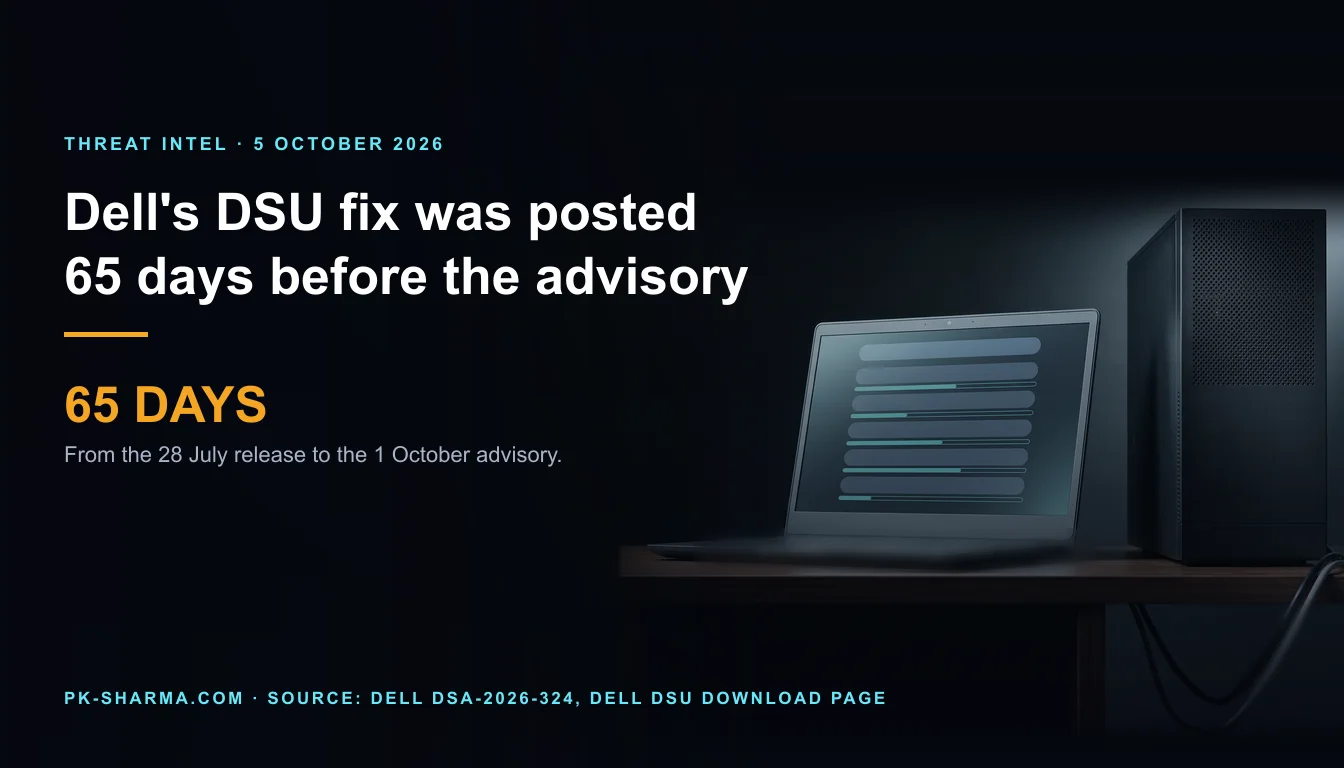
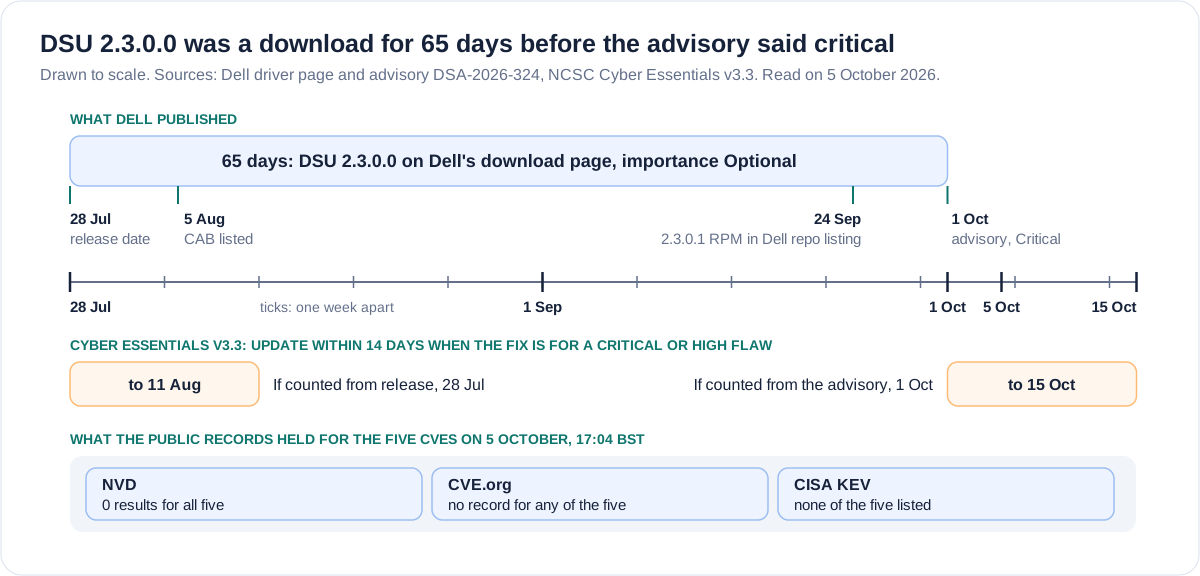
Dell's advisory DSA-2026-324 rates five Dell System Update flaws up to 9.6 and names version 2.3.0.0 as the fix. Dell's own download page dates that version 28 July, 65 days before the advisory, with importance Optional.
By Parminder Kumar Sharma · · 14 min read
A fix dated 28 July, an advisory dated 1 October
Dell's download page for Dell System Update (DSU) 2.3.0.0, the version its advisory names as the fix, gives a release date of 28 July 2026 and an importance of Optional. The advisory, DSA-2026-324, is revision 1.0, dated 1 October 2026, with impact rated Critical. That is 65 days between the two. Dell's product driver list dates a CAB package of the same version to 5 August, 57 days before the advisory, so 57 days is the floor. I read both pages through a browser on 5 October, because Dell's site refuses plain command-line requests.
What that does not establish. It does not establish that anyone has exploited any of the five flaws: the advisory says nothing either way. It does not establish that Dell hid the fix, because the download page lists Security fixes among the fixes, and whether Dell told customers anything earlier is not stated on any page I read. It does not establish that the 28 July package is unchanged today. And it says nothing about how many organisations run DSU, or how they deploy it, which Dell does not publish.
Every state below is time-stamped, because each could change within hours. At 17:04 BST on Monday 5 October, four days after the advisory, the NVD returned no results for any of the five CVEs, the CVE Program had no record for any of them, and none was in CISA's Known Exploited Vulnerabilities (KEV) catalogue, version 2026.10.04. So every score in this briefing is Dell's alone.
BleepingComputer reported the critical flaw at 15:53 BST on 5 October. This site covered a different Dell advisory two days earlier, for Container Storage Modules. That is a different product with no overlap in versions, flaws or fixes.
What Dell states and what it leaves out
The advisory is one page. It is long on scores and short on what a defender asks next.
Dell advisory DSA-2026-324, revision 1.0 of 1 October 2026, read in full on 5 October 2026 through a browser.
- Question
- How bad
- Dell states
- Impact Critical. Five CVEs scored 9.6, 8.2, 8.2, 7.6 and 7.3 on CVSS 3.1
- Dell does not state
- Any CVSS 4.0, temporal or environmental score
- Question
- Fix
- Dell states
- Version 2.3.0.0 or later. Versions prior to 2.3.0.0 are affected
- Dell does not state
- Which change fixes which CVE. The release notes name no CVE
- Question
- Workaround
- Dell states
- Nothing: the advisory has no Workarounds and Mitigations section
- Dell does not state
- Whether any mitigation short of upgrading exists
- Question
- Exploitation
- Dell states
- Nothing
- Dell does not state
- Whether any flaw is exploited, or has a public proof of concept
- Question
- Reach of the lead flaw
- Dell states
- CVE-2026-86360: an unauthenticated attacker with remote access. Vector Network, no privileges, user interaction required
- Dell does not state
- Which network path or function, or what the user does
- Question
- Platforms
- Dell states
- The product is named as Dell System Update, nothing more
- Dell does not state
- Operating systems, or which Dell products bundle DSU
- Question
- History
- Dell states
- Revision 1.0, 1 October. Three reporters credited
- Dell does not state
- When Dell first knew, or told customers
| Question | Dell states | Dell does not state |
|---|---|---|
| How bad | Impact Critical. Five CVEs scored 9.6, 8.2, 8.2, 7.6 and 7.3 on CVSS 3.1 | Any CVSS 4.0, temporal or environmental score |
| Fix | Version 2.3.0.0 or later. Versions prior to 2.3.0.0 are affected | Which change fixes which CVE. The release notes name no CVE |
| Workaround | Nothing: the advisory has no Workarounds and Mitigations section | Whether any mitigation short of upgrading exists |
| Exploitation | Nothing | Whether any flaw is exploited, or has a public proof of concept |
| Reach of the lead flaw | CVE-2026-86360: an unauthenticated attacker with remote access. Vector Network, no privileges, user interaction required | Which network path or function, or what the user does |
| Platforms | The product is named as Dell System Update, nothing more | Operating systems, or which Dell products bundle DSU |
| History | Revision 1.0, 1 October. Three reporters credited | When Dell first knew, or told customers |
Two of those gaps decide your first hour. The first is where DSU runs. Dell's Security Configuration Guide says DSU deploys on supported Dell PowerEdge servers running Windows or Linux, and the 2.3.0.0 download page lists PowerEdge and vSAN Ready Node systems, Windows Server 2022 and 2025, and several Linux distributions. Dell documents this as a server tool, not a laptop or desktop one. The second is the workaround row. With no mitigation stated, the upgrade is the only control Dell offers.
Five flaws, and the lead one is not local
It would be easy to file a command-line update tool under local privilege escalation. That is true of three of Dell's five flaws, and not of the lead one. CVE-2026-86360 is scored 9.6 with the vector CVSS:3.1/AV:N/AC:L/PR:N/UI:R/S:C/C:H/I:H/A:H, and Dell's description opens with "an unauthenticated attacker with remote access". Dell's reason for calling it critical is that the attacker could execute arbitrary code with root privileges.
The five CVEs in Dell advisory DSA-2026-324, with Dell's wording for the class and the attacker. Scores and vectors are Dell's. No CVE record or NVD entry exists yet.
- CVE and score
- CVE-2026-86360, 9.6
- Class, as Dell names it
- Path traversal
- Attacker and vector, as Dell gives them
- Unauthenticated, remote access. Network, no privileges, user interaction required
- CVE and score
- CVE-2026-86361, 8.2
- Class, as Dell names it
- Incorrect permission assignment for a critical resource
- Attacker and vector, as Dell gives them
- Low privileged, local access. Local, low privileges, user interaction required
- CVE and score
- CVE-2026-86362, 8.2
- Class, as Dell names it
- Improper access control
- Attacker and vector, as Dell gives them
- Low privileged, local access. Local, low privileges, user interaction required
- CVE and score
- CVE-2026-63697, 7.6
- Class, as Dell names it
- Improper certificate validation
- Attacker and vector, as Dell gives them
- High privileged, remote access. Network, high complexity, high privileges, user interaction required
- CVE and score
- CVE-2026-71168, 7.3
- Class, as Dell names it
- Path traversal
- Attacker and vector, as Dell gives them
- Low privileged, local access. Local, low privileges, user interaction required
| CVE and score | Class, as Dell names it | Attacker and vector, as Dell gives them |
|---|---|---|
| CVE-2026-86360, 9.6 | Path traversal | Unauthenticated, remote access. Network, no privileges, user interaction required |
| CVE-2026-86361, 8.2 | Incorrect permission assignment for a critical resource | Low privileged, local access. Local, low privileges, user interaction required |
| CVE-2026-86362, 8.2 | Improper access control | Low privileged, local access. Local, low privileges, user interaction required |
| CVE-2026-63697, 7.6 | Improper certificate validation | High privileged, remote access. Network, high complexity, high privileges, user interaction required |
| CVE-2026-71168, 7.3 | Path traversal | Low privileged, local access. Local, low privileges, user interaction required |
I recomputed all five scores from their vectors with the CVSS 3.1 formula and every one matches Dell's. Three counts are derived from the table: two flaws are scored Network (9.6 and 7.6) and three Local; one needs no privileges, three low and one high; and all five carry User Interaction: Required, which Dell never explains. For the lead flaw the exploitability sub-score is 2.835 and the impact sub-score 6.048, which rounds up to 9.6 after the scope adjustment. Change User Interaction to None and the same vector scores 10.0, so the unexplained requirement is worth 0.4. Change Network to Local and it scores 8.6.
Two wording points matter. First, for the lead flaw Dell gives two outcomes. The direct effect is "Filesystem access for attacker", and root code execution is the reason it is critical, something the flaw "can be leveraged" to do. How the first becomes the second is not stated. Second, the BleepingComputer report lists CVE-2026-71168 among the flaws remote attackers can exploit. Dell's advisory describes a low privileged attacker with local access, and "Remote execution" is its label for the outcome. This briefing follows the advisory.
What remote can and cannot mean for a command-line tool
FIRST's CVSS 3.1 specification defines Network as a component bound to the network stack, where the possible attackers extend "up to and including the entire Internet". It defines Local more widely than the word suggests: an attacker who reaches the target remotely, for example over SSH, or who relies on another person to act, is still scored Local. So "remote access" in Dell's sentence and AV:N in its vector set a ceiling on who could attack. They are not a statement that anything listens on the internet.
Dell's own documents point away from an internet-facing service. The Security Configuration Guide says DSU "allows only administrator console and root privilege console account to perform any operation". It lists outbound connections to downloads.dell.com or linux.dell.com on port 443, and it lists inbound ports (22, 80, 443 and 135) as the ones a remote system uses when connecting to DSU in remote mode. I found no standing listener described in the pages I read. The 2.3.0.0 User's Guide describes a tool that reads catalogues and repositories, then applies what they list.
Inference, labelled. The vector says a user must act, and for a command-line tool the plainest user action is running it. If so, the remote part is likely to be whatever the tool reads from outside the host when it runs: a catalogue, a repository, a share, or a connection to a remote system. Dell does not say that. The diagram lists only the inputs Dell documents, and a defender needs to know which of them, in their own estate, are not Dell's servers.
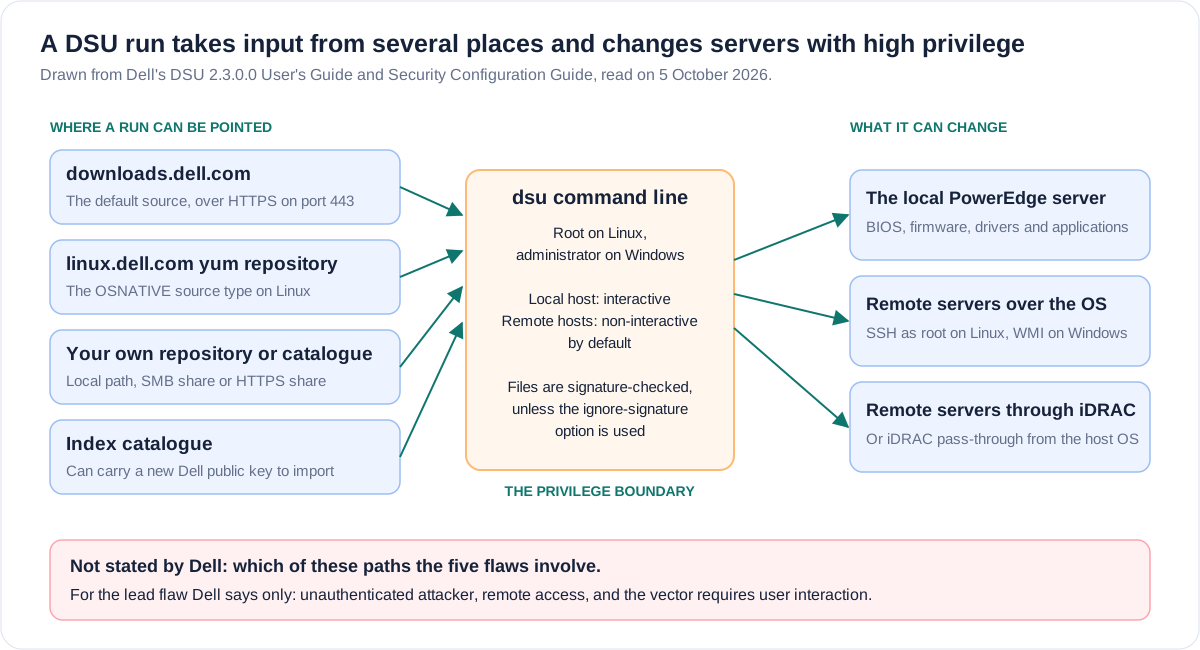
Two documented controls belong in that review. The guide describes a signature check on files and an option to ignore it, and says DSU can download and import a new Dell public key from the index catalogue when it runs interactively. The 2.3.0.0 release notes list, among five resolved issues, that SHA512 signature check verification for catalogues on network shares is now supported. Dell does not link that, or any resolved issue, to a CVE, and this briefing does not either.
Three names that are not controls
System Update. The label sounds like housekeeping. Dell's documentation describes a deployment tool for applications, firmware and drivers that only root or administrator accounts can run, with remote modes that rely on root SSH login for Linux targets and WMI for Windows ones. A tool whose job is to install software with the highest privilege is a privilege boundary, and deserves the scrutiny given to any agent on a server. This is not new ground for DSU. Dell's site shows DSA-2022-009, an unprotected storage of credentials flaw scored 8.2, and DSA-2022-254, an improper certificate validation flaw scored 6.5. The current guide cites a third, DSA-2023-280, which I did not read.
Optional. Dell's download page gives 2.3.0.0 an importance of Optional and lists its fixes as Security fixes, with no detail. The 2.3.0.0 release notes, revised in July and August, tell customers to apply it during their next scheduled update cycle, and their five resolved issues name no CVE and no vulnerability. Dell's DSU overview article, last modified on 1 June, still names 2.2.0.1 as the Linux and Windows package. The advisory, by contrast, says to "upgrade at the earliest opportunity". The download page does say Security fixes, so this is not concealment. It is a security release that does not read like one until the advisory arrives. The NCSC's guidance on updating by default describes the shape: vendors may publish advisories for some vulnerabilities and "silently" update others. An earlier briefing found a fix shipped 21 days before its advisory on a different tool.
Critical. A score someone assigned. Dell alone assigned it: the CVE Program has no record and the NVD no entry, so there is no second score to compare. Dell prints CVSS 3.1 only. An earlier briefing on CISA's paired scores found six of seventeen flaws changed severity band between CVSS 3.1 and 4.0, all of them upward. None of that is evidence of mis-scoring here. It is a reason to treat 9.6 as Dell's reading of the inputs, and the inputs, user interaction above all, are the part Dell leaves out.
What the records say, as at 5 October
Records for the five CVEs and the advisory, each read on Monday 5 October 2026 and re-read at the time shown. Any of these could change within hours.
- Source
- Dell advisory DSA-2026-324
- State
- Revision 1.0, 1 October. Last Modified 01 Oct 2026. Impact Critical
- Read at (BST)
- 17:05
- Source
- Dell download page, DSU 2.3.0.0
- State
- Release date 28 Jul 2026. Importance Optional. Fixes: Security fixes
- Read at (BST)
- 17:05
- Source
- NVD
- State
- 0 results for each of the five CVEs
- Read at (BST)
- 17:04
- Source
- CVE Program
- State
- No record for any of the five (CVE_RECORD_DNE, HTTP 404)
- Read at (BST)
- 17:04
- Source
- CISA KEV
- State
- Catalogue 2026.10.04. None of the five listed
- Read at (BST)
- 17:04
- Source
- BleepingComputer
- State
- Published 15:53 BST. Says Dell has not flagged any of the flaws as exploited
- Read at (BST)
- 16:46
| Source | State | Read at (BST) |
|---|---|---|
| Dell advisory DSA-2026-324 | Revision 1.0, 1 October. Last Modified 01 Oct 2026. Impact Critical | 17:05 |
| Dell download page, DSU 2.3.0.0 | Release date 28 Jul 2026. Importance Optional. Fixes: Security fixes | 17:05 |
| NVD | 0 results for each of the five CVEs | 17:04 |
| CVE Program | No record for any of the five (CVE_RECORD_DNE, HTTP 404) | 17:04 |
| CISA KEV | Catalogue 2026.10.04. None of the five listed | 17:04 |
| BleepingComputer | Published 15:53 BST. Says Dell has not flagged any of the flaws as exploited | 16:46 |
Dell has two entries in KEV: CVE-2021-21551 in the dbutil driver, added on 31 March 2022, and CVE-2026-22769 in RecoverPoint for Virtual Machines, added on 18 February 2026. Neither is DSU. That history is context, not evidence about these five, and absence from KEV says only that CISA has not listed them.
The UK clock: 14 days from release, or from the advisory?
Cyber Essentials v3.3, dated April 2026, applies its security update rule to servers among other devices. Software in scope must be updated within 14 days of release where the update fixes vulnerabilities the vendor describes as critical or high risk, where the CVSS v3 base score is 7 or above, or where the vendor gives no details of the level. It adds a caution: a single update that bundles fixes of mixed severity must go in within 14 days if it covers any critical or high one. All five of Dell's scores are 7.0 or above, so any one of them is enough.
Two readings of the same 14 days for DSU 2.3.0.0, by my arithmetic from the NCSC Cyber Essentials v3.3 text and Dell's dates.
- Reading
- From release of the update
- Window
- 28 July to 11 August
- Why it can be argued
- The rule counts from release of the update. On 28 July Dell gave no level, which is one of the three triggers
- Reading
- From the advisory
- Window
- 1 October to 15 October
- Why it can be argued
- Dell first called the flaws critical on this date, and an assessor may count from it
| Reading | Window | Why it can be argued |
|---|---|---|
| From release of the update | 28 July to 11 August | The rule counts from release of the update. On 28 July Dell gave no level, which is one of the three triggers |
| From the advisory | 1 October to 15 October | Dell first called the flaws critical on this date, and an assessor may count from it |
Which reading an assessor applies is for your certification body, not for this briefing. The prudent plan is to treat 15 October as the latest date, to record the install date of every DSU instance, and to know that the first reading puts some estates already late. The NCSC's update-by-default guidance goes further than the scheme: install all updates as soon as possible, with best-practice timescales of 5 days for internet-facing services, 7 days for operating systems and applications and 14 days for internal or air-gapped services, whatever the severity.
I have no figure for how many UK organisations run DSU, in the public sector, education, health or anywhere else, and Dell publishes none. This section is for any team that runs Dell PowerEdge servers, directly or through a supplier.
What to do about it, in order
Written for a UK infrastructure team that runs Dell PowerEdge servers, or depends on a supplier that does. Dell lists no workaround, so every control beyond the upgrade itself starts with the word Judgement and is not a Dell mitigation. The items that only find, record or re-check do not.
Take this with you
In the order worth doing
- Find every DSU install and its version. Check servers, golden images, templates, bootable ISOs built with DSU or Dell Repository Manager, and every scheduled task, cron job and script that calls dsu. Dell's guide says dsu -v shows the version on Linux when run as root, and dsu /v on Windows when run as administrator. On Linux the RPM package is named dell-system-update.
- Upgrade to 2.3.0.0 or later, Dell's only stated remediation. Dell's Linux repository listing showed dell-system-update 2.3.0.1 dated 24 September, and the pages read do not say what changed in it. Check the download hash against Dell's download page and verify the installer signature, as Dell's Security Configuration Guide recommends. Rebuild golden images and bootable ISOs from the new version, not only the running servers.
- Record the install date of each instance against 15 October, and against 11 August if your assessor counts from release. Keep the record with your Cyber Essentials evidence.
- Judgement: list who can run dsu. Dell says only root and administrator accounts can, so this is the sudo and local administrator list on every server that has it. Remove DSU from servers that never use it.
- Judgement: decide where DSU may fetch from and block the rest. The documented defaults are downloads.dell.com and linux.dell.com on port 443. If you mirror or build your own repository, make it the only other source, reached over HTTPS with its certificate, and check that no script uses the ignore-signature option.
- Judgement: review run-as accounts and stored credentials. Dell's guide shows remote updates relying on root SSH login for Linux targets and WMI for Windows ones, and sample commands that carry credentials on the command line or in a configuration file. Find those scripts and files, rotate what they hold, and confirm no more servers allow root SSH login than need to.
- Judgement: log and review dsu executions. Dell says nothing on exploitation, so there is no indicator list. A run outside your change windows, or by an account that does not normally run it, is worth a question.
- Judgement: update application allow-lists. Replace the rule for the old DSU version with one for the new. Dell's 2.3.0.0 download page lists a supplemental policy file, and its guide describes a Windows Server 2025 supplementary policy and points to Microsoft's documentation for deploying it.
- Re-read Dell's advisory, the NVD, CVE.org and KEV before closing the ticket, because the advisory is revision 1.0 and may change. Ask Dell in writing which of its products bundle DSU and what user interaction its vectors assume.
The question this leaves
Dell's fix sat on a download page for 65 days under a label that said Optional, and the advisory that calls the flaw critical is four days old. Who in your estate decided what Optional means for a tool that installs software as root, and could they tell you today which servers still run a version before 2.3.0.0?
Sources
- PrimaryAdvisory DSA-2026-324, revision 1.0 of 1 October 2026, read in full through a browser: five CVEs, scores, vectors, attacker wording, remediation table, revision history. No workaround sectionDell Technologiesaccessed 2026-10-05
- PrimaryDownload page for DELL System Update 2.3.0.0 A00: release date 28 Jul 2026, importance Optional, fixes listed as Security fixes, compatible systems and operating systems, checksumsDell Technologiesaccessed 2026-10-05
- PrimaryDell System Update driver list: 2.3.0.0 in CAB dated 05 Aug 2026 and 2.2.0.1 dated 18 Feb 2026, both OptionalDell Technologiesaccessed 2026-10-05
- PrimaryDSU 2.3.0.0 Release Notes: revision history (July and August 2026), priority and recommendations, new features, five resolved issues naming no CVEDell Technologiesaccessed 2026-10-05
- PrimaryDSU 2.3.0.0 User's Guide: supported hardware and operating systems, installation prerequisites, update modes, source types, catalogue and repository locations, signature optionsDell Technologiesaccessed 2026-10-05
- PrimaryDSU 2.3.0.0 Security Configuration Guide: deployment models, access control, outbound and inbound ports, product code integrityDell Technologiesaccessed 2026-10-05
- PrimaryDell System Update (DSU) overview article, last modified 1 June 2026: what DSU is, catalogue sources, download links naming 2.2.0.1Dell Technologiesaccessed 2026-10-05
- PrimaryDell Linux repository for DSU: directory listing showing dell-system-update 2.3.0.1 dated 24 September 2026 and the repository refresh scheduleDell Technologiesaccessed 2026-10-05
- PrimaryAdvisory DSA-2022-009 for an earlier DSU flaw, unprotected storage of credentials, scored 8.2Dell Technologiesaccessed 2026-10-05
- PrimaryAdvisory DSA-2022-254 for an earlier DSU flaw, improper certificate validation, scored 6.5Dell Technologiesaccessed 2026-10-05
- PrimaryNVD API query for CVE-2026-86360 and the four other CVEs: zero results each on 5 OctoberNIST National Vulnerability Databaseaccessed 2026-10-05
- PrimaryCVE Services record query for the five CVEs: CVE_RECORD_DNE, HTTP 404, each on 5 OctoberCVE Programaccessed 2026-10-05
- PrimaryKnown Exploited Vulnerabilities catalogue JSON, version 2026.10.04: none of the five listed, Dell's two earlier entriesCISAaccessed 2026-10-05
- PrimaryCyber Essentials: Requirements for IT Infrastructure v3.3, April 2026: the security update management rule and its 14-day testNCSCaccessed 2026-10-05
- PrimaryVulnerability management guidance, update by default: best-practice timescales and the warning about vendors silently updatingNCSCaccessed 2026-10-05
- PrimaryCVSS v3.1 specification: definitions of Network, Local and User Interaction, and the base score formula used to recompute the five scoresFIRSTaccessed 2026-10-05
- Reported byNews report of 5 October 2026 used as a pointer to the advisory, and for its reading of CVE-2026-71168 and its exploitation statementBleepingComputeraccessed 2026-10-05